33
Questions? Call 1-866-44-TDSTV or visit tdstv.com.
…for a Series Recording
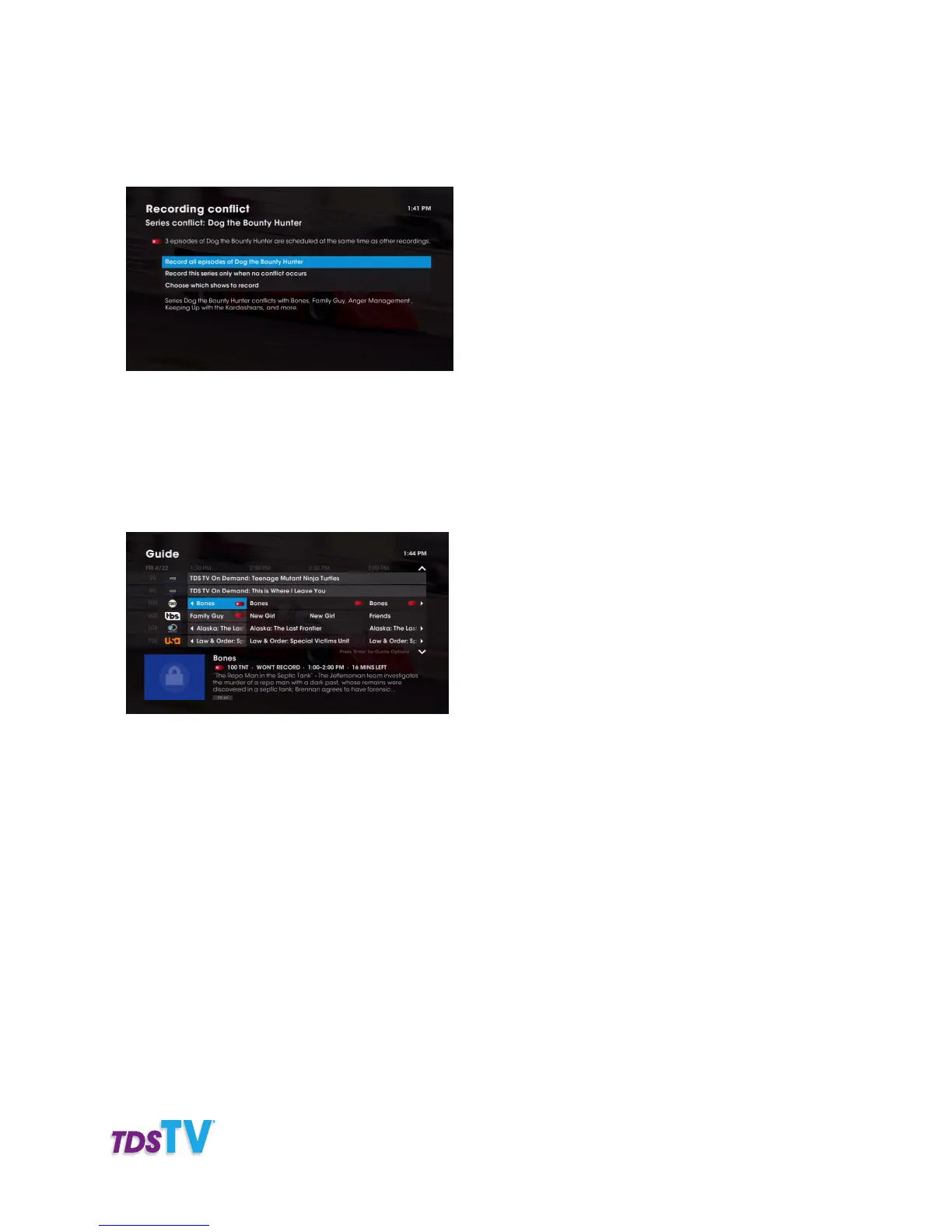
When episodes of a series conflict with previously scheduled recordings, the recording conflict screen
lets you resolve the conflict.
From this screen you can choose to:
• Record all episodes of a series—and override (or cancel) any conflicting recordings
you previously scheduled.
Note: Overridden programs are indicated in the Program Guide with a recording
conflict icon as shown here:
• Record this series when no conflict occurs—only series episodes that do not conflict with
previously scheduled recordings will be recorded.
• Choose which shows to record—manually select the series episodes you want record
from the list by choosing them from a list of conflicting episodes, which you’ll see when
you choose this option.
RESTORING OVERIDDEN RECORDINGS
TDS TV allows you to modify previously overridden program or series recordings. Here’s how:
1. Press GUIDE on your remote to see your Program Guide.
2. Navigate to the name of the program that was overridden (a conflict icon will appear by the
program’s name: a crossed-out red dot for single recordings or crossed-out overlapping red dots
for series recordings) and press OK on your remote.



 To Next Page