6
Questions? Call 1-866-44-TDSTV or visit tdstv.com.
WIRELESS SET-TOP BOX
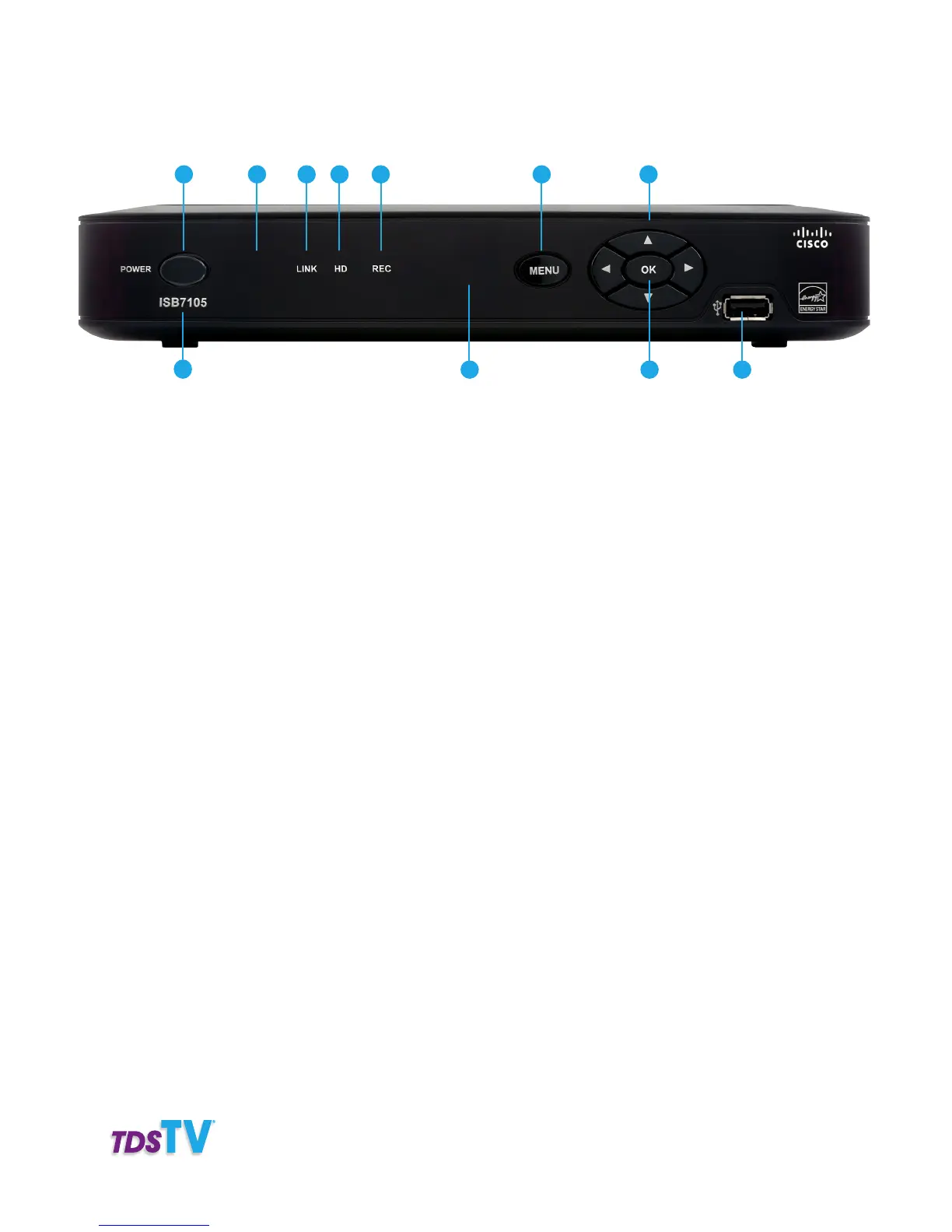
1. Power—Turns on the set-top-box/DVR or places it in standby mode. (The green LED indicates
the set-top box is on. No LED indicates the set-top box is in standby mode.) To restart the set-top box,
press and hold this button for 10 seconds.
2. Model Number—Lists the model number of your set-top box, which varies.
3. Signal Strength—The green light LED Indicates the strength of the wireless signal from the wireless
access point: five lights=excellent, 0 lights=no wireless connection, red light=lost signal.
4. Link— The LED indicates your network link status: solid green=set-top box is connected to your
network; no light=no network connection.
5. HD—The blue LED indicates the set-top is set to a resolution of 720p or 1080i.
6. Record—The red LED indicates a recording is in progress.
7. IR Sensor—Receives the infrared signal from the remote control.
8. Menu—Push to easily access the main TDS TV menu.
9. Arrow Keys—Use to navigate on-screen menus and services.
10. OK—Push to select on-screen items.
11. USB Port—Connects external USB devices for Personal Media Sharing purposes.
2
31 4 5 8
7
6 9
10 11
Front View



 To Next Page