9
Questions? Call 1-866-44-TDSTV or visit tdstv.com.
REMOTE CONTROLS
Note: Unless otherwise specified, in this document the term remote control (or remote) refers to the
Universal Remote Control provided with TDS TV, not your TV remote control or any other remote control.
There are two types of TDS TV remote controls: a Cisco remote control and a TDS remote control.
To determine which one you have, look for the logo at the bottom of the remote control.
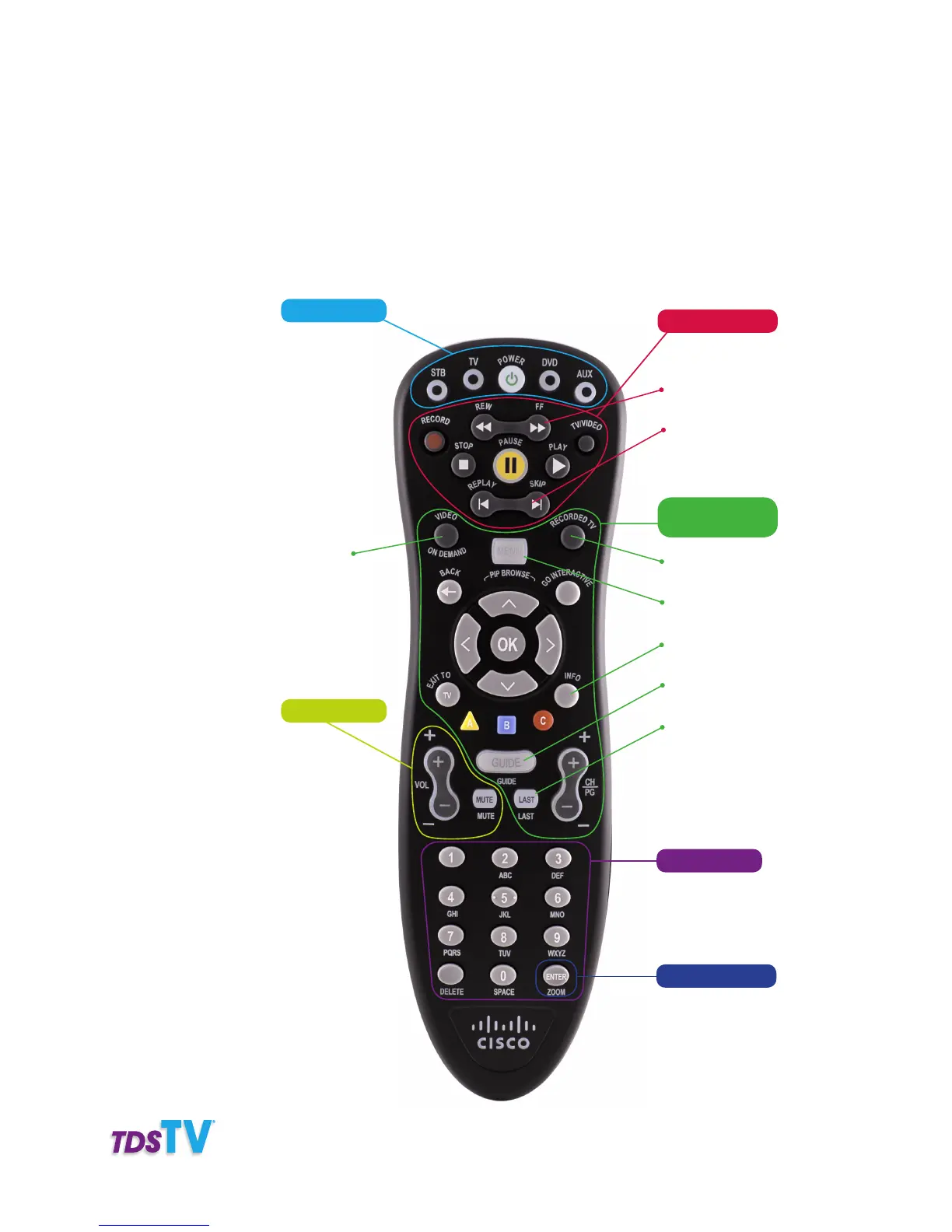
Cisco Logo’d
Remote Control
Access Video-On-
Demand Store
Numeric Keys:
Enters channel
numbers, text, remote
codes, and parental
control PIN
Volume Control:
Viewing and
Browsing Buttons:
Access DVR
recordings
Access TDS TV
features
Program description
and original air date
Access Interactive
Program Guide
Displays last 5
channels viewed
Control Buttons:
Control recording
and DVR functions
Advance by day
through the Guide
DVR jump forward
or back
Device Buttons:
Power on/off for
devices programmed
to work with remote
Quick Key:
Access favorites list,
parental controls, and
closed captioning



 To Next Page