8
Questions? Call 1-866-44-TDSTV or visit tdstv.com.
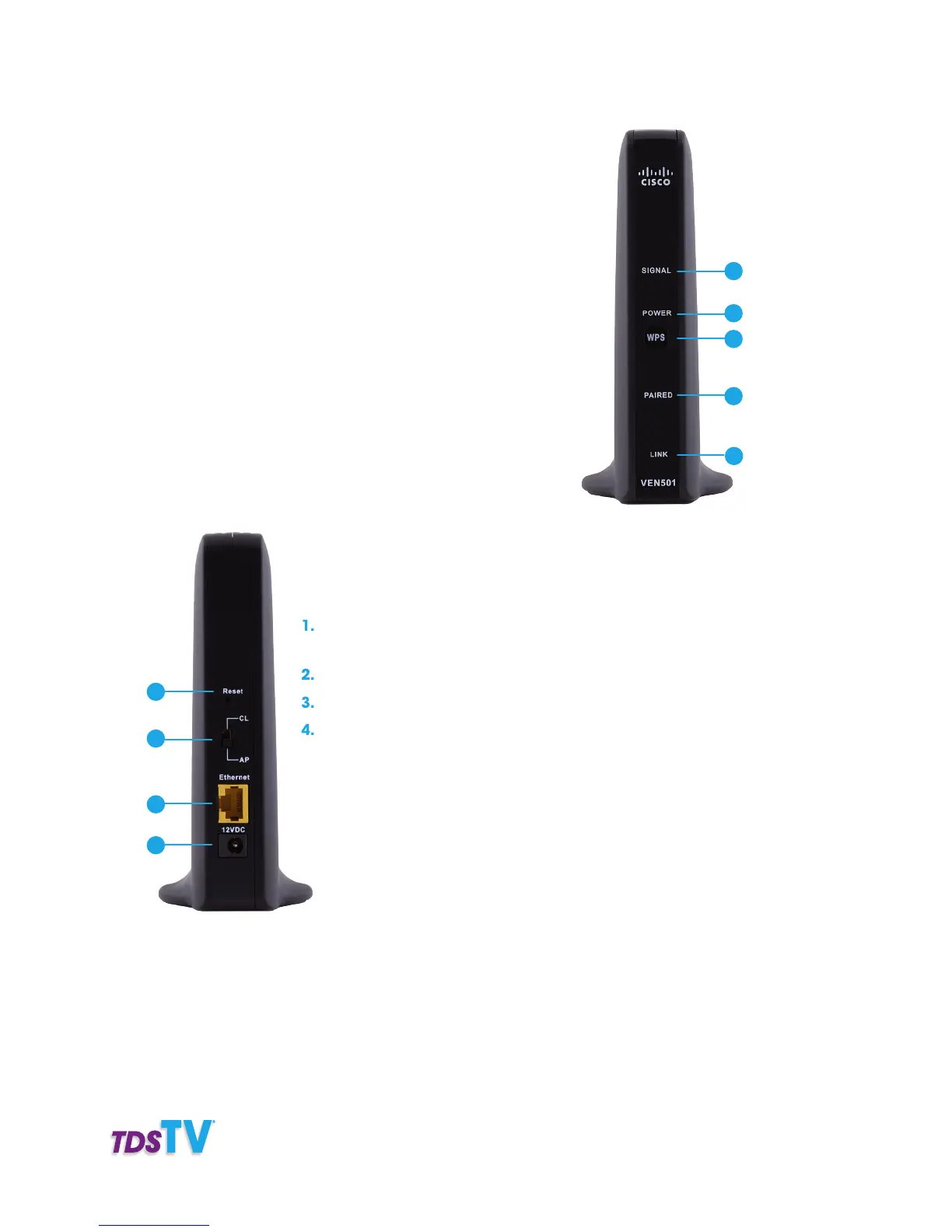
WIRELESS ACCESS POINT (WAP)
1. Signal—The green LED indicates the strength of the wireless
signal: five lights=excellent, 0 lights=no wireless connection,
red light=lost signal.
2. Power—The green LED Indicates the WAP is on.
3. WPS—Press to pair the WAP with a wireless set-top box.
4. Paired—Solid green LED indicates at least one wireless set-top
box is paired, blinking orange LED indicates a pairing is in prog-
ress, a flashing green LED indicates wireless activity is detected.
5. Link—LED indicates status: blinking green indicates traffic on
the residential gateway connection; solid green indicates an
Ethernet link to the residential gateway is detected; No light
indicates gateway is not connected.
1. Reset—DO NOT PRESS unless instructed by
TDS TV customer support.
2. CL/AP Switch—Always switch this toward AP.
3. Ethernet Port—Connects to the TDS TV residential gateway.
4. Power—Connects to the power outlet using the AC power
adapter provided.
1
2
3
4
5
Front View
1
2
3
4
Back View



 To Next Page