R If the charging terminals of the charging cradle become abnormally hot, immediately unplug
the USB charging cord and contact your dealer.
R The temperature of the charging cradle internal battery is abnormal. Stop charging and wait for
a while. We recommend charging at an ambient temperature between 10 °C to 35 °C.
The charging cradle status indicator LED and the earphone status indicator LED are
flashing red at the same time. (EAH-AZ80/EAH-AZ60M2/EAH-AZ40M2)
R The earphones are not properly inserted into the charging cradle. Put in the earphones again
properly.
R Is there dust, water droplets, or dirt on the terminals of the earphones or charging cradle?
Remove dust, water, and dirt.
“Clean the charging terminals of the earphones”, Page 79
“Clean the charging cradle terminal section”, Page 79
The pattern of the charging cradle status indicator LED changed while charging.
(EAH-AZ80/EAH-AZ60M2/EAH-AZ40M2)
R The pattern differs depending on whether the charging cradle lid is open or closed. (This is not
a malfunction.)
Cannot feel the best noise cancelling effect.
R Wear the earphones correctly.
“EAH-AZ100”, Page 29
“EAH-AZ80”, Page 30
“EAH-AZ60M2/EAH-AZ40M2”, Page 31
R Replace the earpieces.
“EAH-AZ100”, Page 31
“EAH-AZ80/EAH-AZ60M2/EAH-AZ40M2”, Page 33
R EAH-AZ100/EAH-AZ80/EAH-AZ60M2: Select the best earpieces.
“Selecting the best earpiece for Active Noise Cancelling (EAH-AZ100/EAH-AZ80/EAH-
AZ60M2)”, Page 53
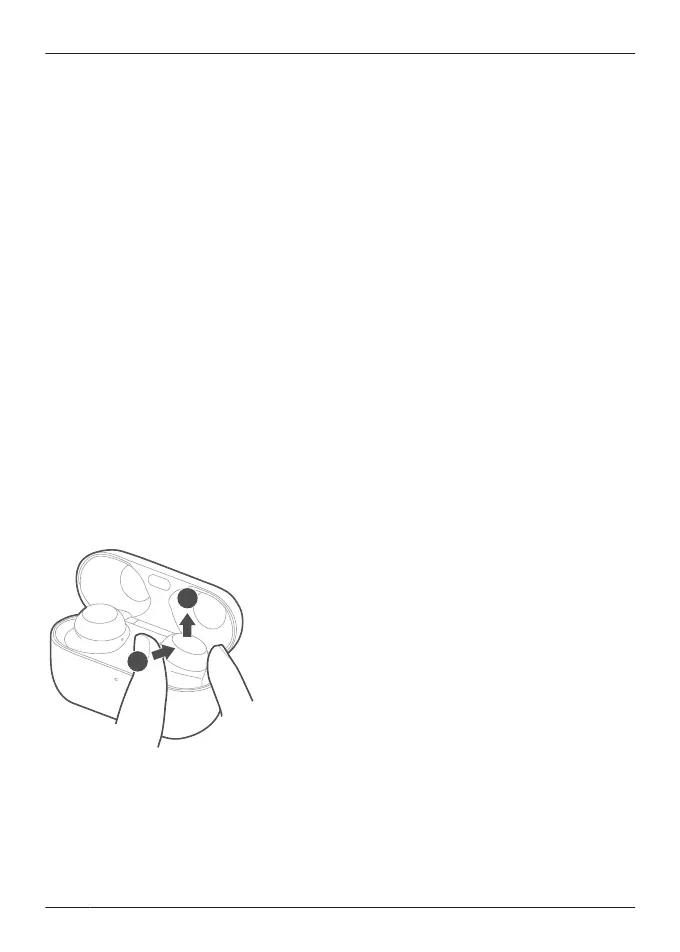
The earphones are difficult to remove.
R Push the earphones from the side inside the charging cradle to tilt them and remove them.
While resetting the EAH-AZ100 to factory settings, the pairing sound that played once
stops.
R Turn off the Bluetooth
®
function of the connected Bluetooth
®
device and try again.
“EAH-AZ100”, Page 74
68
FAQ



 To Next Page