p
Model 880 DEPOSITION CONTROLLER
y
SECTION 3.XX
e page 105 of 275 ^
SECTION 3.16
Communications Configuration Related Parameters
Communications setup
The Communications setup menu can be located by pressing the fixed MENU key while on the Run Time
screen. Press the EXECUTIVE MENU key on the MAIN menu. Finally, press the COMM. SETUP key
on the EXECUTIVE MENU (the fixed STATUS key returns the Runtime screen).
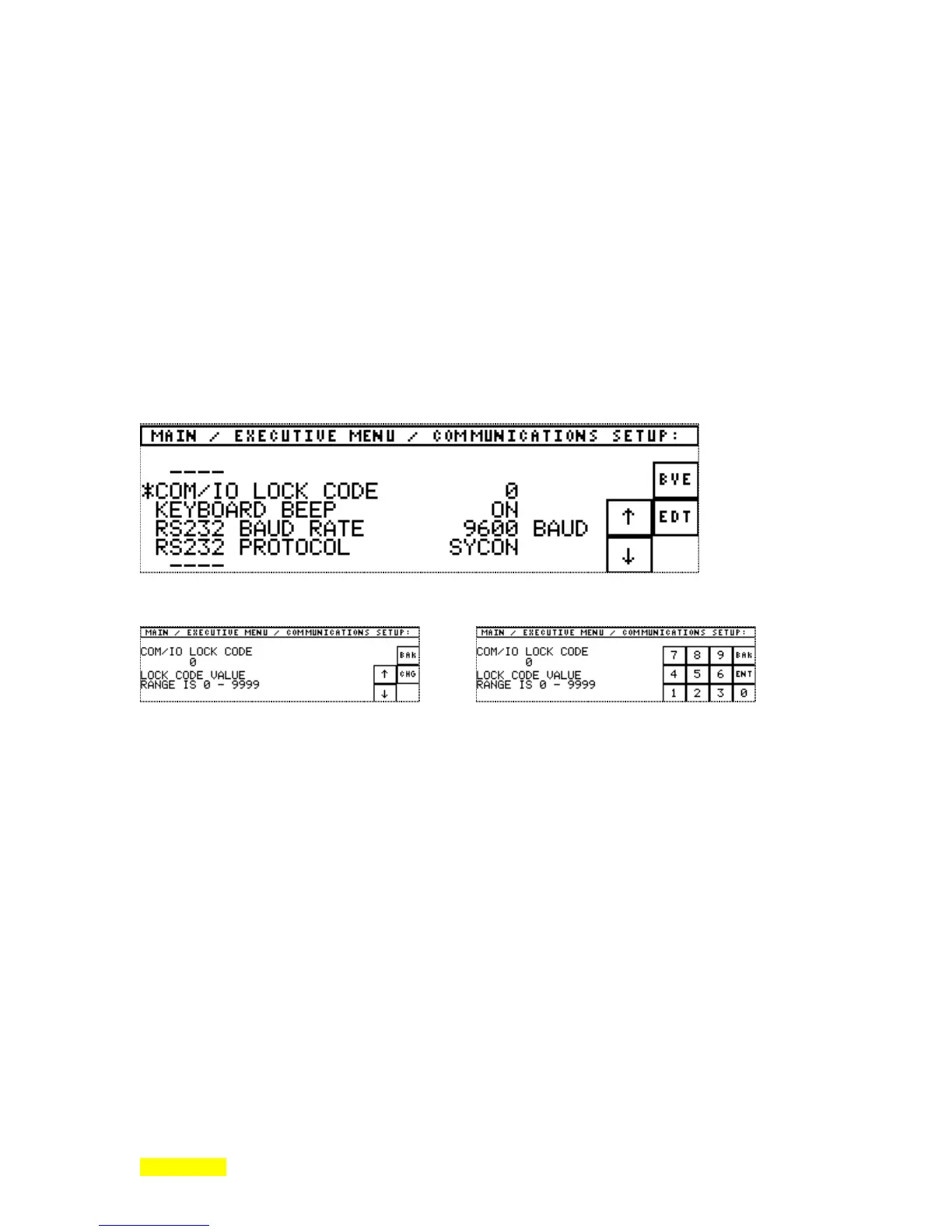
The following screens illustrate the communications setup programming from general list to specific list
item change. Its programming steps are like those of other programmed elements previously described.
Cursor to the list item using the arrow keys, press the EDT (edit) key, press the CHG (change) key, press
numeric or numeric representation of needed value, and press ENT (enter). Scrolling can take place when
individual elements are displayed or when the list is displayed. The BAK (back) key returns to the previous
menu keys. The BYE key leaves the Communications setup. The STATUS key returns the Runtime screen.
The Communications setup menu. The asterisk represents the arrow key controlled cursor.
Pressing EDIT results in... Pressing CHANGE results in...
The edit menu screen presents the current value The edit/change menu provides the new entry
and the permitted value range. capability. BACK allows return to the previous
screen without change.



 To Next Page