p
Model 880 DEPOSITION CONTROLLER
y
SECTION 5.XX
e page 163 of 275 ^
Editing an I/O Program
In order to get to the I/O screens, you need to navigate through the following sequence. From the
Run Time Screen, press the fixed MENU key. When the MAIN MENU appears, press the EXECUTIVE
MENU key and then press the I/O SETUP key and the unit will display the following screen. Rungs (I/O
SETUP Program lines) can range from 001 (END statement only) to 999 (memory constraints aside). 001
and 1 refer to the same rung, etc.
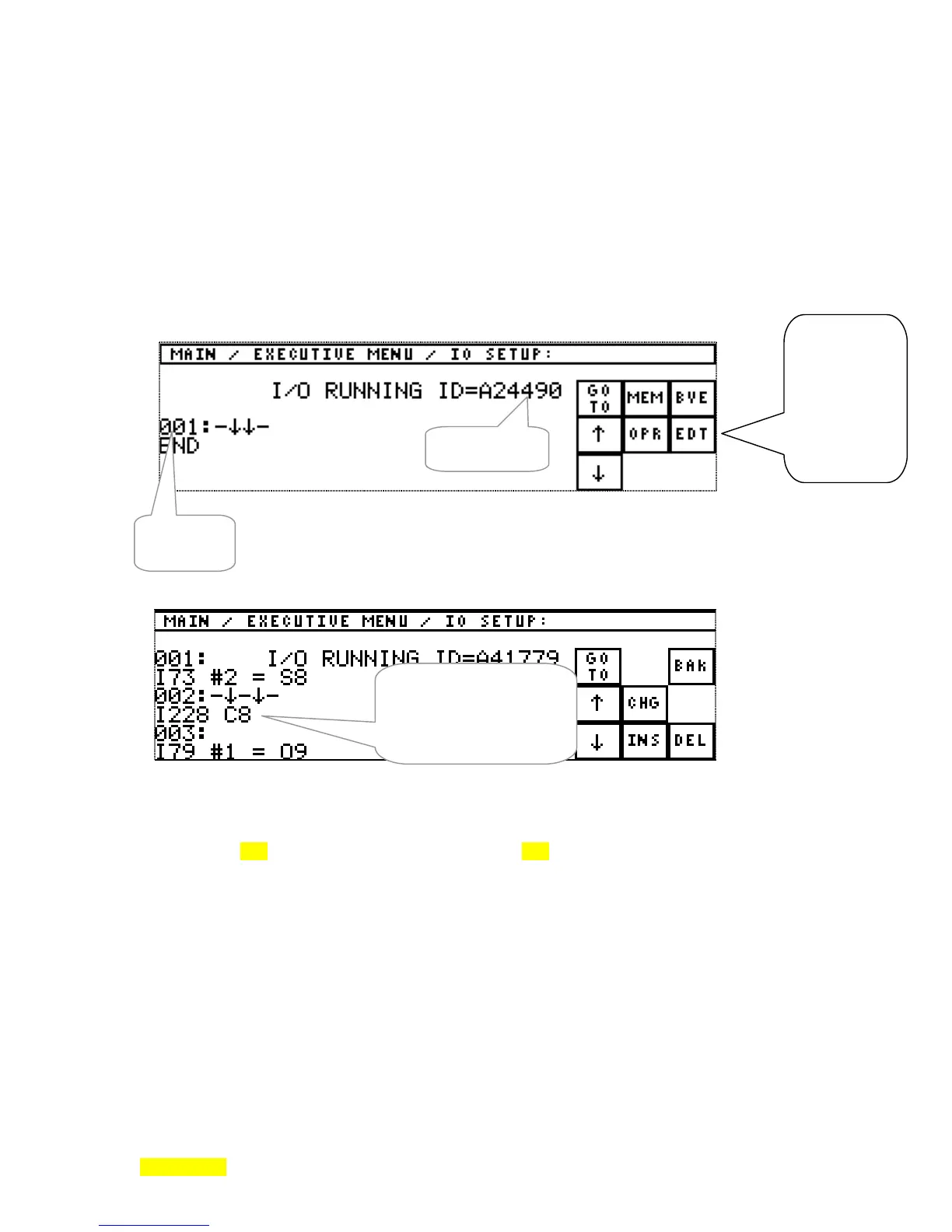
Figure- 5.10: I/O SETUP MAIN Menu (or 1
st
I/O SETUP Menu) .
Figure- 5.11: EDT (edit) menu with typical I/O Program values.
Figure 5.10 is the top level of the I/O menu. Figure 5.12 shows the structure of the various menus.
By pressing the fixed STATUS key while in this set of menus, you will be taken back to the Run Time
screen. The BAK key navigates back up one level and cancels unfinished EDTs (edits). The BYE key
returns to the Executive MENU.
SECTION 5.11
Top Level I/O Menu:
See Fig. 5.10. Typical
I/O Program: (with line #
002 in the edit position)
See Fig. 5.11.
I/O Program
Checksum
scrolling
line
numbers
central area
always
contains the
line (rung)
that can be
edited. This
is the EDIT
line. The
down arrows
point to
The 2
nd
of 3 lines
displayed is the line
to be edited
(indicated by -↓↓-
immediately over the



 To Next Page