p
Model 880 DEPOSITION CONTROLLER
y
SECTION 5.XX
e page 149 of 275 ^
SECTION 5
I/O PROGRAMMING
I/O Programming Introduction
The ability of the user to configure the structure of Model 880's inputs and outputs is
one of its most powerful features. The I/O configuration can be customized by the user through
the use of the I/O setup menus of the Model 880. This is accomplished through the LCD display, the fixed
front panel MENU key and the software controlled touch panel LCD display overlay (a 12 column by 4
row key matrix). See section 2.1.
In this section, I/O Setup menus will be used to enter, view and maintain I/O programs through the
above described LCD menus. Section x.x will describe host port commands that can duplicate these
actions.
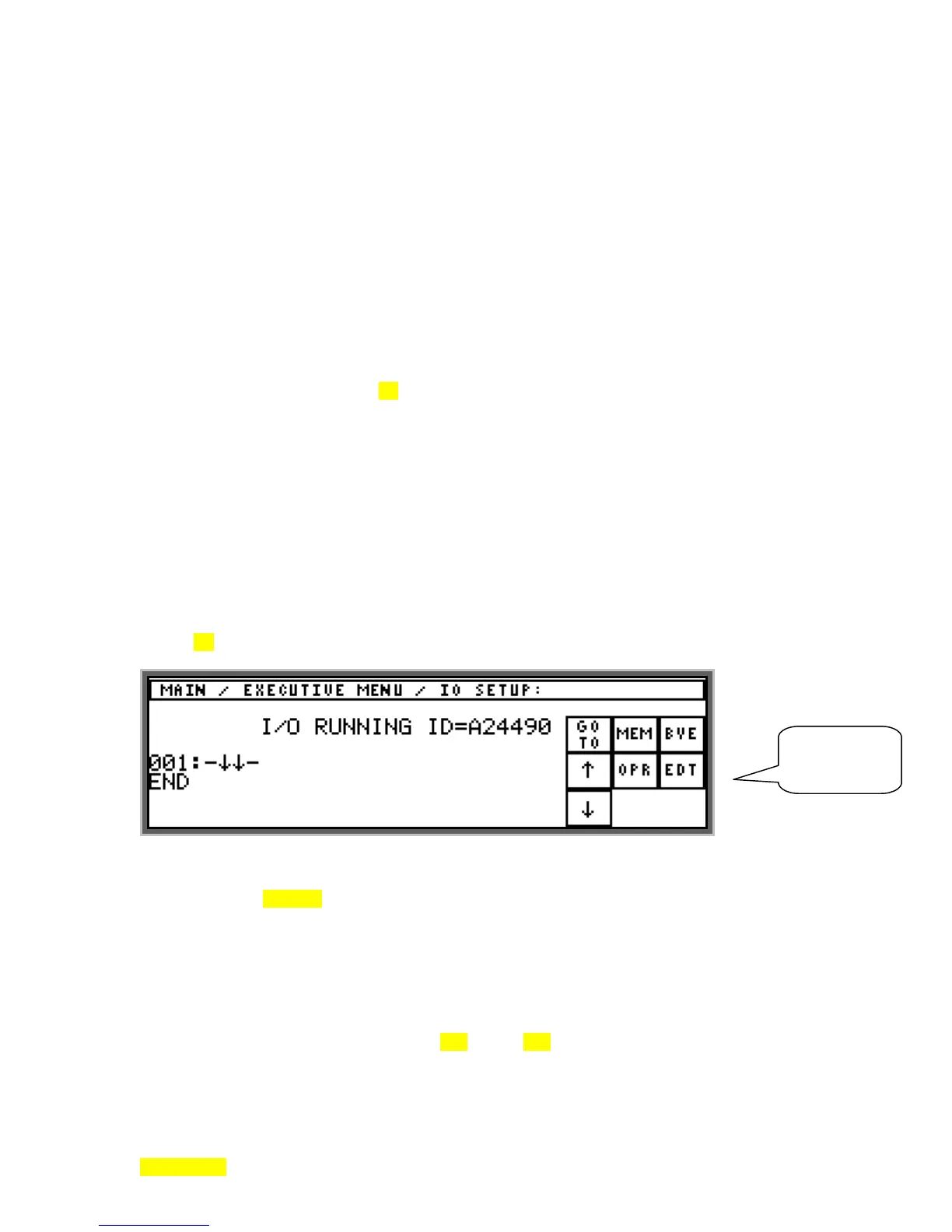
General Description: The LED display indicates run time values of rate/power/thickness. The 1
st
line of
the LCD indicates the menu path down to the current menu. The next line (central part only) indicates
operations as running or stopped along with the I/O program checksum (prefixed with the label: ID=).
Next, there is an area that shows as many as three I/O Setup list items with the 2nd of 3 list positions
allowing edits (edit line always indicated by -↓↓-). Each list item occupies two display lines (line# on 1
st
,
tokens on 2
nd
). In the area on the right, there are 9 touch key areas that can become active or inactive as
appropriate for the various cascading menu usages. The following depicts the main I/O setup menu in its
initial state (with no program entered).
There are four general functions that can be utilized: 1) View the I/O program using GOTO and arrow
keys, 2) Exchange (swap) or save the I/O program using the MEM (memory) key to access a sub-menu, 3)
Run or stop the I/O program using the OPR (operations) key to access a sub-menu, 4) Edit the I/O program
(includes adding/deleting/changing lines) using the EDT (edit) key to access a series of sub-menus. See
sections 5.9 and beyond for detailed descriptions.
The I/O program is a list of logical combinations of states or events with their desired results. The
states and events are related to the inputs, outputs and internal operation of the Model 880 by identification
numbers shown in Table 5.4. These ID's along with a function code form tokens which are evaluated
along with Boolean operators (AND, OR & NOT) to cause the desired output results. Each line of the I/O
program is called a rung. The minimal program is shown above, with the END line in the 2
nd
list position
(display lines 5 and 6). Don't confuse program line (rung) number with the physical LCD display line
number. The display line number will not be used.
An I/O rung consists of three segments: the rung number, the input statement, and the output
token. The rung number is like a line number in a software program. Rungs can be inserted or deleted by
editing an I/O program as described in Sections 5.11 through 5.14. When this is done the rungs are
renumbered. The rung number serves as a reference when writing or recording an I/O program.
SECTION 5.1
I/O
PROGRAMMING
MAIN MENU



 To Next Page