16 MPH200 series video encoders WebUI user manual
Media prole (video)
MPH series encoders has a total of six (6) media proles. Each media
prole can be set separately for individual resolution, frame rate, GOP
structure and bitrate, within the processing power of the device.
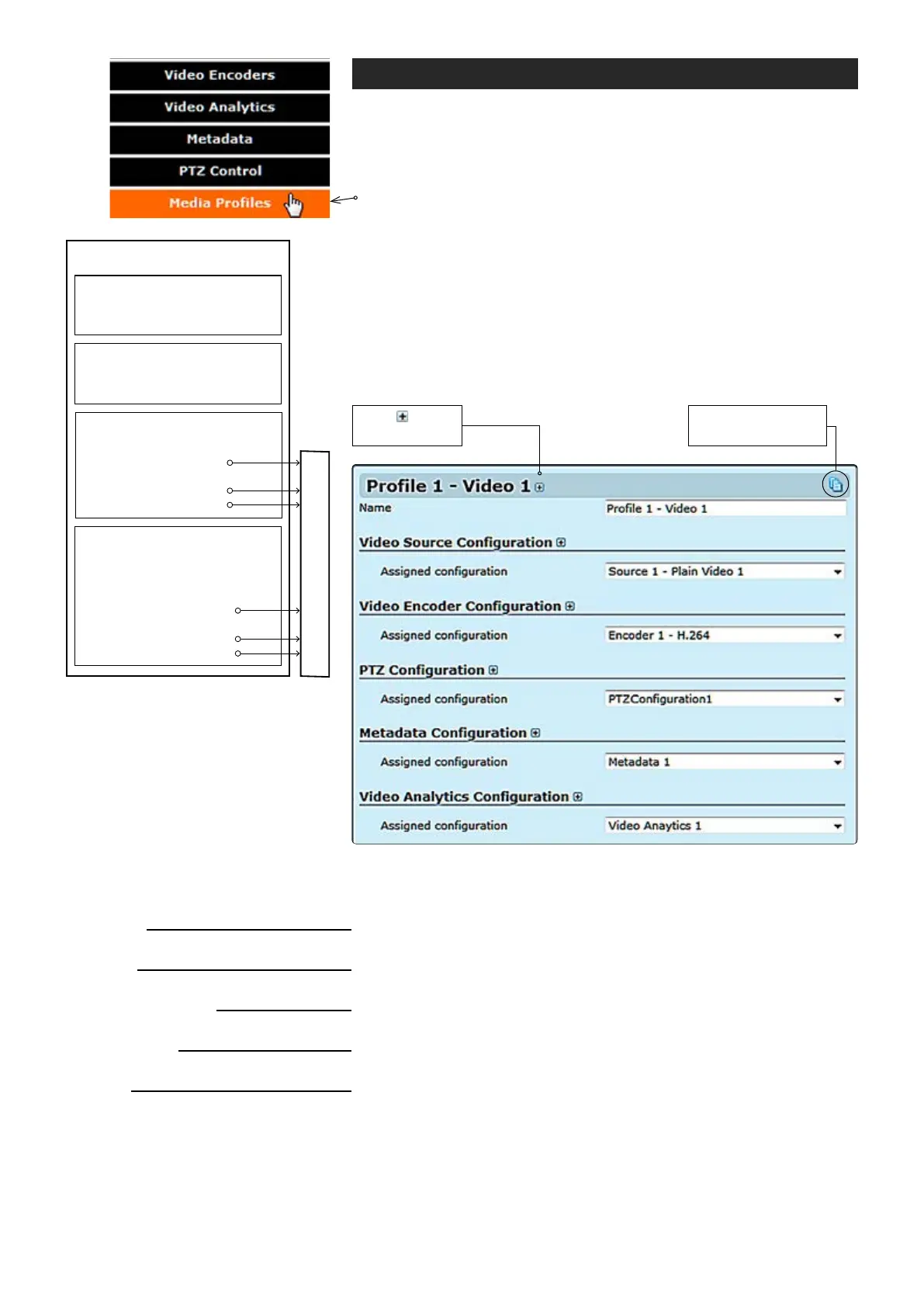
Click “Media Proles” under the Media Conguration menu. Media
Prole Congurations page appears on the screen. On this page you
can associate virtual video sources with physical video inputs and
encoding proles.
By default this page contains six different media proles.
Notes! It is not possible to change encoding format /resolution
and video input settings on this page. Before modifying the proles
the video stream must be stopped on the MAIN page.
Description how the video encoder,
a video source and video input is
assembled to the media prole.
Name:
Video Source Conguration
Assigned conguration:
Video Encoder Conguration
Assigned conguration:
PTZ Conguration
Assigned conguration:
Metadata Conguration
Assigned conguration:
Video Analytics Conguration
Assigned conguration:
MEDIA PROFILE CONFIGURATIONS page.
User dened alias name for
media prole (max 63 chars).
_________________________________________________________
Select assigned video source conguration.
_________________________________________________________
Select assigned video encoder conguration.
_________________________________________________________
Select assigned PTZ conguration.
_________________________________________________________
Select assigned metadata conguration.
_________________________________________________________
Select assigned video analytics conguration.
Click this to create
copy from prole.
Click to see
more settings.
VIDEO INTERFACE
Streams output (RTP)
VIDEO SOURCE CONFIGURATION
•
Physical video interface selection
•
Text overlay
•
Destination IP address
- primary stream
•
Additional IP address(es)
- stream multiplication
•
Dynamic streams (RTSP)
METADATA
• Events
• Analytics (Motion detection,
tampering detection
• Destination IP address
- primary stream
• Additional IP address(es)
- stream multiplication
• Dynamic streams (RTSP)
ENCODER CONFIGURATION
MEDIA PROFILE
•
Brightness, contrast & saturation
•
Privacy zone masking



 To Next Page