18 MPH200 series video encoders WebUI user manual
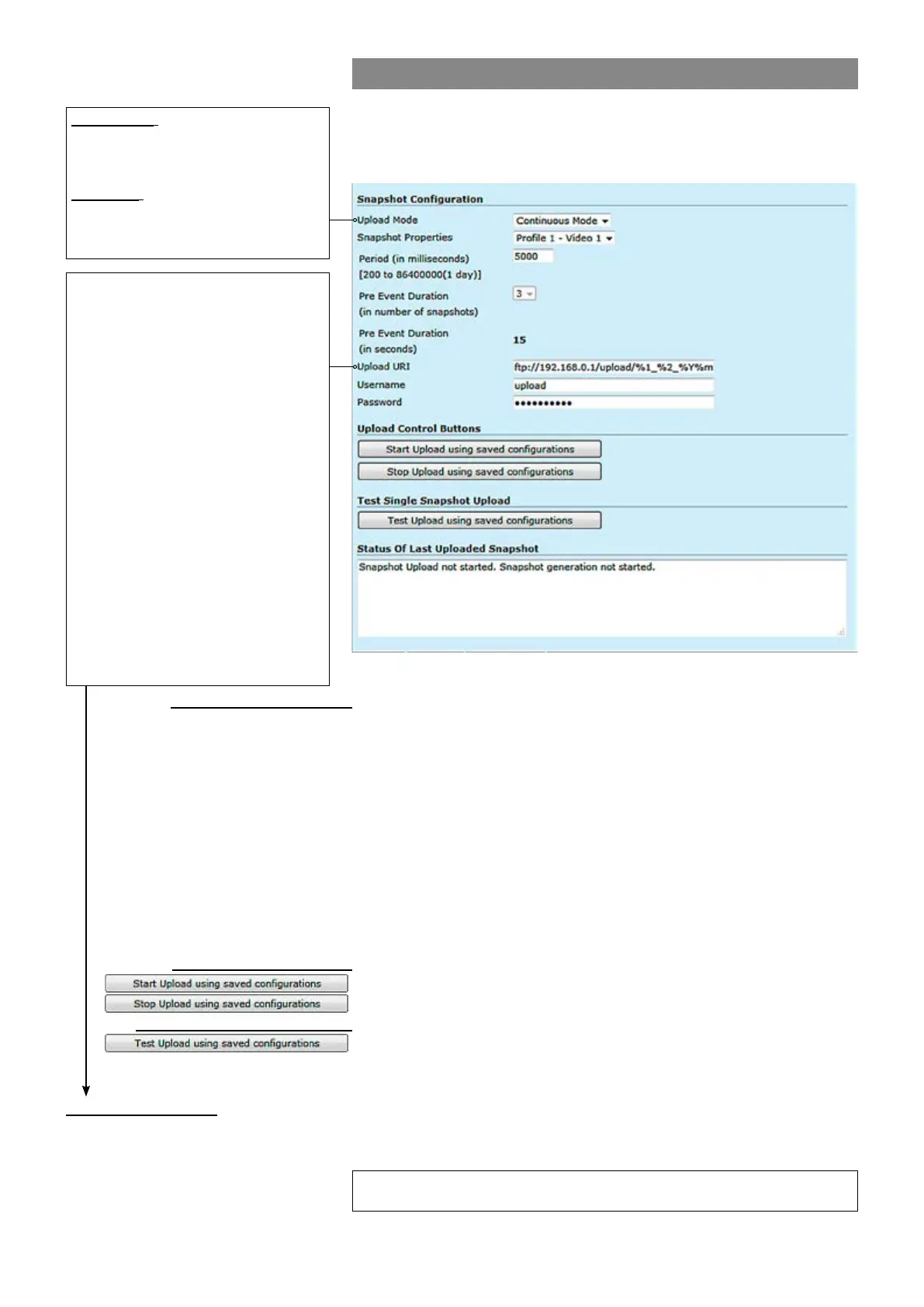
JPEG snapshot conguration
Additionally there is a JPEG image capture feature that allows taking
JPEG snapshots from the video and storing them into a ftp server. It is
also possible view JPEG captures with http.
Continuous: Device generates a
snapsthot at specied interval (period)
and sends the images to congured
FTP server.
Triggered: Snapshots are generated
when internal event triggers it. Trigger-
ing event can be motion detection,
tampering or digital IO event.
%d: The day of the month as a decimal
number (range 01...31).
%H: The hour as a decimal number using a
24-hour clock (range 00...23).
%I: The hour as a decimal number using a
12-hour clock (range 01...12).
%m: The month as a decimal number
(range 01...12).
%M: The minute as a decimal number
(range 00...59).
%S: The second as a decimal number
(range 00...60).
%4: The milliseconds as a decimal number
(range 0000...9999).
%p: Either “AM” or “PM” according to the
given time value, or the corresponding
strings for the current locale. Noon is
treated as “PM” and midnight as “AM”.
%y: The year as a decimal number without
a century (range 00...99).
%Y: The year as a decimal number
including the century.
%1: Device hostname (manually conf. or
received from DHCP-server).
_________________________________________________________
Snapshot generation can operate in two separate modes: Continous
and triggered mode.
Keeps the event state unchanged for the dened period for instance if an
Specied interval when device generates a snapsthot.
After event has occured, device sends rst congured number of images
before the event and then continues sending images until dened timeout
[ms] elapses.
Denes the remote FTP server address. URI can contain arbitrary
directory path and device shall create the directory if it does not yet exist.
Set username for server.
Set password for server.
Note! Hard Factory reset restores admin password to defaults.
_________________________________________________________
Starts uploading using saved congurations.
Stops uploading using saved congurations.
_________________________________________________________
Tests upload using saved congurations.
_________________________________________________________
Shows status of last uploaded snapshots.
Snapshot Conguration:
Upload Mode:
Snapshot Properties:
Period (in milliseconds):
Pre Event Duration:
Upload URI:
Username:
Password:
Upload Control Buttons:
:
Test single Snapshot Upload:
:
Status of last Uploaded Snapshot:
Snapshot URI example:
ftp://192.168.0.247/upload/%1_%Y%m%d/camera1_%H%M%S_%4.jpg expands to:
ftp://192.168.0.247/upload/MPH102-RD00101126_20140424/camera1_183059”)_830.jpg
Trigger Conguration
See section “Event management system” from page 31 for more details.



 To Next Page