50 MPH200 series video encoders WebUI user manual
Device management
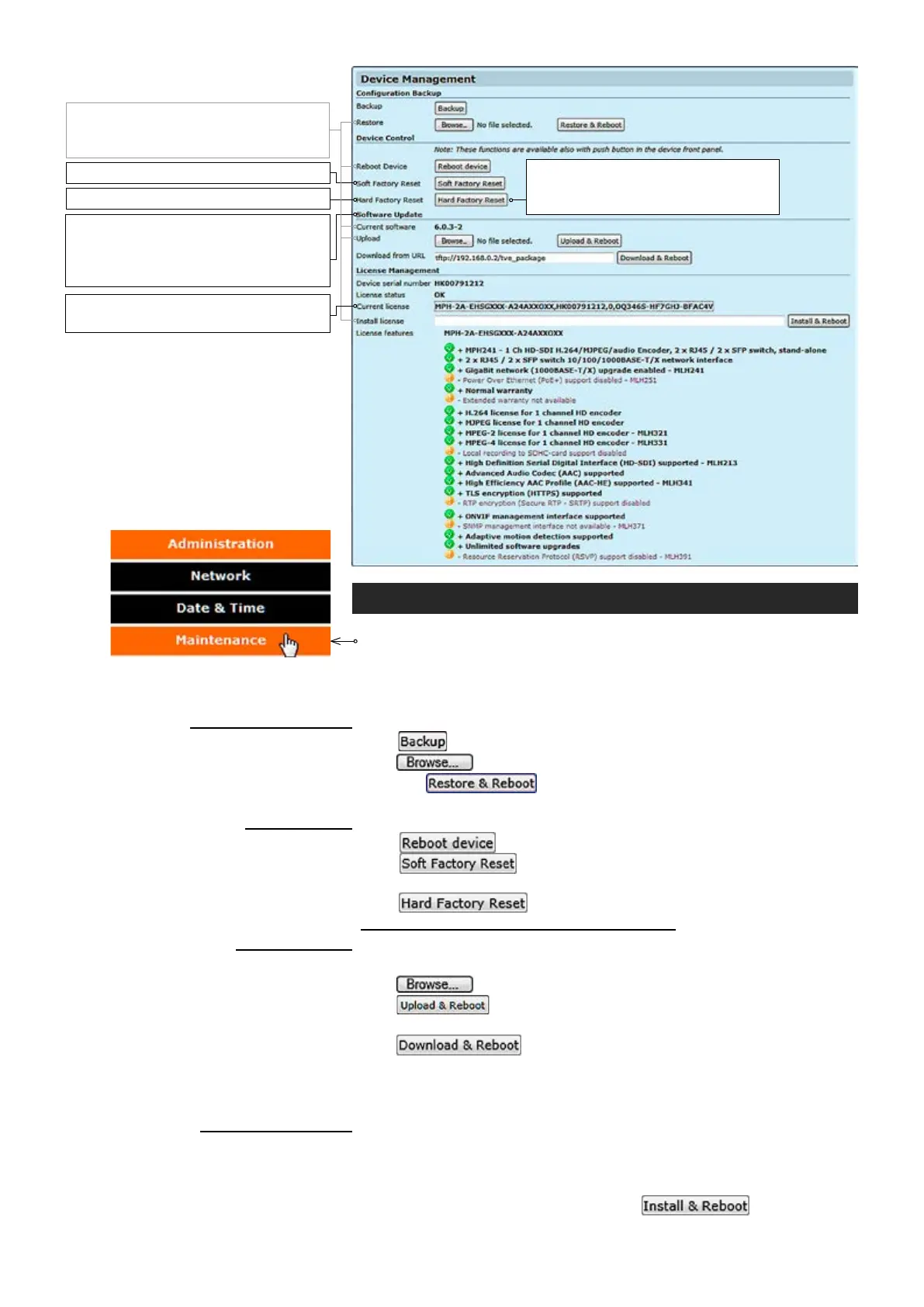
Click “Maintenance” under the Administration menu. Device
Management page appears on the screen.
This page allows you to
make conguration backup and restore, reboot the device, apply soft
and hard factory resets, update software and install new license key(s)
.
_________________________________________________________
Click ckup to store the current conguration to a le.
Click ckup to nd/select the stored conguration le to the device and
then click ckup to save the conguration le to the device.
Device restarts automatically after pressing this button.
_________________________________________________________
Click Reboot button to restart the device.
Click Reboot b utton to make a soft factory reset to the device ->
restores all, except IP conguration to the default factory settings.
Click Reboot b utto n to make a hard factory reset to the device ->
restores all settings to default factory settings!
_________________________________________________________
Shows device’s current rmware version.
Click ckup to nd/select the new rmware le to the device and then
click ck to upload the rmware le to the device. Device restarts
automatically after pressing this button.
Click ckup to upload the new rmware le from user specied
server (TFTP, FTP and HTTP) to the device. An example of FTP URL:
“tftp://FTP_SERVER_IP/MPH-x-x.x.xx-x.bin”. Device restarts automatically
after pressing this button.
_________________________________________________________
Shows device serial number.
Shows current licence status.
Shows device’s current licence(s).
Copy a licence code here and then click to take the
license to use.
Device restarts automatically after pressing this button.
Conguration Backup
Backup:
Restore
:
Device control
Reboot Device:
Soft Factory Reset:
Hard Factory Reset:
Software update
Current software:
Upload:
Download from URL:
License management
Device serial number:
License status:
Current license:
Install license:
License features:
Note! After the software has been
updated, please clear your browser’s
cache to ensure the correct opera-
tion of WebUI.
Note! A new license will replace the
old one.
Note! wait at least 4 min. rebooting.
Note! wait at least 15 min. rebooting.
Note! After device reboots, wait until
M-led is green again (wait at least 10
minutes).
Note! Restores all setting to default
factory settings, including IP cong
and admin password to defaults.



 To Next Page