48 MPH200 series video encoders WebUI user manual
Network settings
_________________________________________________________
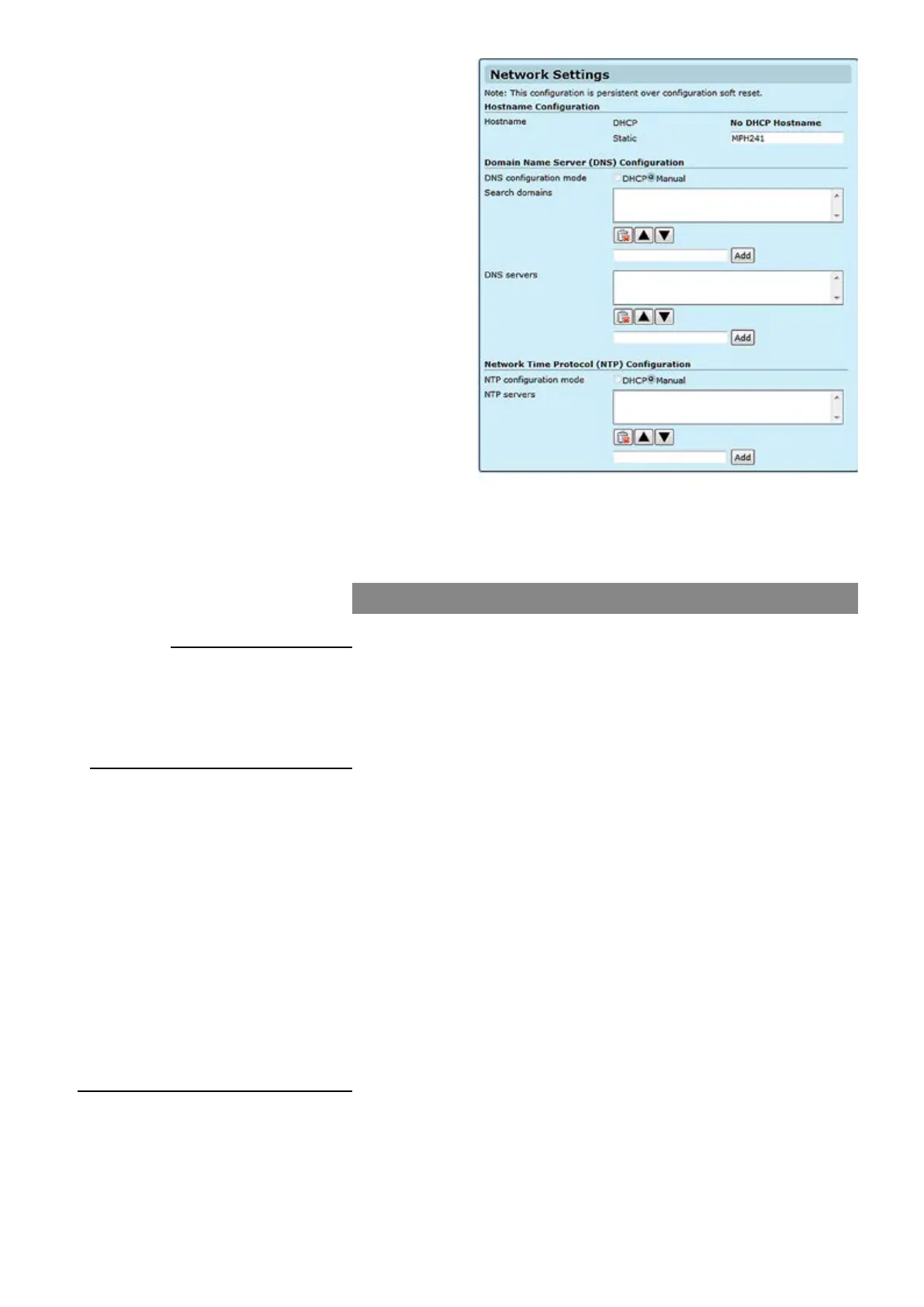
User dened hostname for
device (max 64 chars). If the DHCP server is
congured to assign a hostname to the unit, it will be used, and will be
shown here.
Note! Underline is not allowed, use only marks A...Z, a...z, 0...9
and – (dash)
_________________________________________________________
If the unit needs to resolve an URL to an IP address by sending a name
resolution query, (for instance NTP server given in URL form from
DHCP) you need to enter at least one DNS server IP address.
Static Mode or DHCP Mode. In Static NTP mode you can set up to 3
NTP servers, change the priority by moving the servers up and down
and no needed servers can be deleted. The server on the top of the list
has the highest priority and decreases down the list. In DHCP mode all
controls are disabled and the priority is assigned by the DHCP server.
Searches the given DNS domain (e.g. teleste.com) for lookup an IP
address; you can add up to three domain names. You can change the
DNS domains’ priority by moving them up and down. The top of the list
has the highest priority.
Sends name resolution query to then given DNS servers, you can add up
to three DNS sever. You can change the DNS servers’ priority by moving
them up and down. The one on the top of the list has the highest priority.
_________________________________________________________
If you select DHCP server to control DNS and NTP settings, the manu-
ally entered DNS and NTP servers will be discarded.
You can add up to three NTP servers for time synchronisation. You can
change the NTP servers’ priority by moving them up and down. The one
on the top of the list has the highest priority.
Hostname Conguration
Hostname:
Domain Name Server Conguration
DNS conguration mode:
Search domains:
DNS servers:
Network Time Protocol (NTP) Conguration
NTP conguration mode:
NTP servers:



 To Next Page