59 MPH200 series video encoders WebUI user manual
Web user interface
You can manage the switch via Web User Interface (WebUI).
Following options are available:
Conguration
• Set port speed
• Congure simple port-based VLAN
• Enable/disable ow control
• Storm Control Conguration
• Congure RSTP parameters
• Congure QoS
• Congure and monitor IGMP snooping
Monitoring
• Read and clear port statistics
• Monitor LACP status
• Monitor RSTP status
• Monitor IGMP status
How to access the Ethernet Switch
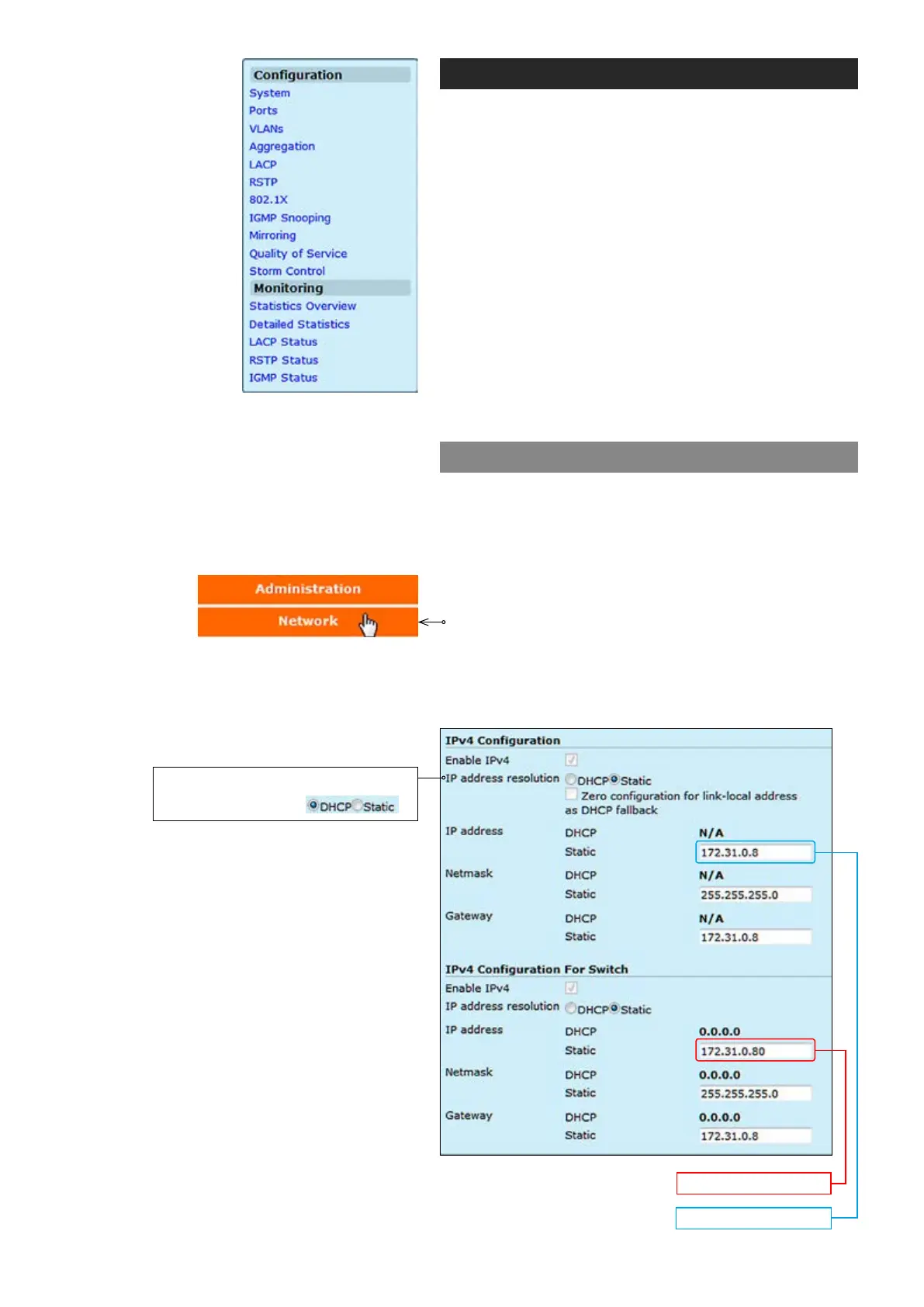
In order to access the Ethernet switch you need to assign
an IP address to the switch from encoder WebUI. By
default both encoder and ethernet switch IP addresses are
assigned automatically from DHCP server. The IP address
should be in the same IP range as encoder is set.
To assign the static IP address, click “Network” under the
Administration menu. NETWORK SETTINGS page
appears on the screen. In the “IPv4 Conguration For
Switch” session you can set the IP address, netmask and
gateway address.
Encoder IP address
Switch IP address
The default setting is DHCP enabled.



 To Next Page
 Loading...