ACKF01_GB_00 TEXA S.p.A. 68/122
3 INSTALLATION
3.1 Installation on Konfort units
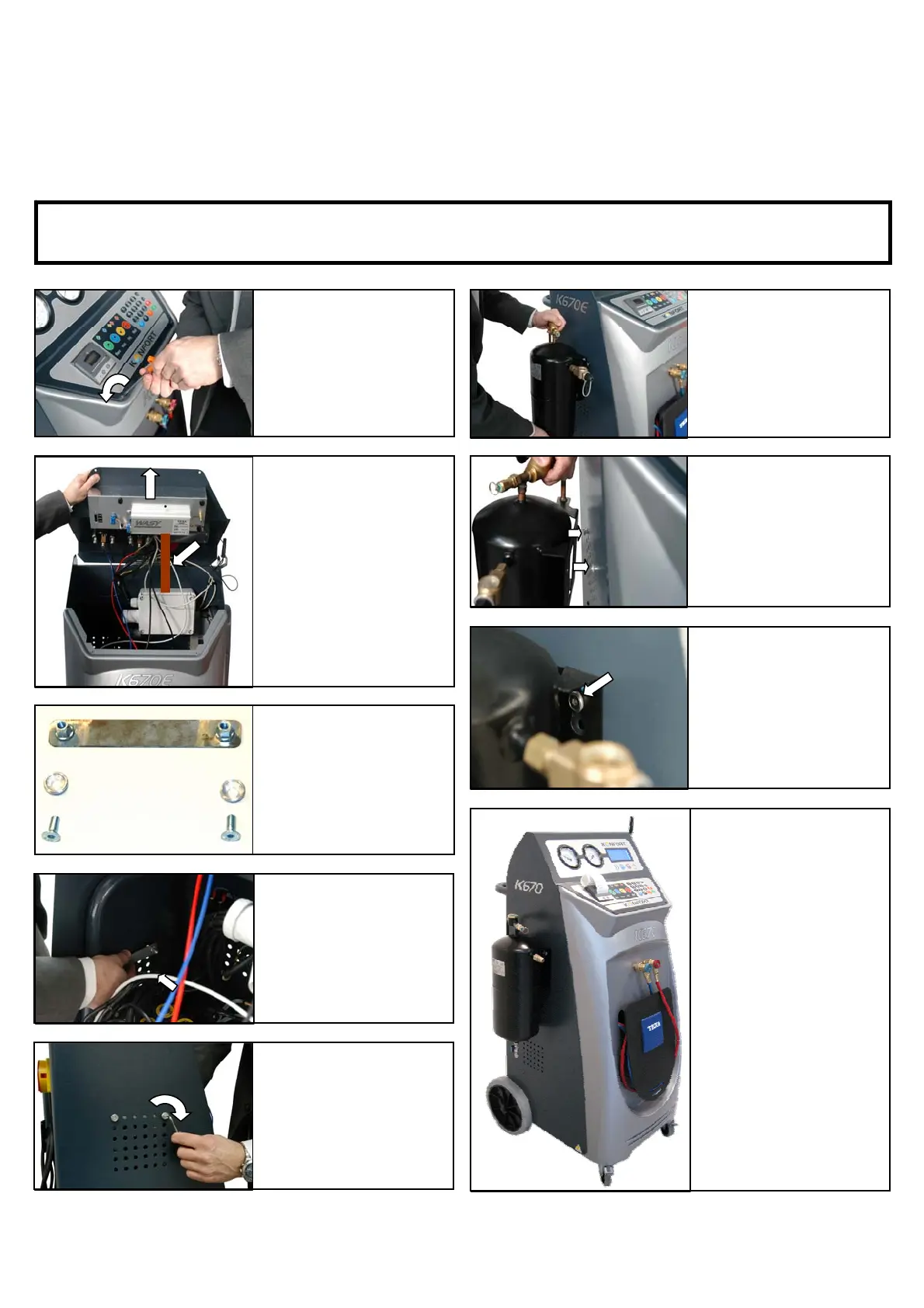
This procedure explains how to install the flushing canister on the Konfort units.
WARNING: Prior opening the Konfort station, make sure that the units is switched-off and its
power cable is disconnected from the main power source.
a) Remove the two
screws fixing the
control panel of the
Konfort unit.
b) Lift up the control
panel of the Konfort
unit and secure it with
the proper fixing bar.
c) Unpack the
installation kit and
verify if all
components
are present.
d) On the left lateral
panel and from inside
the unit, position the
metallic installation
bracket toward the
upper line of
ventilation holes.
e) Position the two
screws with the two
aluminium rings.
ight them with the
required tool.
f) Present the flushing
canister toward the
two aluminium rings
which you have just
installed on the left
side of the unit.
g) The two aluminium
rings should be
inserted in the two
holes present on the
base plate of the
canister.
i) Now the main
component of the
flushing kit is installed
on the Konfort unit
ready for use.
It can still be easily
removed in case of
non-frequent use.
h) Once the two
aluminium rings are
inserted, the canister
should slide down and
finally sit on the
surround of the rings.


 To Next Page