iCNC PERFORMANCE
3-16 OPERATION Manual 0-5399
Offsets
If there is a need to drive the same distance often (i.e. plasma torch to the same position where gas torch was) it’s useful to save these
kinds of distances as default offsets (offset 1 and 2). This way you can drive the default offset by just clicking one button.
Tables
It is possible to define several different home positions. These can be used to define the home positions of different plates on the cutting
table, or different cutting tables. Select the Table Number from the list and click the Drive to button. The machine drives to the defined
home position of the selected table.
Program Zeros
iCNC Performance will save the coordinates for last 5 program starts relative to the absolute 0.0 position. You can choose the wanted
program zero point from the drop down list and click drive to.
Set absolute zero (home) position by clicking the Set absolute 0,0 here button. This tool is needed, if the programmed working area limits
are in use. Those limits force the machine to stop before it hits the electrical limit switches. Setting absolute zero position can also be
automatic, when the machine is driven to the pre-defined zero position every time the controller is turned on. Absolute zero position is also
needed, if there is a need to set several home positions.
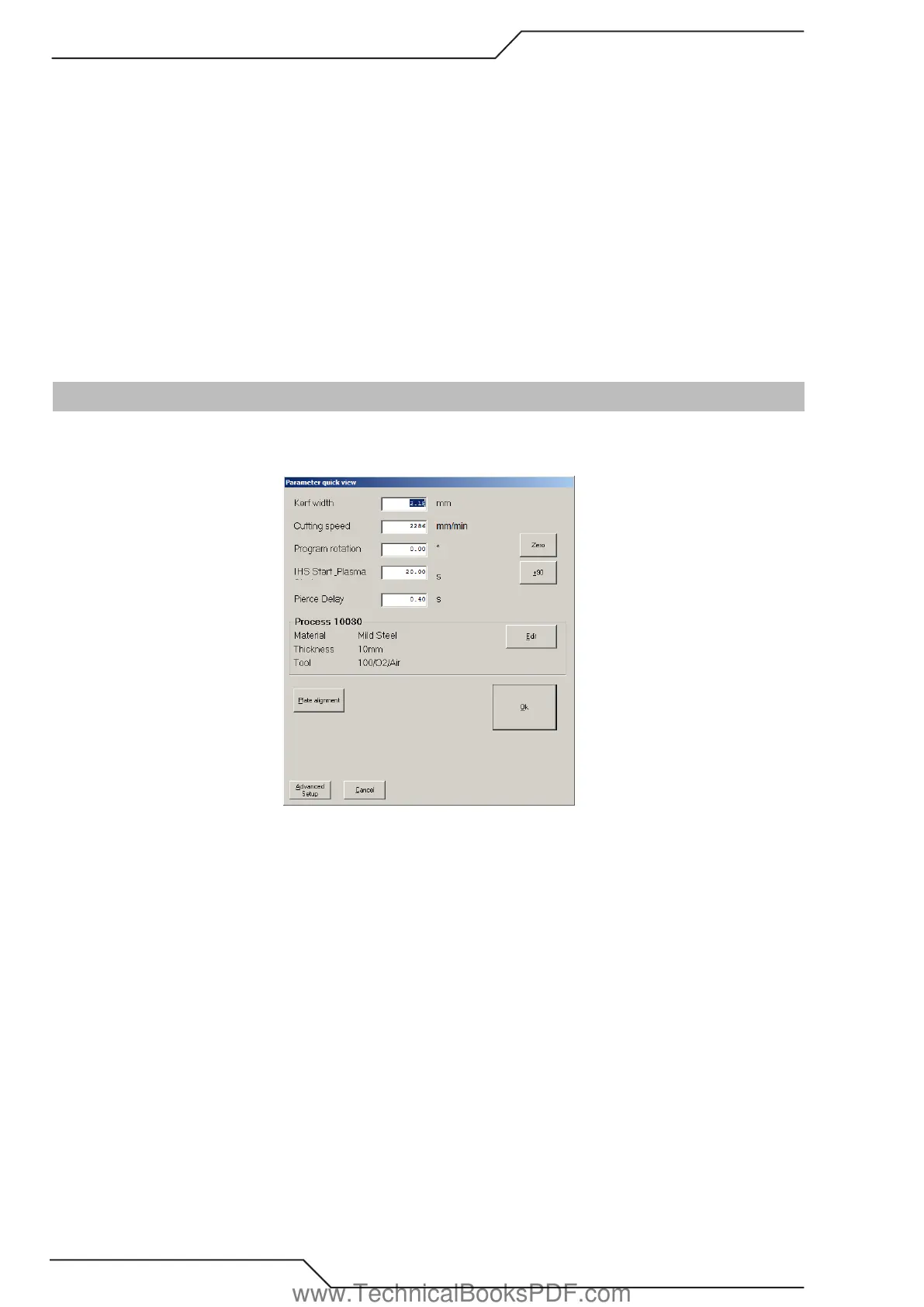
3.11 Parameter Quick View
The parameter quick view screen opens automatically when a program is sent to cutting from Promotion Nest or when the Setup button
is clicked. The quick view screen allows the operator to change the most commonly used variable parameters quickly. It also provides
options for plate alignment and advanced set up.
Kerf Width
Specifies the amount of kerf (compensation) that will be applied to the cutting program. Caution should be taken when selecting the amount
of kerf. To high a value can cause the program to be altered, especially when a radius of an arc is smaller than the kerf value.
Cutting Speed
This is the speed of the cutting process.
Program Rotation
Any value (degree) will rotate the cutting program. When a plate alignment is performed the rotation of the skewed plate is automatically
entered here. Also, by clicking on the +/- 90 the part program will rotate at 90 degree intervals. Clicking on the zero box will clear any value
of rotation to zero degrees.
IHS/Plasma Start
Time for the torch to go ignition height and ignite the plasma arc. Any excess time will be discarded and next delay will be performed
(Pierce Delay).
Pierce Delay
This is a move delay after the pierce has started.
www.TechnicalBooksPDF.com



 To Next Page