1-2 Model 310 Series DH Incubator Thermo Scientific
Section 1
Installation and Start-up
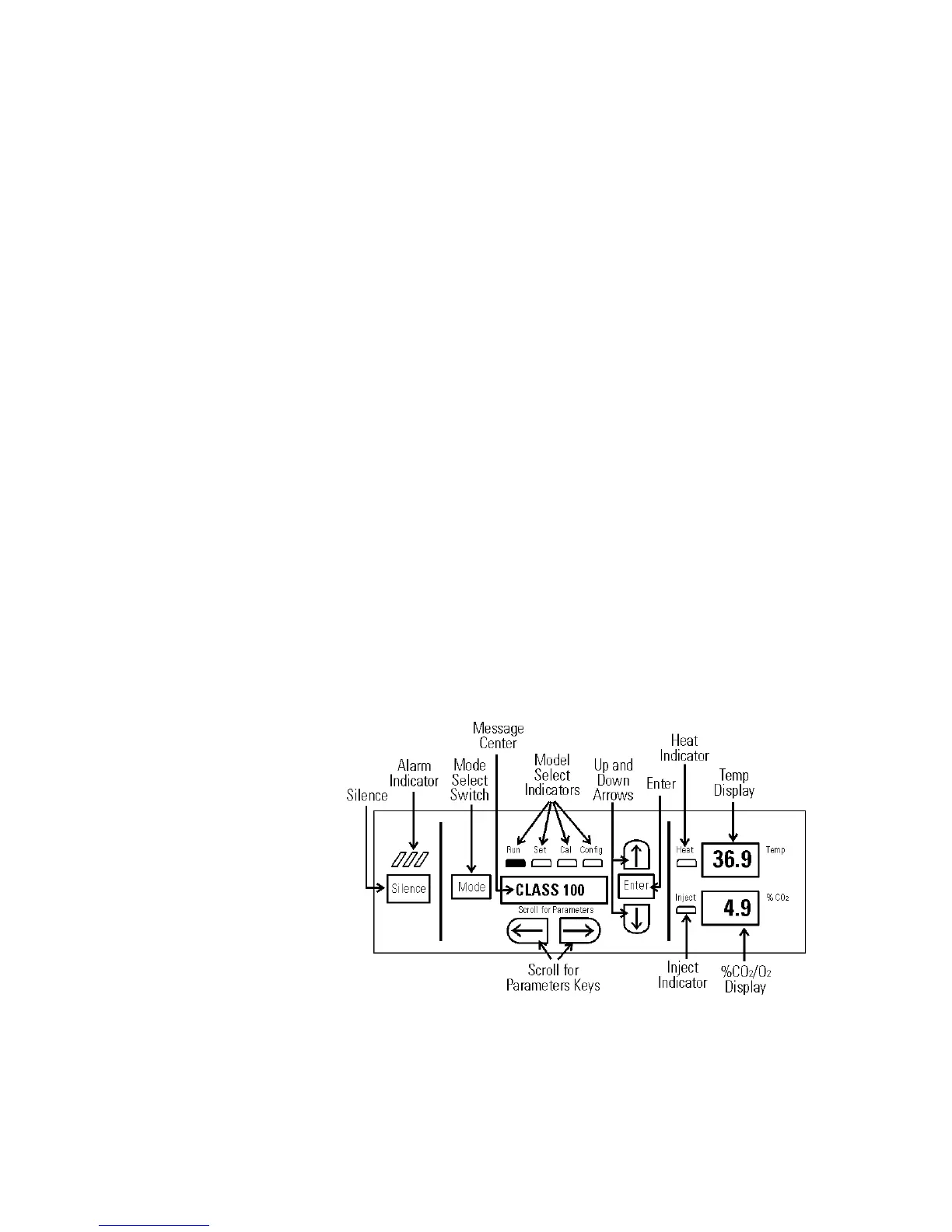
Silence - Silences the audible alarm.
Alarm Indicator - Light pulses on/off during an alarm condition in the
cabinet.
Mode Select Switch - Used to select Run, Setpoints, Calibration and
System Configuration Modes.
Message Center - Displays system status.
Mode Select Indicators -
Run: Run Menu
Set: Set Points Menu
Cal: Calibrate Menu
Config: Configuration Menu
Up and Down Arrows - Increases or decreases the number values, toggles
between choices.
Enter - Stores the value into computer memory.
Heat Indicator - Lights when power is applied to the heaters.
Temp Display - Program to display temperature continuously, RH con-
tinuously (with RH option), or toggle between temperature and humid-
ity (with RH option). See Section 3, Configuration.
Scroll for Parameters Arrows - Moves the operator through the choices
of the selected mode.
CO
2 Inject Indicator - Lights when CO2 is being injected into the incu-
bator.
% CO2 Display - Displays CO
2 percentage continuously.
Control Panel Keys,
Displays & Indicators
Figure 1-2. Control Panel








 To Next Page