52
■ Enable/Disable Balance-less Bump-less Function
Character
Name
Description
Initial Value
1
SET3
CNT
Setting Mode Selection
Screen
Control Parameter Mode
Settings about Control
38
BMP
Balance-less Bump-less
Function
ON/OFF Setting
0
Without balance-less bump-less function
1
With balance-less bump-less function
1
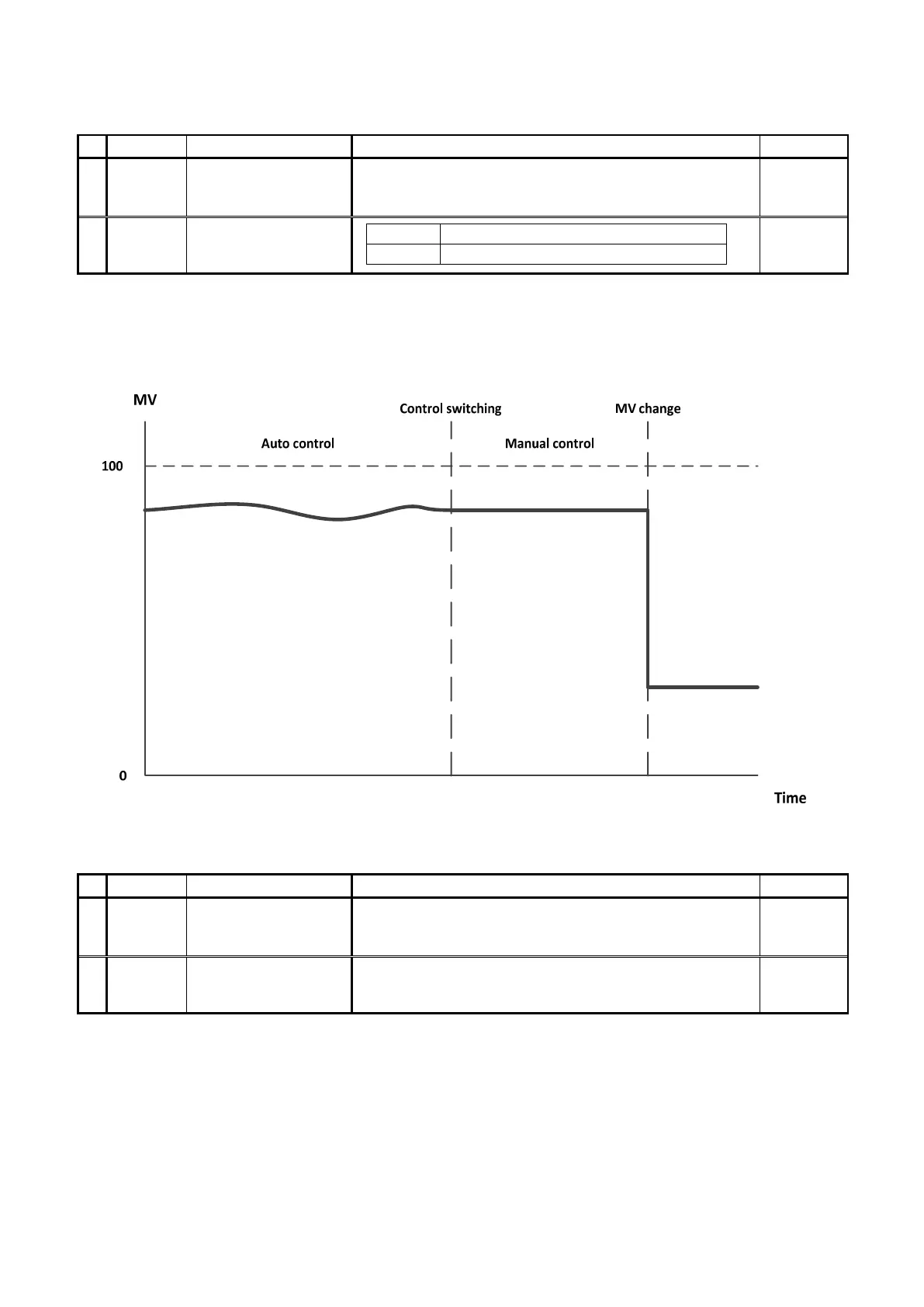
If PID control is set, the balance-less bump-less function will be used to prevent the sudden change of the manipulated
variable (control output) upon switching the control between auto and manual and to prevent damage to peripherals and
bad effect on control system that may be caused by such a sudden change.
■ Manual reset setting
Character
Name
Description
Initial Value
1
SET3
CNT
Setting Mode Selection
Screen
Control Parameter Mode
Settings about Control
39
PBB
Manual reset setting
Setting Range: 0.0–100.0 or
-100.0–100.0 (heating/cooling) (heat/cool)
Setting Unit: %
00
Value of manual reset will be added to the manipulated variable.
It shall be set to cancel the offset that has occurred at the proportional control.
Reference of Setting: Set the manipulated variable, which is in a steady state at the proportional control, to manual reset.


 To Next Page