68
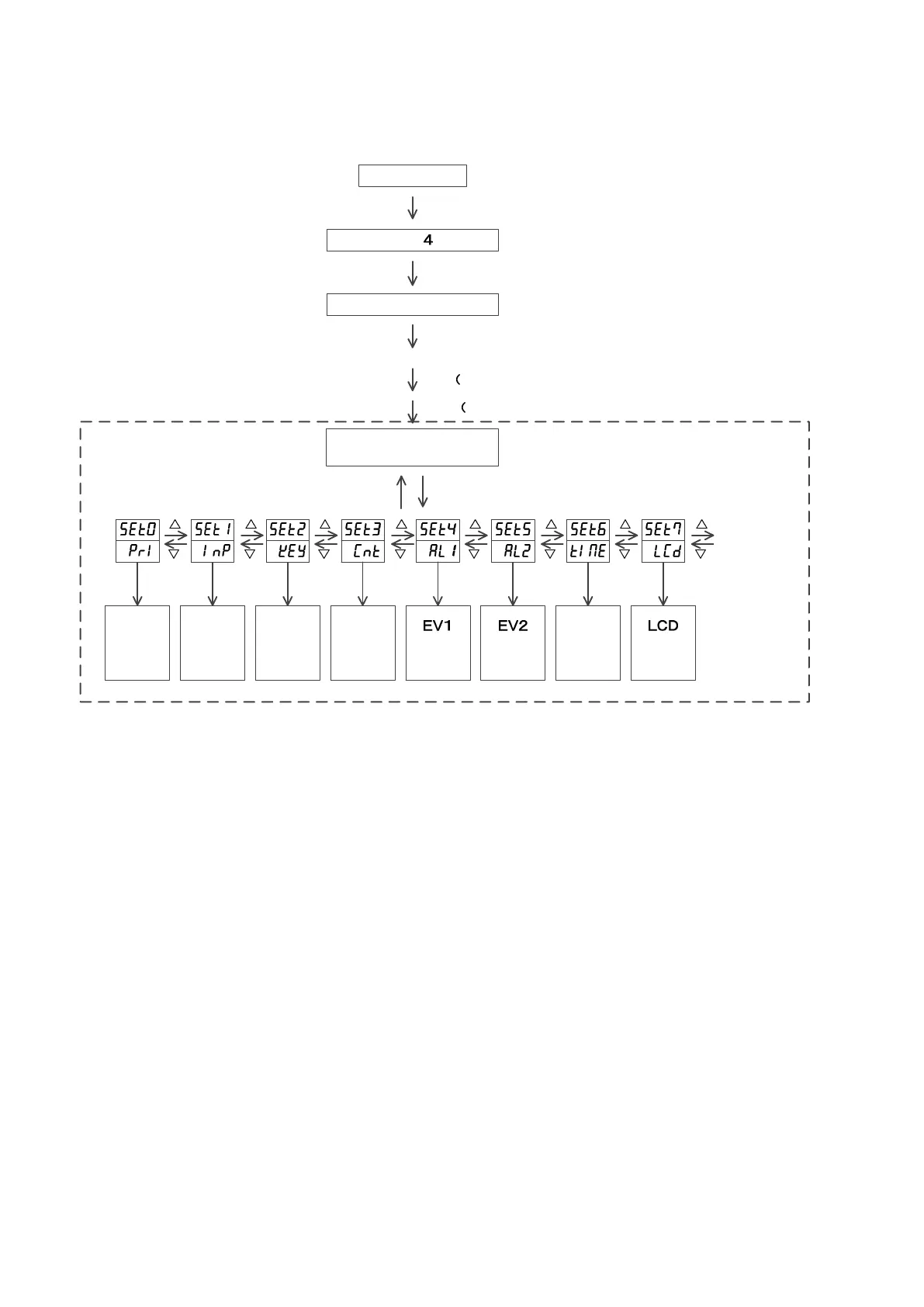
6.4.10 Change to Blind Setting Mode
Power on
initial display( seconds)
RUN mode
After power on, “Input Type Screen” appears for 4
sec, then it will proceed to “Operation Mode ”.
M key 10 seconds
Indication disappears momentarily
F key Press for once)
M key Press for once)
RUN mode
M key 2 seconds
Priority
screen
setting
mode
Input
setting
mode
Key
function
setting
mode
Control
setting
mode
setting
mode
setting
mode
Timer
setting
mode
setting
mode
M key M key M key M key M key M key M key M key
to SET0
Blind setting mode
When Blind Mode is ON, “ON” and “OFF” will be displayed below each character (SV display section).
Display when turned “ON”
Non-display (blind) when turned “OFF”
Switching between “ON” and “OFF” shall be done with the F key.
Changing of mode during the blind mode can be done with ▽/△ keys.
Reset the power to end the blind mode.


 To Next Page