ISOCAN / ISOBUS ARTEMIS - SEED DRILL CONTROLLER
16
3.4 MCM Control channel setup
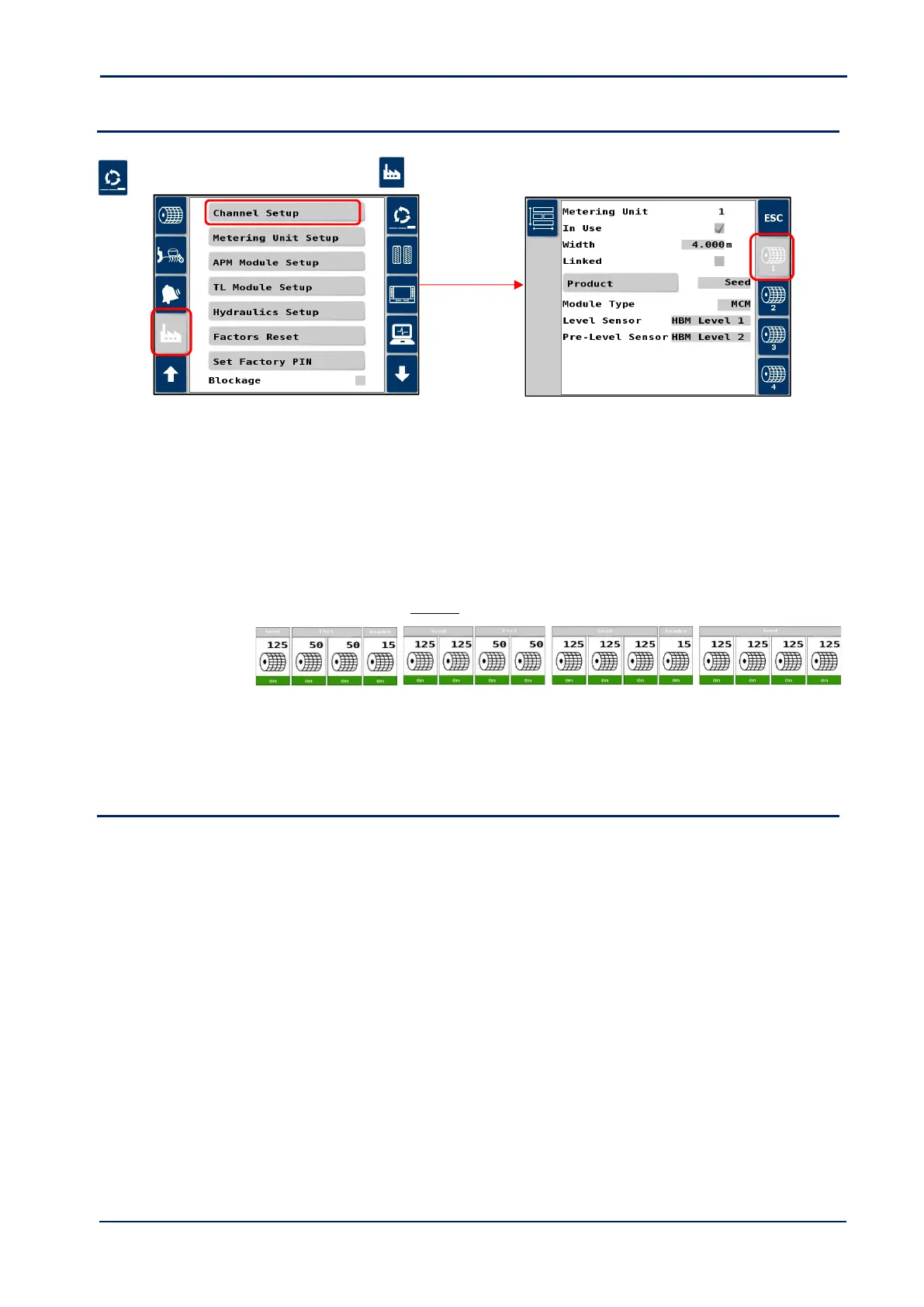
Setup in the Artemis app as follows.
1. Cycle to the ‘Setup’ screen, touch the tab and select “Channel Setup”
2. Select the control channel for each motor in turn,
“Metering unit” Indicates the selected channel.
“In Use” Set to “Yes” to enable a channel (sequentially i.e. 1,2 , 1,2,3 , or 1,2,3,4).
“Width” Set the working width in metres. If separate left and right motors are installed utilising 2 channels,
each channel would be set to half the full working width.
“Linked” When a configuration requires multiple hoppers / metering units to dispense a single product, then
the control channels are linked.
Two, three or four single, adjacent control channels may be linked in this way.
Examples:
“Product” Assigned a product type “Seed”, “Fert A”, “Fert B etc.
“Module Type” Should be “MCM”
3.5 Priming Switch
Part Ref. S/SW/500-7-019
For each motor channel, the priming switch manually operates the motor to dispense product for calibration purposes.
Mount the switch [50] where convenient for calibration. Route the cable back to connector ‘H’ of the Expansion
Harness S/TC/1015540-01 for that motor.



 To Next Page