EMTX-SVX01G-EN 19
Using Rover Comm4
Using Rover Comm4
Rover Comm4 is an optional Rover application that replaces the EveryWare service software. It
maintains all of the functionality of EveryWare with the added convenience of running in Windows.
With Rover Comm4, you can:
• Configure, monitor, and test VAV II/III/IV controllers and termincal unit controllers (TUC)
• Override VAV controllers and TUCs
• Save configuration files
• Perform offline editing
Operation Instructions
For instructions on how to use Rover Comm4, refer to the Rover Comm4 Online Help (click Contents
and Index on the Help menu.)
Connection Instructions
For instructions on connecting your laptop PC to a Comm4 link, refer to Installing Rover Service
Tool Version 7.0, X39641065-01. You can find a hard copy of this document in the Rover package and
an electronic copy on the Rover Installation CD-ROM.
Power Requirements and Hardware Installation
Input Power
USB self power (500mA, SV)
Output Power
150mA, 5V power output for external devices requiring power
Hardware Installation
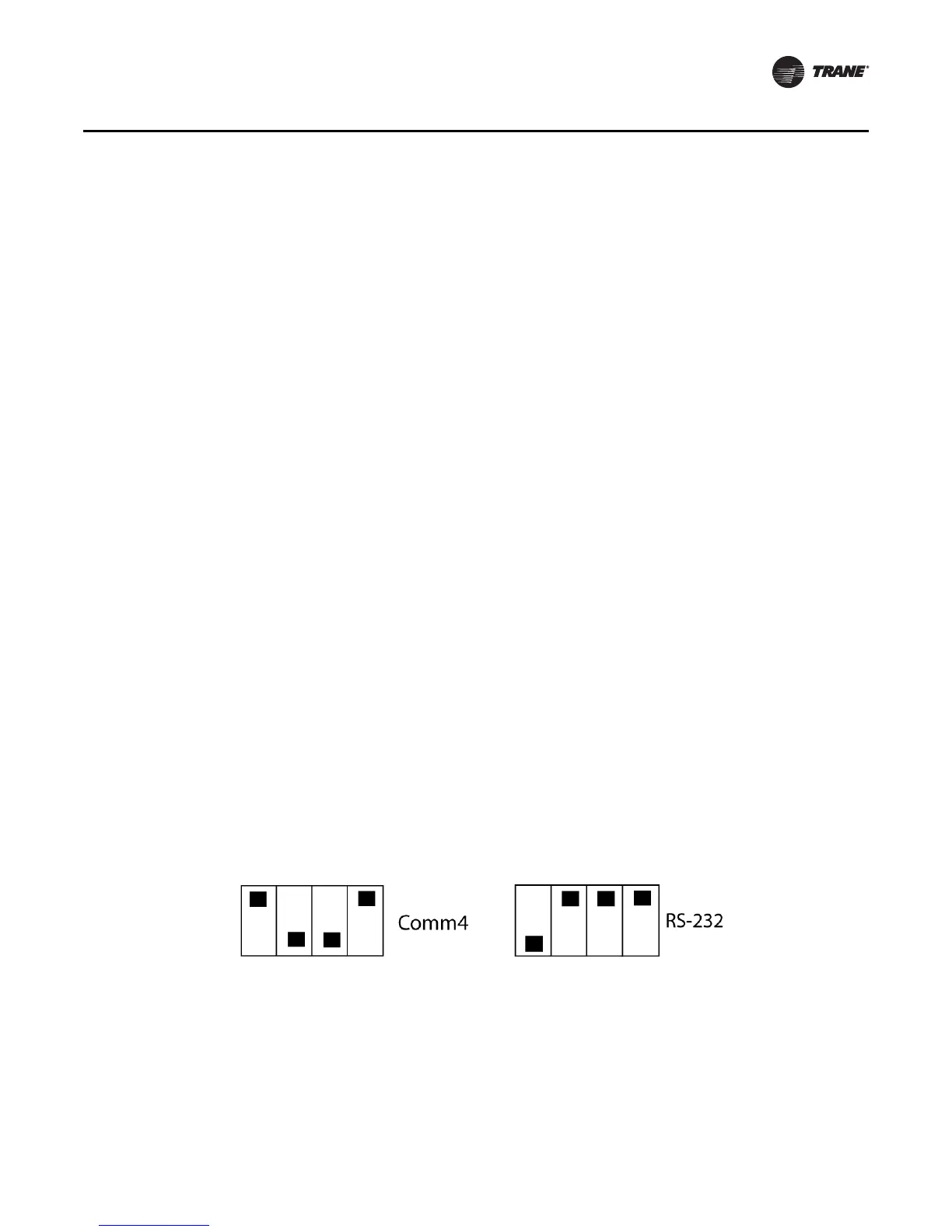
On the outside of the unit is a 4-pin DIP switch that is set to select the mode of operation. Set the
DIP switch to accommodate your application for either an Comm4 or RS-232 as shown in Figure 10.
After setting the DIP switch, plug in the adapter to the USB port to start the driver installation.
Figure 10. Mode block configuration settings



 To Next Page