Wireless Travel Router12
1. PRODUCT OVERVIEW
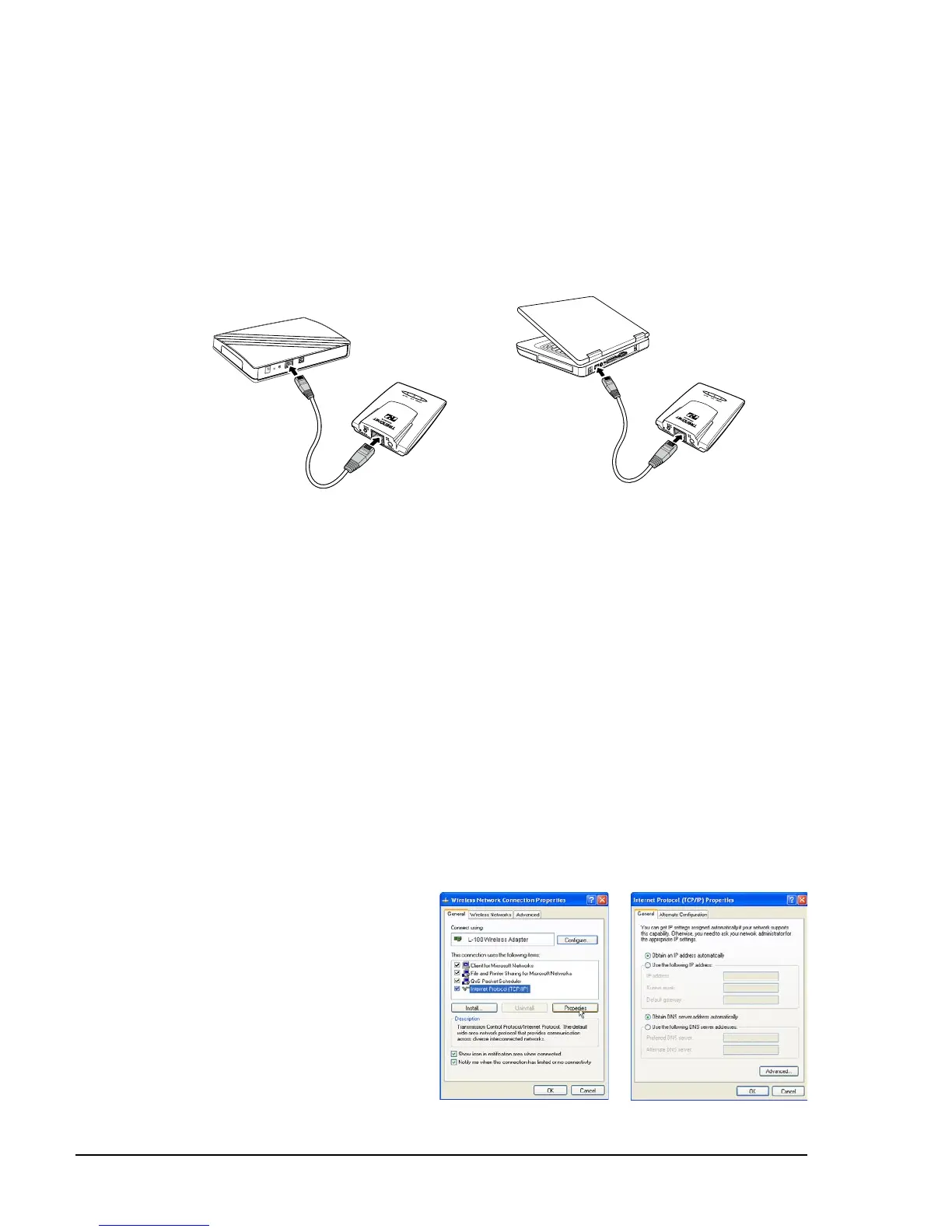
Use the Ethernet (RJ-45) cable to connect to a computer for wired connection or
connect to a DSL or cable modem for internet connection.
1 Connect one end of the Ethernet cable to your computer or a DSL or cable
modem.
2 Plug the other end to the LAN port of the travel router.
1.5.3 Connecting the Ethernet Cable
Wired computer connection
1.6 System Requirements
Operating systems: Windows XP, Vista
Microsoft Internet Explorer 5.5 or higher
At least one RJ-45 Ethernet network
•
•
•
1.6.1 Conguring Connections
To properly detect the connections, congure your computer’s network settings rst.
The following instructions are based on Windows XP. Non-Windows XP users will
see similar screens.
1
For Windows XP, click Start > Control Panel > Network Connections. Right
click on a connection, then select Properties.
2
Highlight Internet Protocol
(TCP/IP), then click
Properties.
3 Click Obtain an IP address
automatically and Obtain
DNS server address
automatically.
4
Click OK and OK again.















 To Next Page