Wireless Travel Router 65Wireless Travel Router 65
4. ROUTER MODE
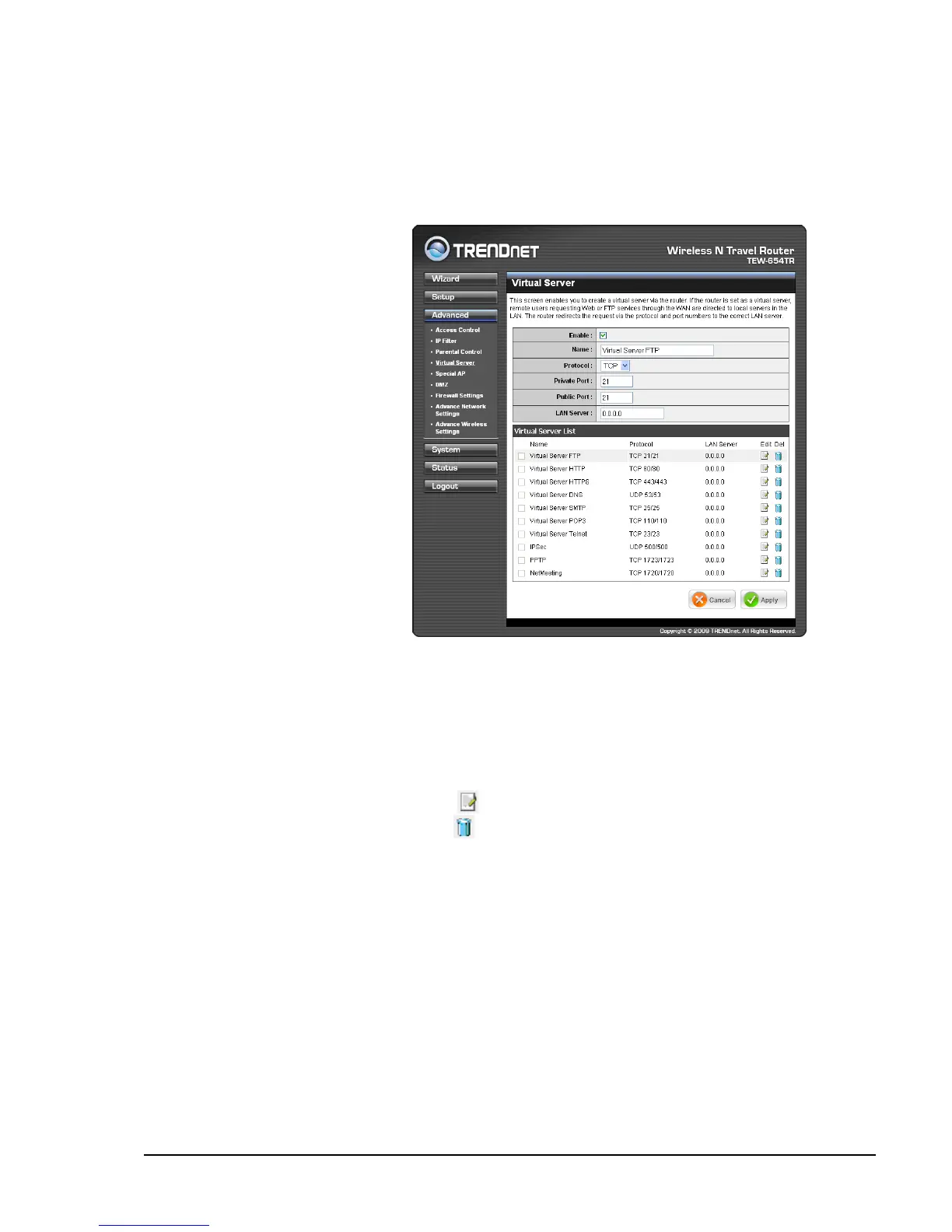
Virtual Server
The Virtual Server menu allows you to congure the travel router as a virtual
server. Remote users accessing the Web or FTP services through the WAN can be
automatically redirected to local servers in the LAN.
Enable
Check the box to enable virtual
server. Uncheck to disable.
Name
Create a virtual server name.
Protocol
Select the type of protocol to
use: TCP, UDP, or Both.
Private Port
Enter the port number of the
being used as a virtual server.
Public Port
Enter the port number of the
of the WAN that will be used
to provide access to the virtual
server.
LAN Server
Enter the LAN IP address that will be assigned to the virtual server.
Virtual Server List
Displays the list of virtual server proles. By default, a number of proles have been
created and are all disabled. A checkmark before the virtual server name indicates
that the prole is enabled.
To edit a prole, click the corresponding
icon.
To delete a prole, click the correspond icon.
Once conguration is complete, click Apply to save and apply settings, or click
Cancel to cancel changes. The travel router will restart for new settings to take effect.















 To Next Page