Wireless Travel Router52 Wireless Travel Router52
4. ROUTER MODE
4.2.2 Setup
The Setup menu allows you to congure basic router settings. Click the Setup button
then the submenu to view page.
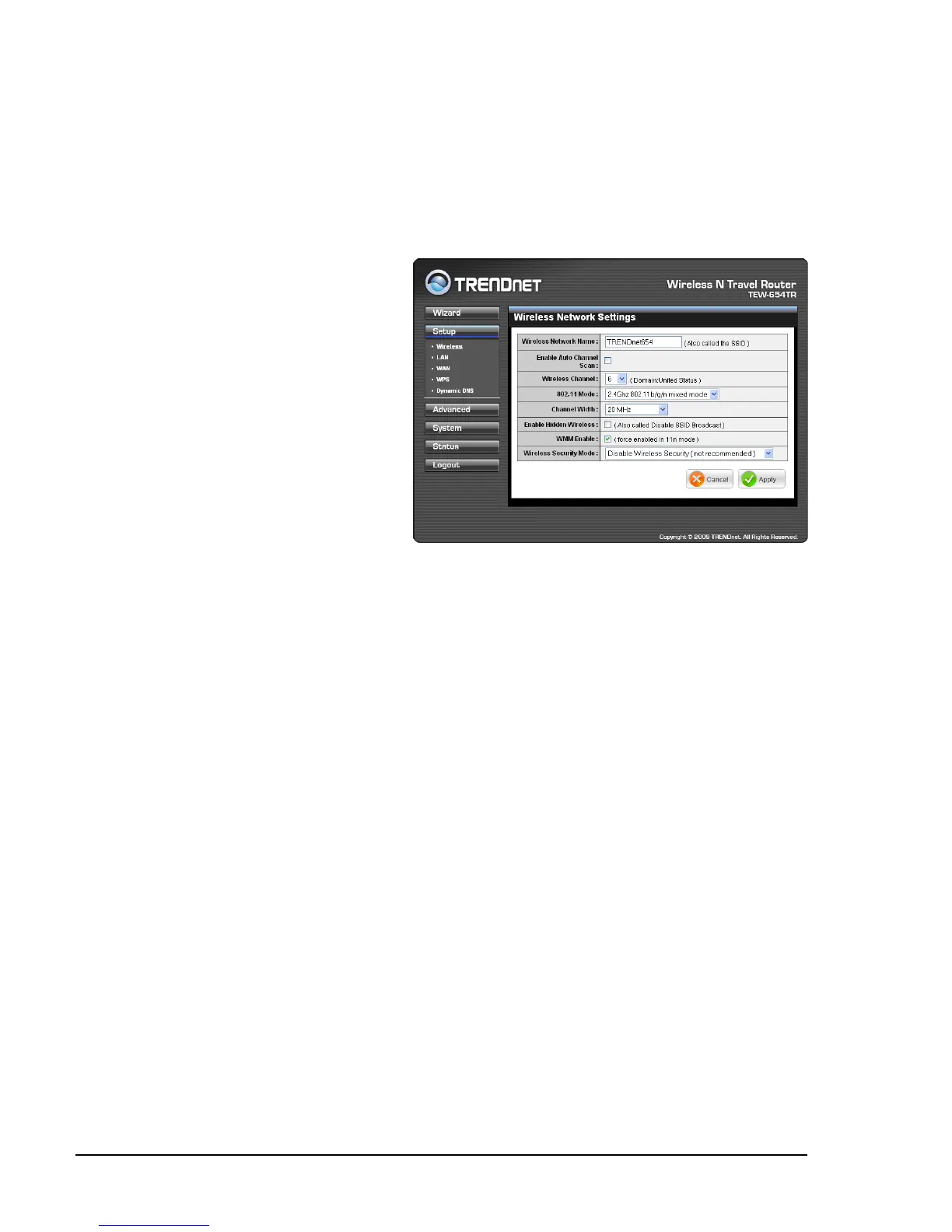
Wireless Network Settings
Wireless Network Name
The name of your wireless
network, also called Service Set
Identier (SSID).
Enter up to 32 characters.
Enable Auto Channel Scan
Auto channel scan selects the
channel with the least amount
of interference. Check to enable
auto channel scan.
Wireless Channel
Manually select the channel
from the list. By default, the channel is set to 6. If Enable Auto Channel Scan is
checked, this box is grayed out.
802.11 Mode
Limit the type of wireless clients to allow connection with. Select any of the following
modes if your clients are:
2.4Ghz 802.11b/g mixed mode: a mix of 802.11b and 11g wireless devices.
2.4Ghz 802.11b/g/n mixed mode: a mix of 802.11b, 11g, 11n wireless devices.
2.4Ghz 802.11n only mode: all 802.11n wireless devices.
Channel Width
Select the appropriate channel width:
20 MHz (Default): Select if your wireless clients are not 802.11n.
Auto 20/40 MHz: Select if your wireless clients are a mix of 802.11b, 11g, 11n
wireless clients. If you are not sure which wireless clients you are using, select
Auto.
Enable Hidden Wireless
Check to hide the SSID of your wireless network to be broadcasted when wireless
clients scan for wireless networks. To display the router’s SSID, keep the box
unchecked (default).
WMM Enable
Wi-Fi Multimedia (WMM) improves the quality of video and voice applications
transmitted over a wireless network. This function is commonly used with multimedia
applications such as a game console. Check the box to enable WMM.
•
•
•
•
•



 To Next Page