Wireless Travel Router56 Wireless Travel Router56
4. ROUTER MODE
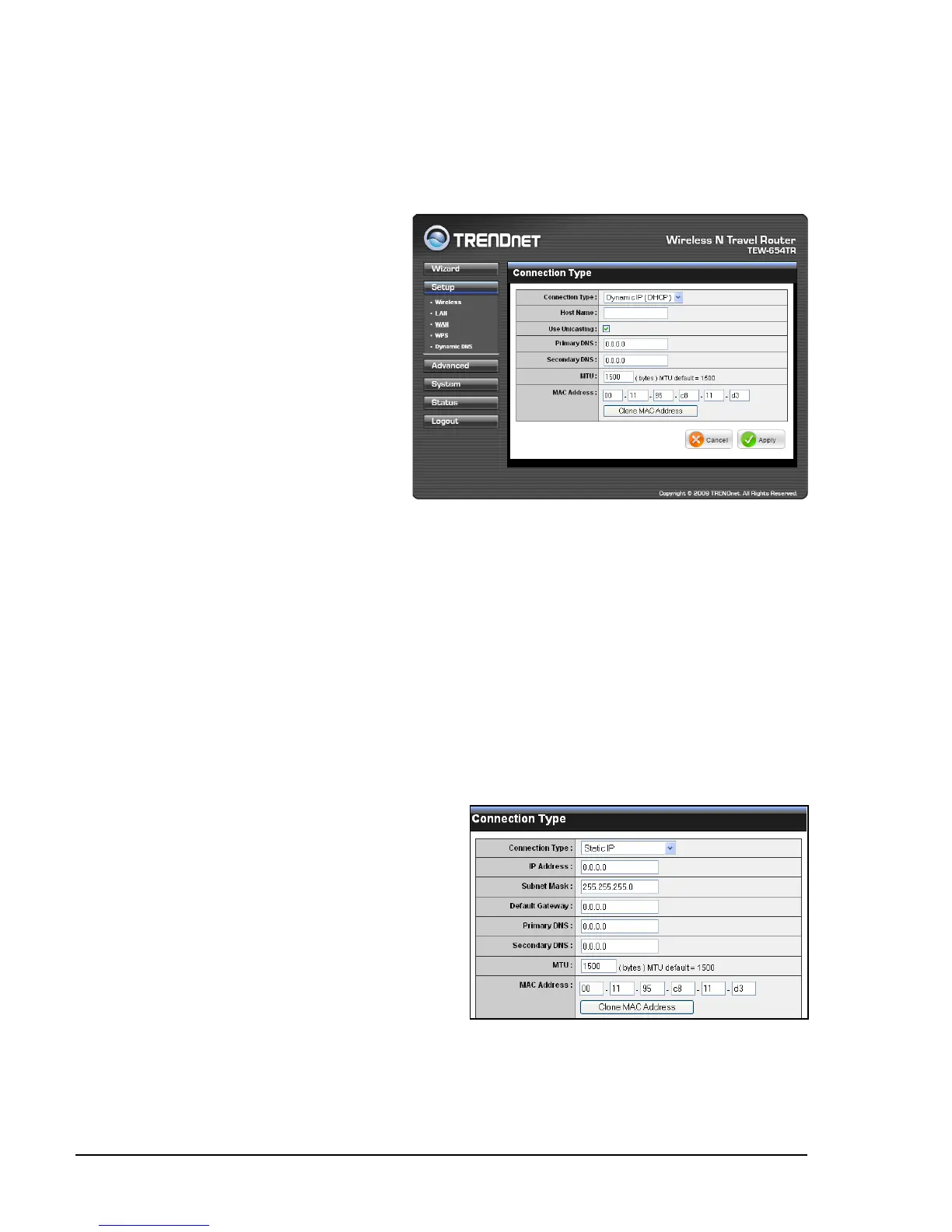
Connection Type
Select the type of Internet connection that you use from the list. The required elds
may vary depending on the selected connection type.
Wide Area Network (WAN) Settings
Dynamic IP (DHCP)
Host Name
Enter the host name. This eld is
optional but may be required by
some ISPs.
Use Unicasting
If you have problems obtaining
an IP address from your ISP.
check this box to enable
unicasting. Enabled by default.
Primary / Secondary DNS
Enter the DNS server addresses
provided by your ISP.
MTU
Adjust the MTU (Maximum Transmission Unit) for optimal performance with your
ISP. The default value is 1500.
MAC Address
Enter the MAC address of the computer that was last connected to a modem. To
enter the MAC address of your current computer, click Clone MAC Address.
Once conguration is complete, click Apply to save and apply settings, or click
Cancel to cancel changes. The travel router will restart for new settings to take
effect.
Static IP
IP Address
Enter the IP address provided by your
ISP.
Subnet Mask
Enter the subnet mask provided by your
ISP.
Default Gateway
Enter the gateway provided by your ISP.
Primary / Secondary DNS
Enter the DNS server address provided
by your ISP.















 To Next Page