Wireless Travel Router50 Wireless Travel Router50
4. ROUTER MODE
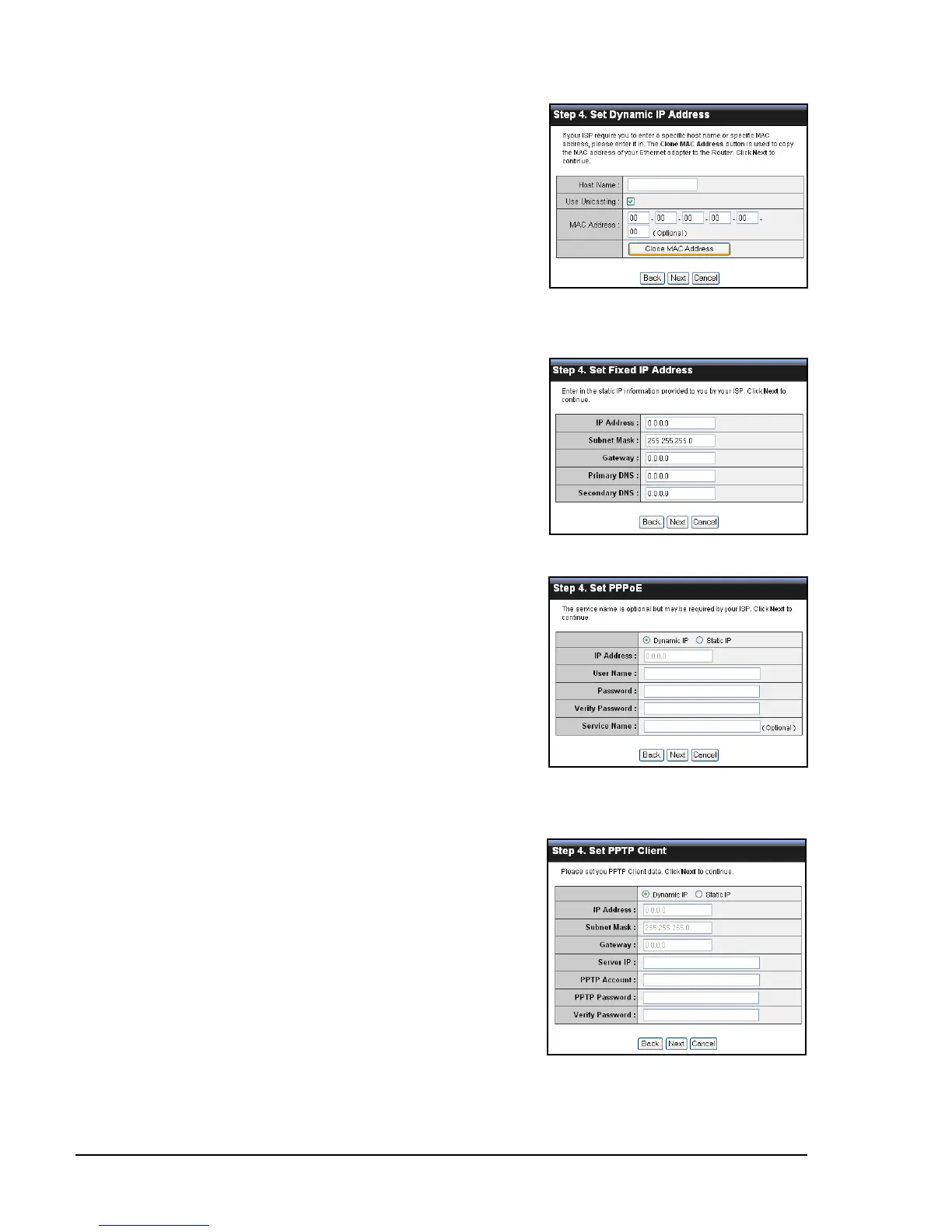
If you selected Obtain IP Automatically
(DHCP Client)...
Enter the Host Name (optional).
You may need to enter the MAC Address
of the computer that was last connected
to a modem. To do this, click Clone MAC
Address.
Click Next to continue.
Skip to step 6.
If you selected Fixed IP...
Enter the information provided by
your ISP: IP Address, Subnet Mask,
Gateway, Primary DNS, and Secondary
DNS (optional).
Click Next to continue.
Skip to step 6.
If you selected PPPoE...
Select either Dynamic IP or Static IP.
If you selected Dynamic IP, enter the
User Name and Password.
If you selected Static IP, enter the IP
Address, User Name, and Password
provided by your ISP.
Click Next to continue.
Skip to step 6.
If you selected PPTP...
Select either Dynamic IP or Static IP.
If you selected Dynamic IP, enter the
Server IP, PPTP Account, and PPTP
Password (optional).
If you selected Static IP, enter the IP
Address, Subnet Mask, Gateway,
Server IP, PPTP Account, and PPTP
Password (optional) provided by your ISP.
Click Next to continue.
Skip to step 6.















 To Next Page