42 Juno Series Handhelds User Guide
Text messaging
Use the phone functionality on the Juno 3D handheld to send and receive text
me
ssages.
1. Make sure that a SIM card is installed. See Installing and removing the SIM card,
page 26.
2. Make sure that the phone is turned on. See Turning on and turning off the
integrated radios, page 48.
3. Do one of the following:
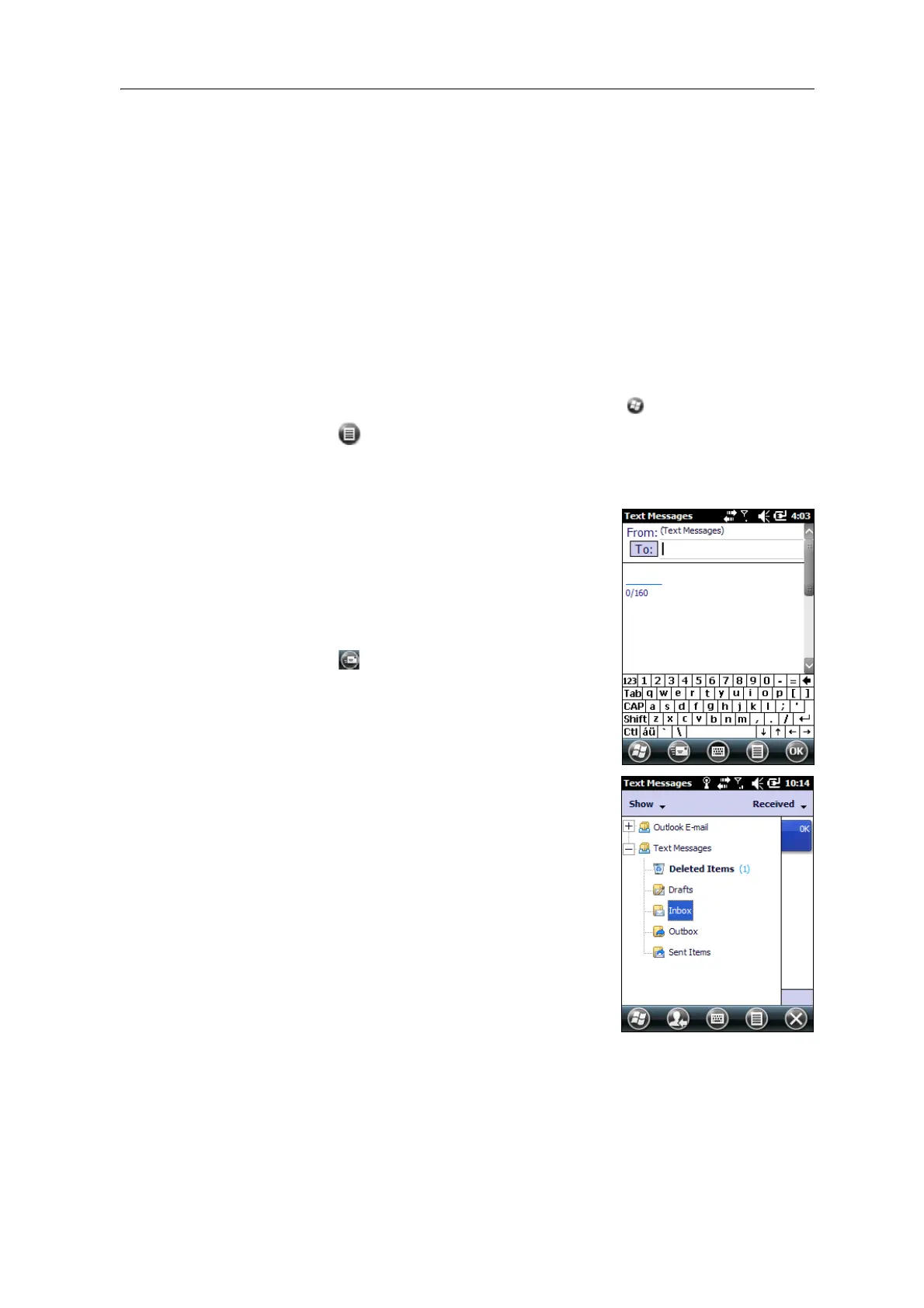
• To send a text message:
a. On the Ho
me screen, select the Text item (this shows Text Messages: x
unread, or No New messages). Alternatively, tap / Text.
b. Tap / New.
c. To enter a contact number, make sure that the cursor is flashing in the To
f
ield and then do one of the following:
– Use the keyboard to enter a phone number.
– Select Menu / Add Recipient to select a
number from your Contacts.
d. Tap in the message area (the cursor will
f
lash) and then enter the text using the
keyboard.
e. Tap
to send the message.
• To access your text message folders.
a. On the H
ome screen, select the Text item
(this may show Text Messages: x unread, or
No New messages) and then tap again.
b. Click the Inbox drop-down arrow.
c. Click the required folder to view messages in
th
at folder.



 To Next Page