9-24
User Authentication and Accounting (User Login, Job Accounting) > Enabling Job Accounting
Enabling Job Accounting
1
Display the screen.
1 [System Menu/Counter] key > [▲] [▼] key > [User/Job Account] > [OK] key
2 [▲] [▼] key > [Job Account.Set.] > [OK] key
2
Configure the settings.
[▲] [▼] key > [Job Accounting] > [OK] key > [▲] [▼] key > [On] > [OK] key
If the login user name entry screen appears during operations, enter a login user name
and password, and select [
Login
]. For this, you need to login with administrator privileges.
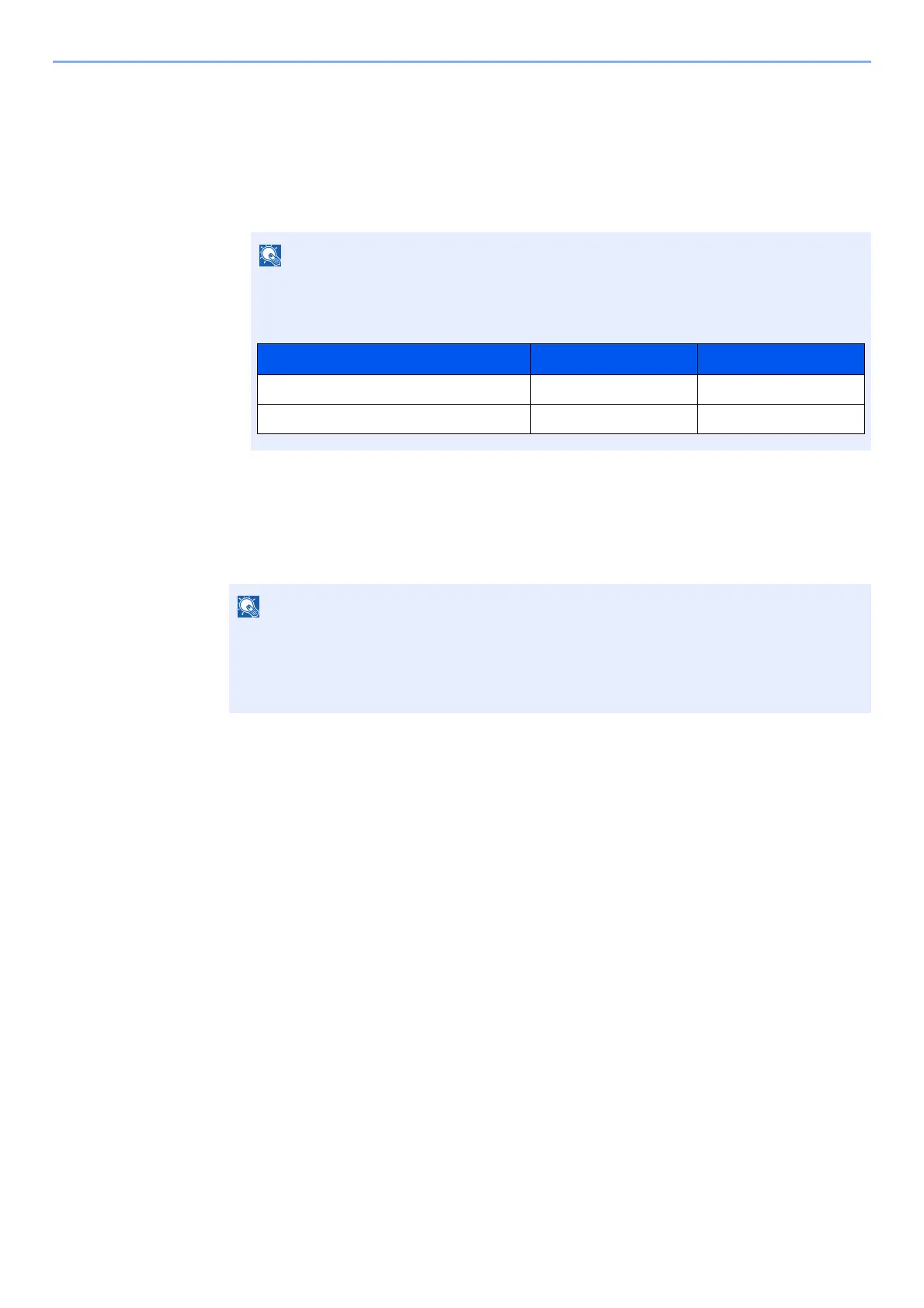
The factory default login user name and login password are set as shown below.
• To disable job accounting, select [Off].
• When the display returns to System Menu default screen, logout is automatically executed
and the screen to enter the Account ID appears. To continue the operation, enter the
Account ID.
Model Name Login User Name Login Password
P-3521 MFP 3500 3500
P-4020 MFP/P-4025w MFP 4000 4000











 To Next Page