2-40
Installing and Setting up the Machine > Installing Software
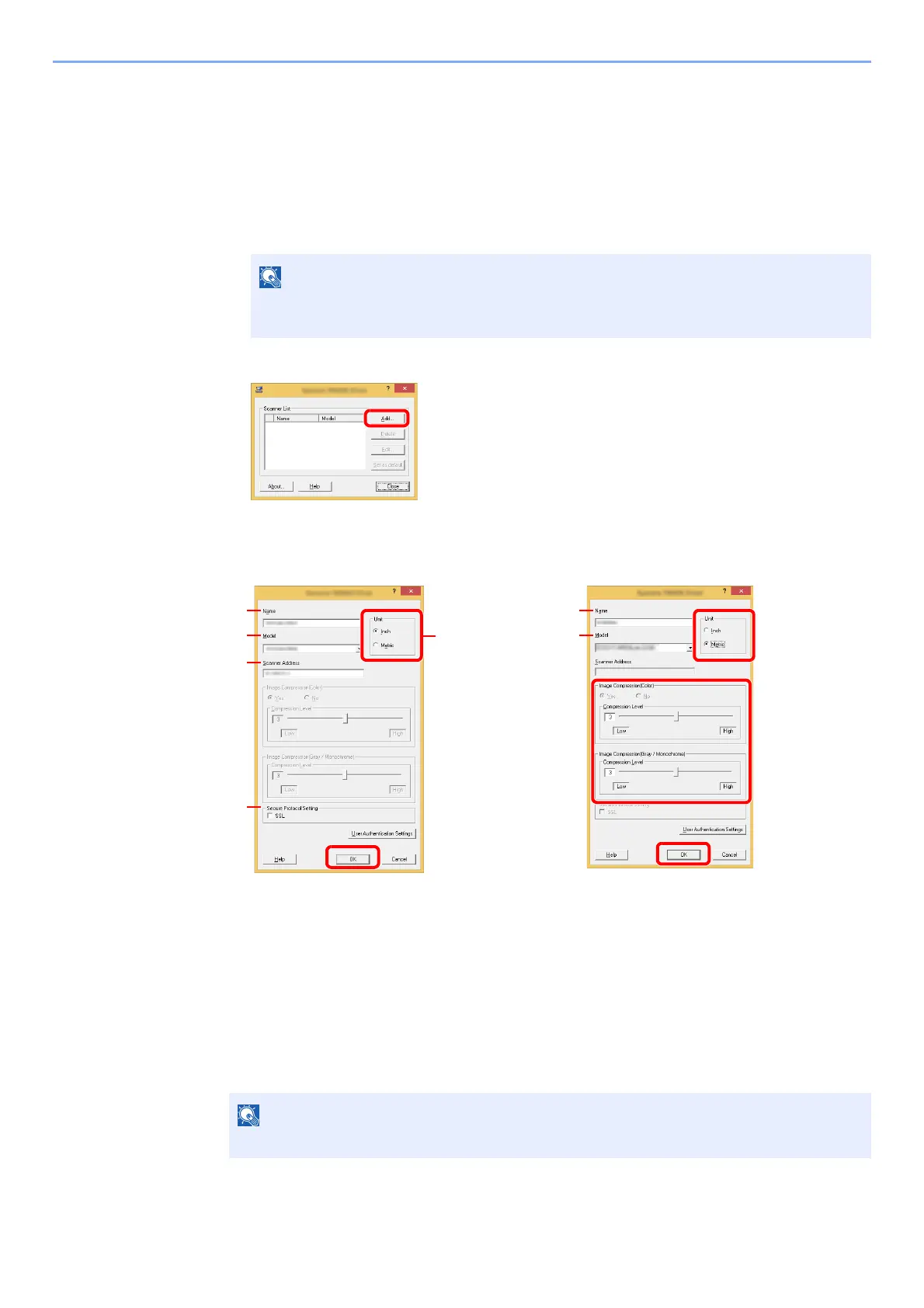
Setting TWAIN Driver
Register this machine to the TWAIN Driver. Instructions are based on interface elements as they appear in Windows 8.1.
1
Display the screen.
1 Click [Search] in charms, and enter "TWAIN Driver Setting" in the search box. Select
[TWAIN Driver Setting] in the search list.
2 Click [Add].
2
Configure TWAIN Driver.
In Windows 7, select [Start] button on the Windows, [All Programs], [(Brand Name)]
and then [TWAIN Driver Setting]. TWAIN Driver screen appears.
1 Enter the machine name.
2 Select this machine from the list.
3 Enter the machine's IP address or host
name.
4 Set units of measurement.
5 When using SSL, select the checkbox
beside SSL.
6 Click [OK].
1 Enter the machine name.
2 Select this machine from the list.
3 Set units of measurement.
4 Set Compression Level.
5 Click [OK].
When the machine's IP address or host name is unknown, contact Administrator.
3
2
1
5
4
6
(Network)
3
2
1
4
5
(USB)











 To Next Page