35
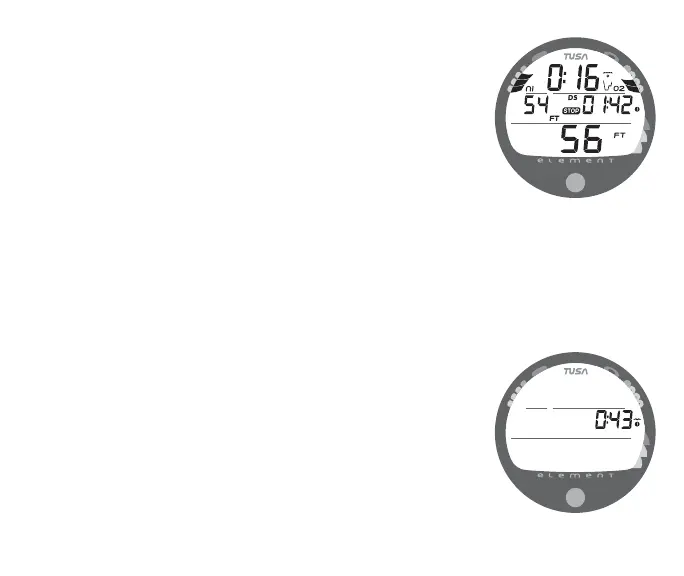
Upon ascending to within10 FT (3 M) below the Stop Depth, the
Deep Stop Main screen (Fig. 32) will automatically appear
displaying the Stop Depth (1/2 Max Depth) with the 2 minute
Countdown Timer that counts down from 02:00 to 0:00
(min:sec). Also displayed will be Dive Time Remaining, current
Depth and applicable bar graphs.
Press and release the button (< 2 seconds) to access the ALT 1
screen that displays Elapsed Dive Time (Fig. 33), press it again
to view the ALT 2 screen displaying Temperature, Time, and
Max Depth (similar to figure 29), then if a Nitrox dive press it
again to view ALT 3 displaying FO2 and PO2 (similar to figure
30).
> If you descend 10 FT (3 M) below, or ascend 10 FT (3 M)
above, the calculated Stop Depth for 10 seconds during the
countdown, the No Deco Main will replace the DS Main
display and the DS feature will be disabled for the
remainder of that dive.
> In the event that you enter Deco, exceed 190 FT (57 M), or
a High O2 condition (=> 80%) occurs, the DS will be
disabled for the remainder of that dive.
> The DS is disabled during a High PO2 Alarm condition
(when => Set Point).
Fig. 32 - DEEP STOP MAIN
Fig. 33 - DEEP STOP ALT 1



 To Next Page