49
Each dive has up to 3 Log screens >> Dive Identifier (Preview),
Dive Data, and O2 Data (if a Nitrox dive). Dives are displayed
in a reverse sequence that starts with the dive most recently
recorded, back to the oldest one stored. The most recent dive
will always be the first shown in the sequence.
To access Log Mode -
> Press/release the button momentarily (< 2 seconds) while the
unit is scrolling through the Surface Sequence.
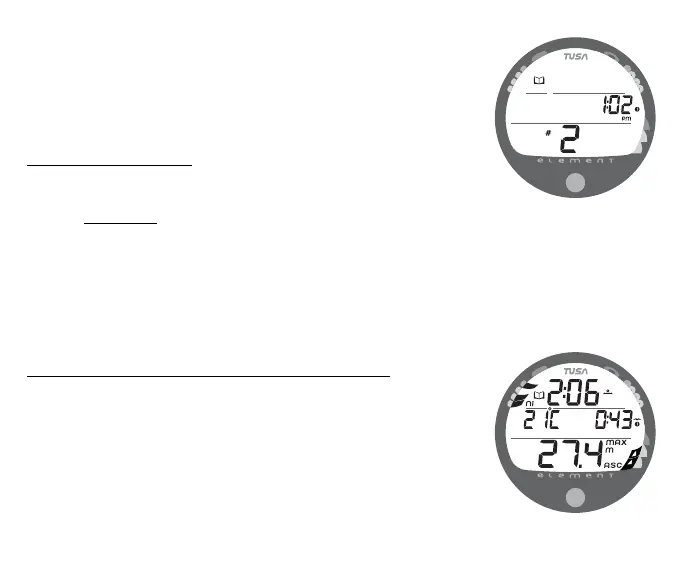
> The first screen (Dive Preview/Identifier) of the most recent
dive conducted will appear displaying (Fig. 55) -
• Log Mode (book) icon
• Time of Day, that the dive started with clock icon
• Dive Number (for that activation period) with icon
> While viewing the Preview screen, press/release the button
momentarily (< 2 seconds) to view the second screen.
Dive Data (the second screen) information includes (Fig. 56) -
• Log Mode icon
• Surface Interval - prior to that dive with clock/wave icon
• Temperature - minimum during the dive with icon
• Elapsed Dive Time (hr:min) with Dive mode icon
• Maximum Depth - reached during the dive with icon
• ASC - max ascent rate maintained for 4 consecutive seconds
• NiBG - nitrogen loading at the end of the dive, segment
reflecting max loading during the dive will appear flashing.
Fig. 55 - LOG PREVIEW
Fig. 56 - LOG DIVE DATA



 To Next Page