Page 31 of 56
6. MONITORING AND CHANGING PARAMETERS AND
OTHER DATA
In order to set the autoclave's clock, check the main sterilization parameters
(sterilization time, and dry time) and to print the sterilization of one of the 40
previous cycles, the operator can enter three sub-directories and obtain the
required data.
6.1. Menu
1. Enter the MENU screen by pressing simultaneously, 2-3 seconds,
the UP and DOWN keys.
To exit this screen, press START/STOP key to move the curser to
EXIT and press UP.
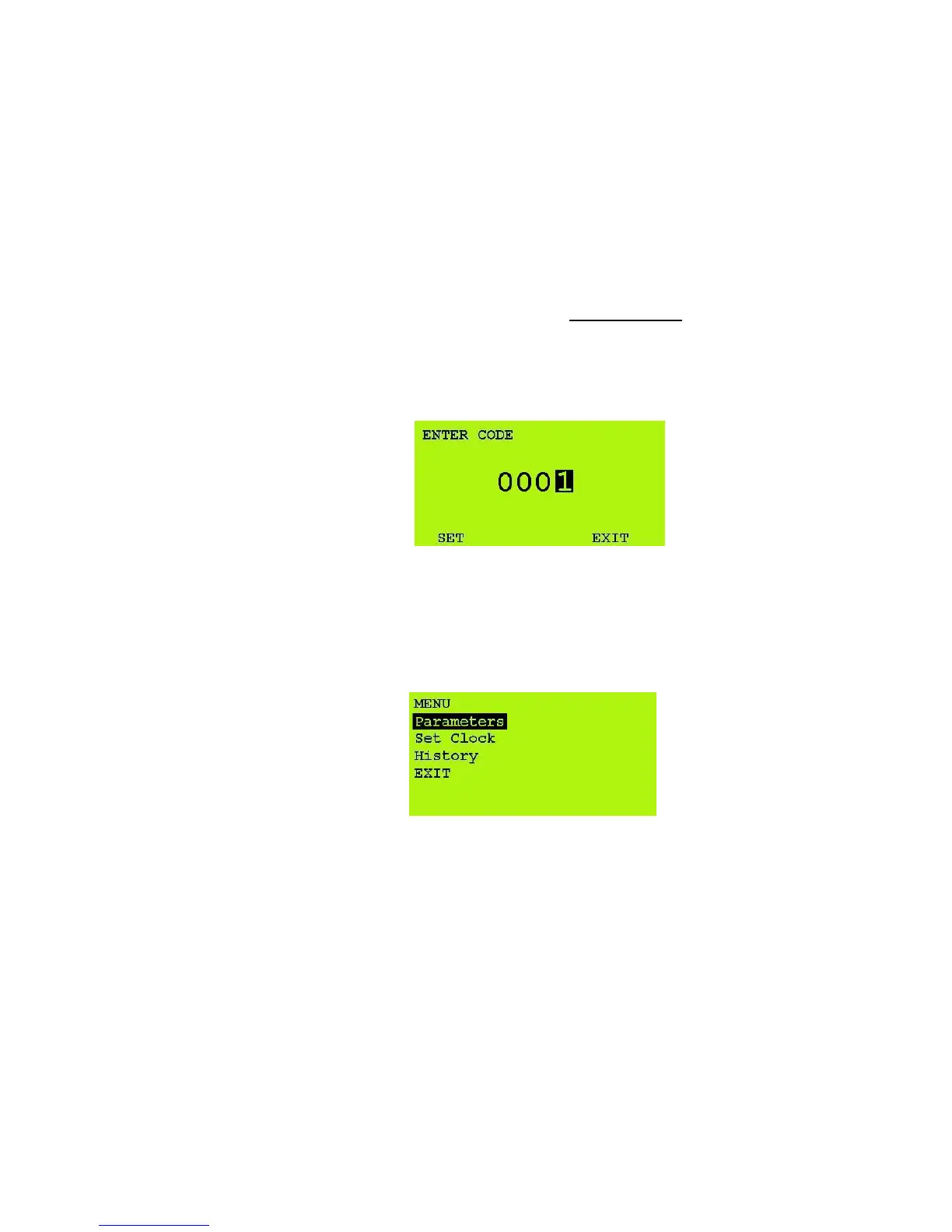
2. 0000 is displayed on the screen with the cursor blinking under the
right digit.
3. To increase the right digit, press the UP key.
4. After changing the code to 0001 move the cursor to SET by
pressing the START/STOP key four times.
5. When SET is blinking, press the UP key to enter the MENU of the
autoclave.
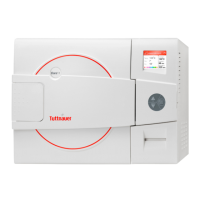
The following screen is displayed:
6. To brows through the sub-directories, use the UP and DOWN
keys.
7. When the required directory is blinking, press the START/STOP
key.
The required screen (see the following paragraphs) will be displayed.
8. To exit the MENU screen, press UP key to move the curser to
EXIT and press START/STOP.








 To Next Page