Page 37 of 56
7.2. Printer Handling
7.2.1. Maintenance
Wipe off the soiling on the printer surface with a dry soft
cloth with a weak neutral detergent. After that, wipe the
printer with a dry cloth.
7.2.2. Setting paper
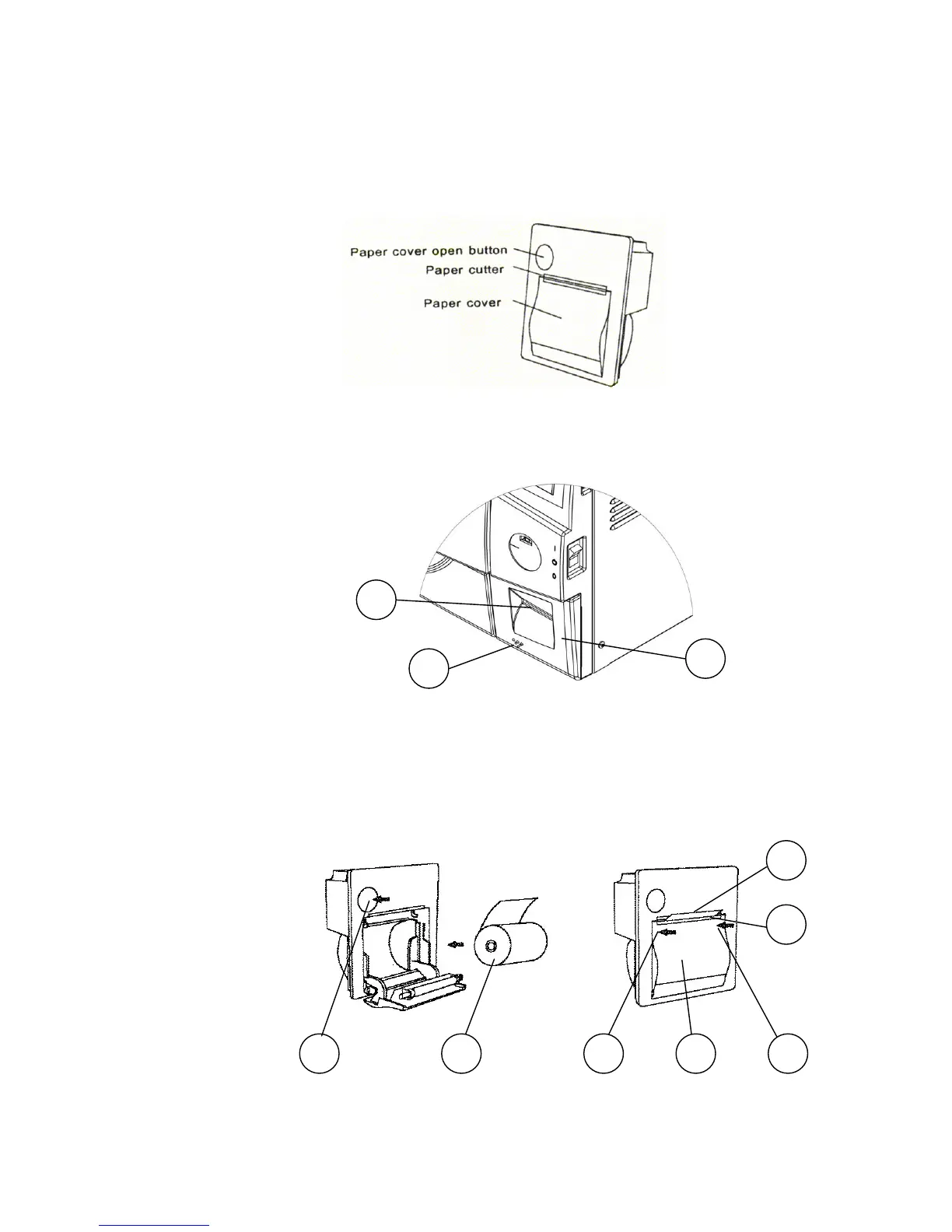
Fig. 1
1. Open the printer's cover door (3) by pulling it at the left
bottom corner (2).
2. Press the paper cover open button, and open the printer's
paper cover. Handle the paper cutter carefully not to cut
your hand.
3. Set a paper roll (5) as shown on Fig. 2.
4. Close
the paper cover (9) by pressing both ends of the
cover (8) with the tip end of the paper (6) emerging
from the cutter (7).
Fig. 2
5. Close
the printer's cover door (3) by pressing corner (2),
with the tip end of the paper emerging from the slot (1).
2
3
1
4 65 6
9
7
8








 To Next Page