A-6 Courier V.Everything Getting Started Guide
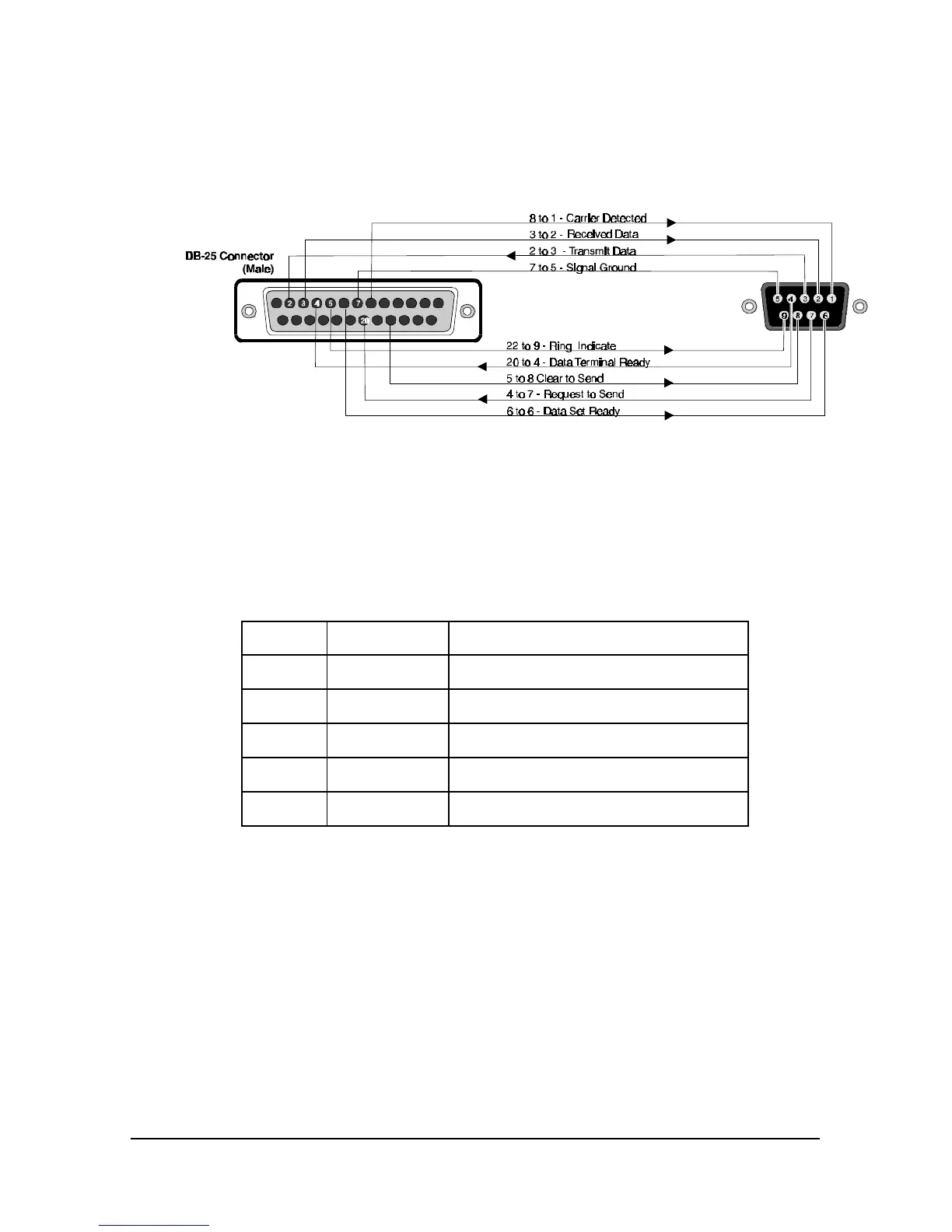
Wiring a DB-25 to DB-9 Cable
DB-9 connectors for PCs should be wired at the computer end of the
cable as shown below.
Figure A.2 Wiring a DB-25 Cable
Minimum Requirements
Some computer/terminal equipment supports only a few of your
Courier V.Everything’s EIA-232 signals. The minimum required for
your Courier V.Everything to operate asynchronously follows:
DB-25 DB-9 Supports this signal
Pin Pin Function
2 3 Transmitted Data
3 2 Received Data
7 5 Signal Ground
20 4 Data Terminal Ready
Flow Control Requirements
If your computer and software support Clear to Send and you wish
to use Transmit Data hardware flow control (&H1), Pin 5 (DB-25) or
Pin 8 (DB-9) is required.
If your computer and software support Request to Send and you
wish to use Received Data hardware flow control (&R2), Pin 4
(DB-25) or Pin 7 (DB-9) is required.















 To Next Page