© 2009 Verizon. All Rights Reserved.
94
Verizon Hub User Guide
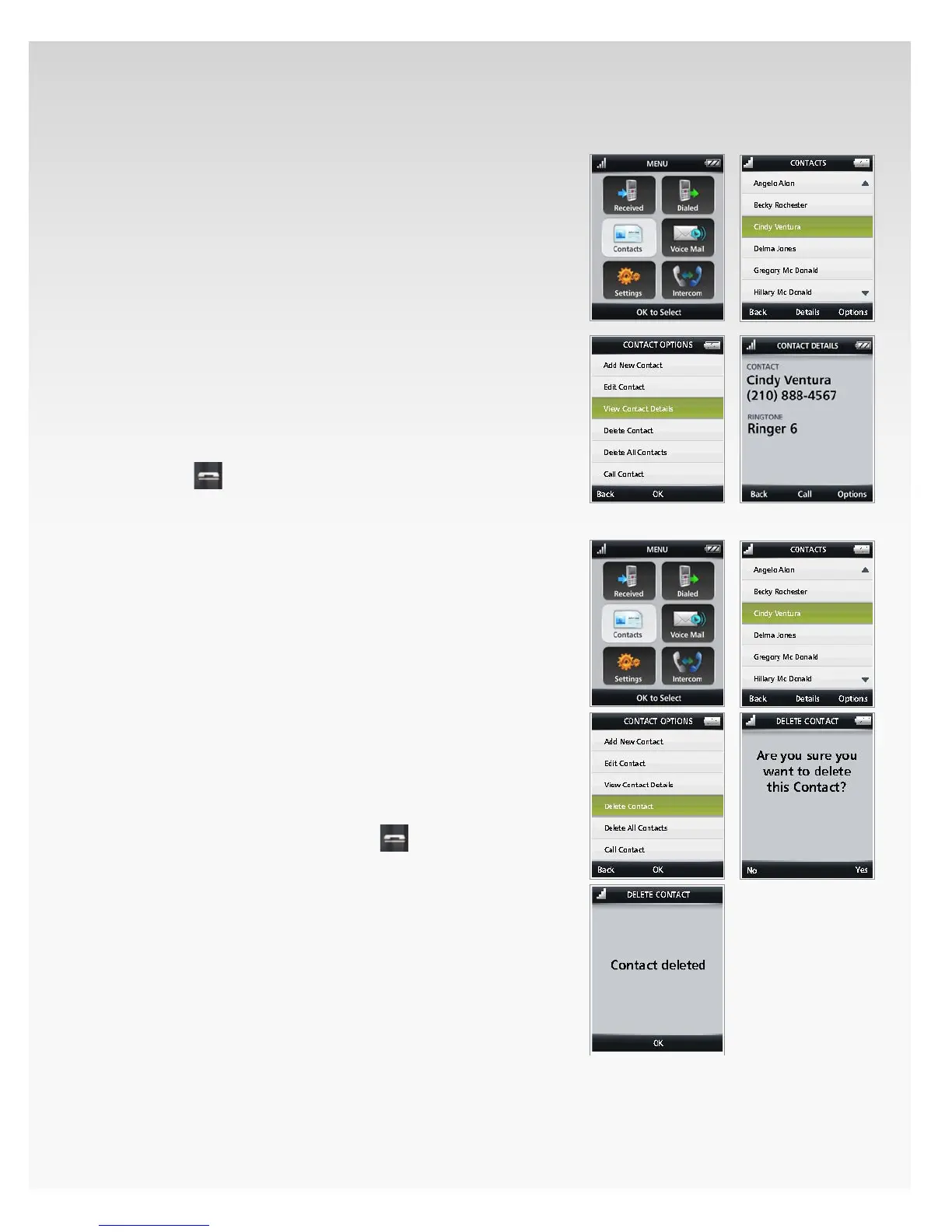
View Contact Details.
Press 1. OK to open Menu.
Move the OK Button/Joystick to select 2. Contacts and
press OK.
Your list of Contacts will appear. 3.
Move the OK Button/Joystick to select the 4. Contact
you want to view and press OK.
The Contact Details will appear.5.
Press 6. Back to return to the previous screen.
Press 7. OK to call this Contact.
Press 8. Options to Add New Contact, Edit Contact,
View Contact Details, Delete Contact, Delete All
Contacts or Call Contact.
Press 9. Back to return to the previous screen.
Press10.
to return to Home.
Delete Contact.
Press 1. OK to open Menu.
Move the OK Button/Joystick to select 2. Contacts and
press OK.
Your list of Contacts will appear. 3.
Move the OK Button/Joystick to select the 4. Contact
you want to delete and press OK.
Press 5. Options.
Move the OK Button/Joystick to select 6. Delete Contact
and press OK.
A conrmation message will appear.7.
Press 8. Yes.
Press 9. OK.
You will return to Contacts. Press10.
to return to Home.
This Contact will be deleted from the handset.














 To Next Page