© 2009 Verizon. All Rights Reserved.
61
Verizon Hub User Guide
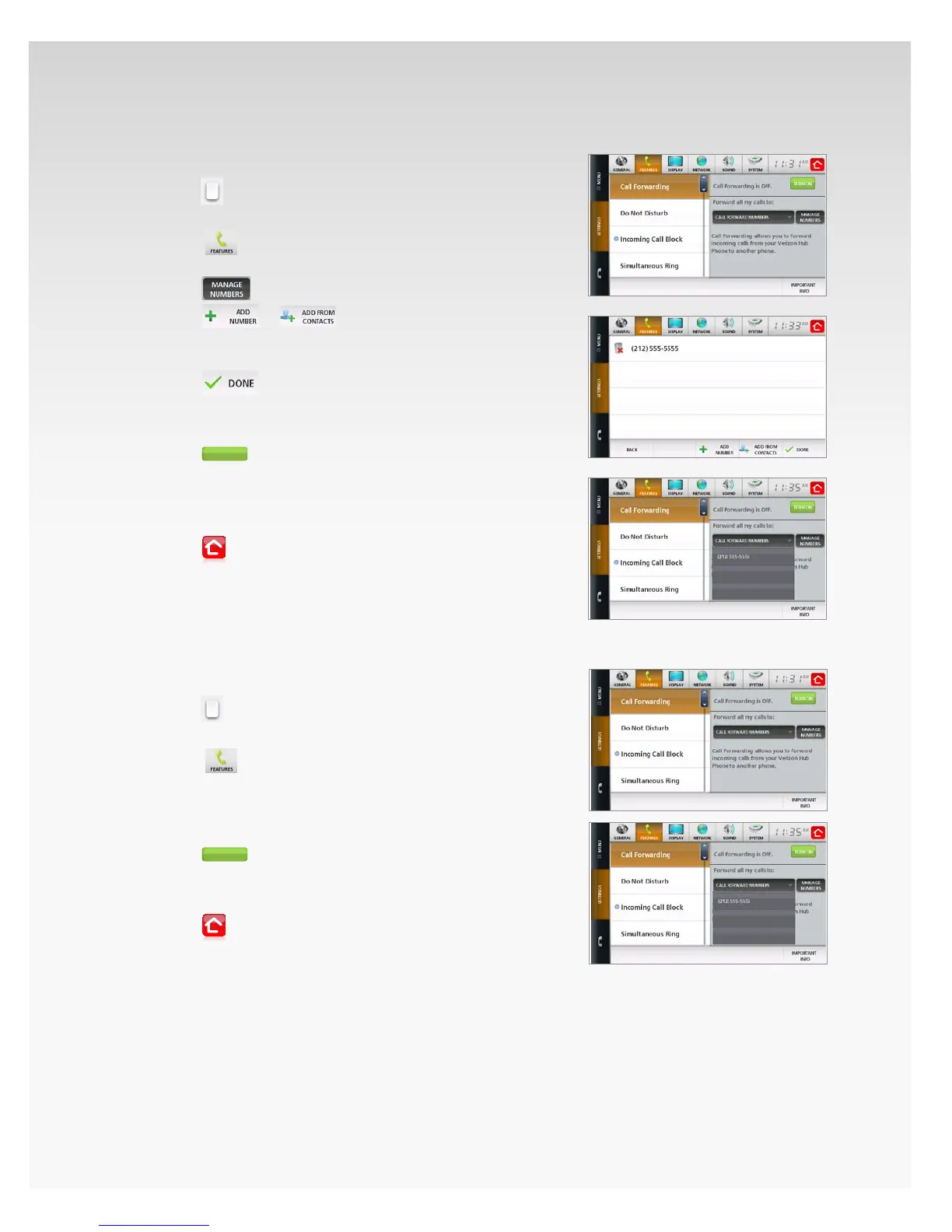
Turn On Call Forwarding – First Time Setup.
Touch 1. Menu.
Touch2.
.
Touch 3. Settings.
Touch4.
.
Touch 5. Call Forwarding.
Touch6.
.
Touch7.
or
– the keyboard will appear.
Use the keyboard to enter a 10-digit 8. phone number,
and touch Enter.
Touch9.
.
Touch 10. Call Forward Numbers and select the
number from the list.
Touch11.
.
Your calls will be forwarded to the phone 12.
number you selected.
To add more numbers, repeat steps 6-9.13.
Touch14.
to return Home.
Your calls will be forwarded to the phone number you
selected until you turn o Call Forwarding.
Turn On Call Forwarding – Already Set Up.
Touch 1. Menu.
Touch2.
.
Touch 3. Settings.
Touch 4.
.
Touch 5. Call Forwarding.
Touch 6. Call Forward Numbers and select the number
from the list.
Touch7.
.
Your calls will be forwarded to the phone number 8.
you selected.
Touch9.
to return Home.














 To Next Page