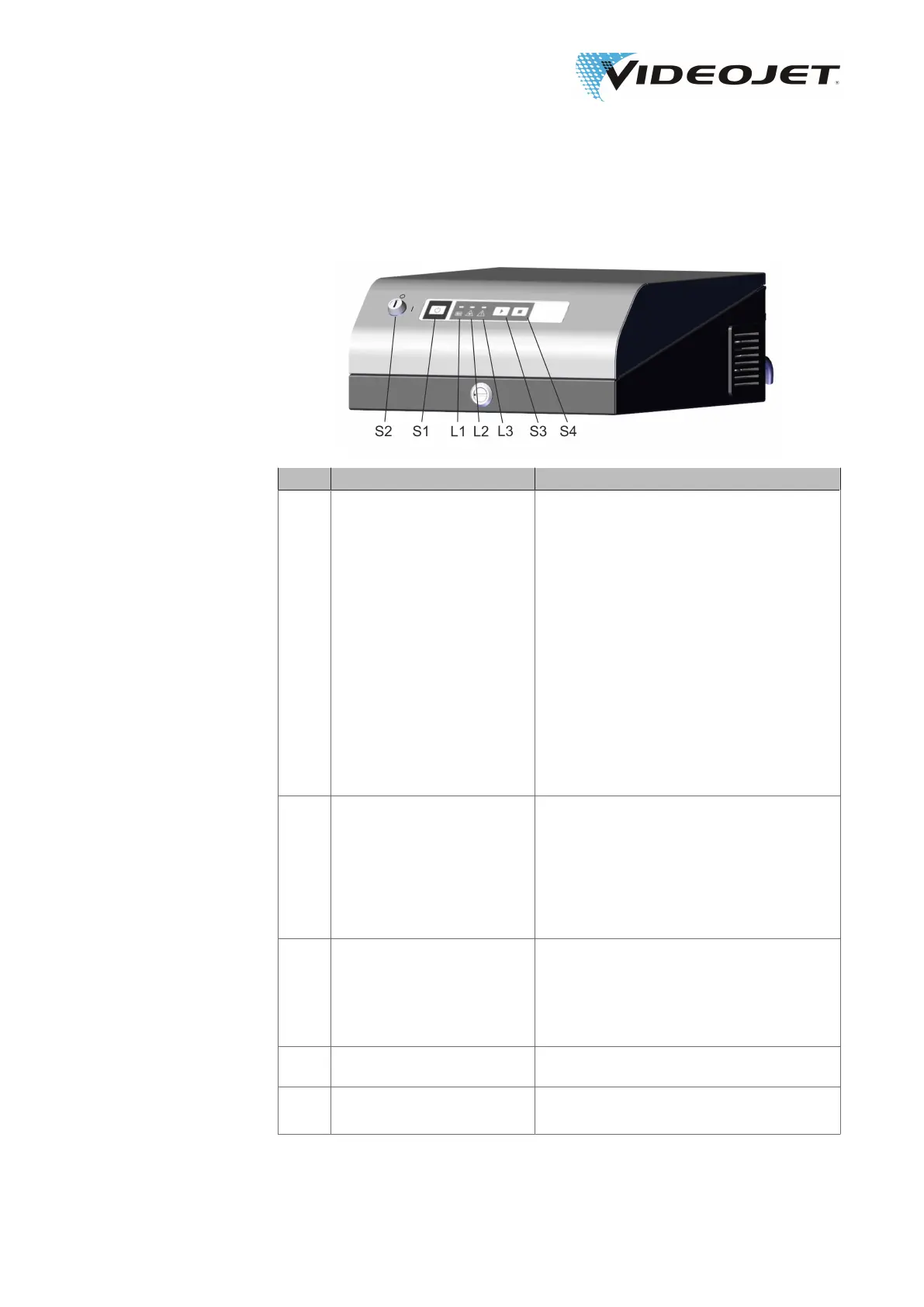
5.3 Elements on the Supply Unit
No. Type Function
S1 Push button
POWER/STANDBY
switches the supply unit on.
There are two LED indicators on the push
button, left blue (STANDBY), right white
(POWER, flashes during initialization, is on
when the system is ready, is on during
each marking process).
If the supply unit is on this button switches
the laser beam source an the control elec-
tronics off.
Attention:
The system is not separated completely
from the power supply. For complete sepa-
ration the main power switch must be used
or the supply line must be disconnected.
S2 Key switch applies the power supply for the laser beam
source (position »I«). The marking process
can be started.
Note:
Remove the key switch if switched off (po-
sition »0«) to protect the system from unau-
thorized operation!
S3 Push button
START
With »START« the currently selected tem-
plate can be marked.
Laser radiation is emitted!
Make sure the safety instructions are
observed.
S4 Push button
STOP
With »STOP« a marking process can be
stopped.
L1
LED status indicators
Beam shutter closed -green-
is on when the shutter is closed.
09/17 - Index: AD [EN]
37
Videojet 3140/3340/3640/5 Operating the Laser System



 To Next Page