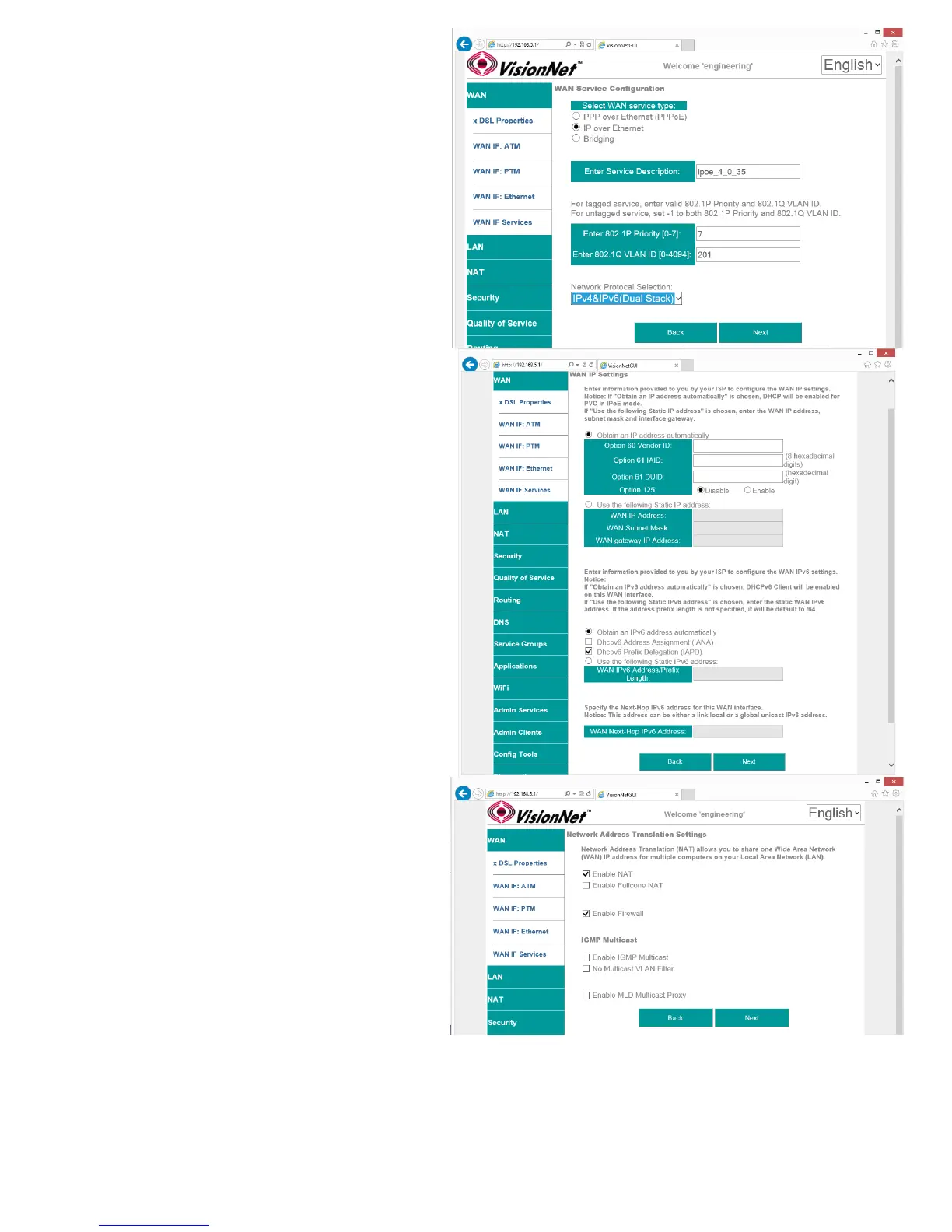
2.C Specify Basic WAN Services
WAN Service Type: IPoE
Service Description: User Defined
802.1p: If untagged, leave as -1 (Null)
802.1q: If untagged, leave as -1 (Null)
Network Protocol: IPv4, Dual Stack, or IPv6
Once complete, select “Next”
2.D Specify WAN IP Settings
WAN Service Type: IPoE
IPv4
Enable DHCP client plus desired additional
DHCP Options
or enter Static IP Parameters
IPv6:
Specify applicable IPv6 Addresses
Static IPv6 may be applied; but is not
advisable.
Once complete, select “Next”
2.E Specify WAN Services
NAT:
Translation from WAN to LAN IPs
Full Cone NAT:
Augments NAT by keeping translated port
associations open
Firewall:
Necessary for Management Services, Port
Forwarding, etc.
Enable IGMP Multicast:
Only to be used, for IPTV WAN Services,
where IGMP proxy is required. Do not enable
otherwise.
No Multicast VLAN Filter
VisionNet M504 / M505N R3 Page 25 of 62 User Manual Rev 0.1c



 To Next Page