SECTION 9.3 WiFi Security
Abstract:
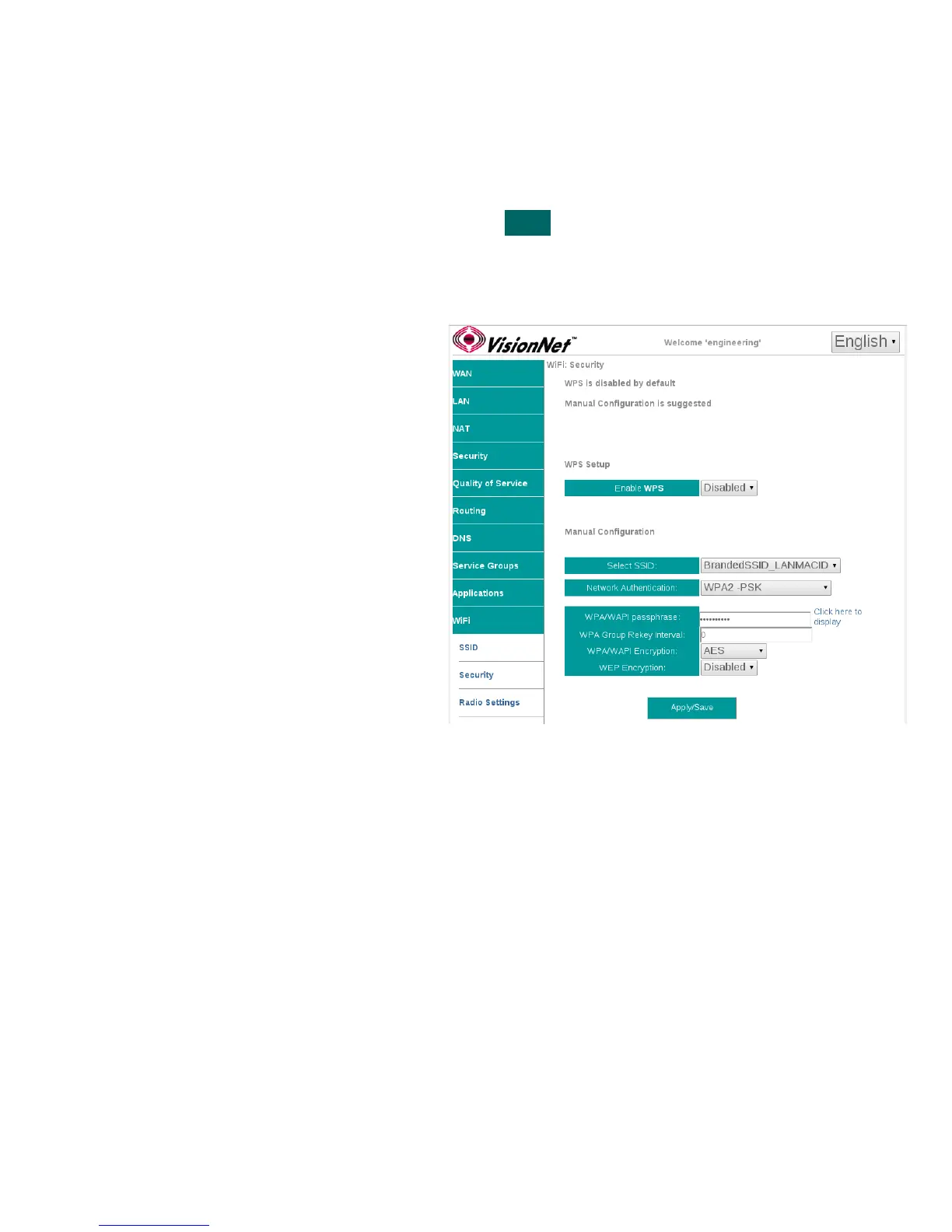
WiFi Security should always be enabled. The following directions will provide detail on configuration.
Step 1 Direct your browser to the SSID page
1.A In the left-hand navigation pane, select:
WiFi
Security
Step 2 SSID Related Security Settings
2.A Enable WPS
Suggested Configuration - Disabled
SSID
Select SSID
Network Authentication
Suggested Setting: WPA2-PSK
WPA Passphrase
This may be any passphrase that you
like.
WPA Group Rekey Interval
Suggested Setting: 0
WPA Encryption
Suggested Setting: AES
WEP Encryption
Suggested Setting: Disabled
Step 3 When finished, select “ Apply / Save “.
It may take up to 1 minute for your change to take effect. You will need to
“forget” old network settings and re-connect all devices after making this
change.
VisionNet M504 / M505N R3 Page 52 of 62 User Manual Rev 0.1c



 To Next Page