SECTION 6.2 STATIC ROUTE TABLE
Abstract
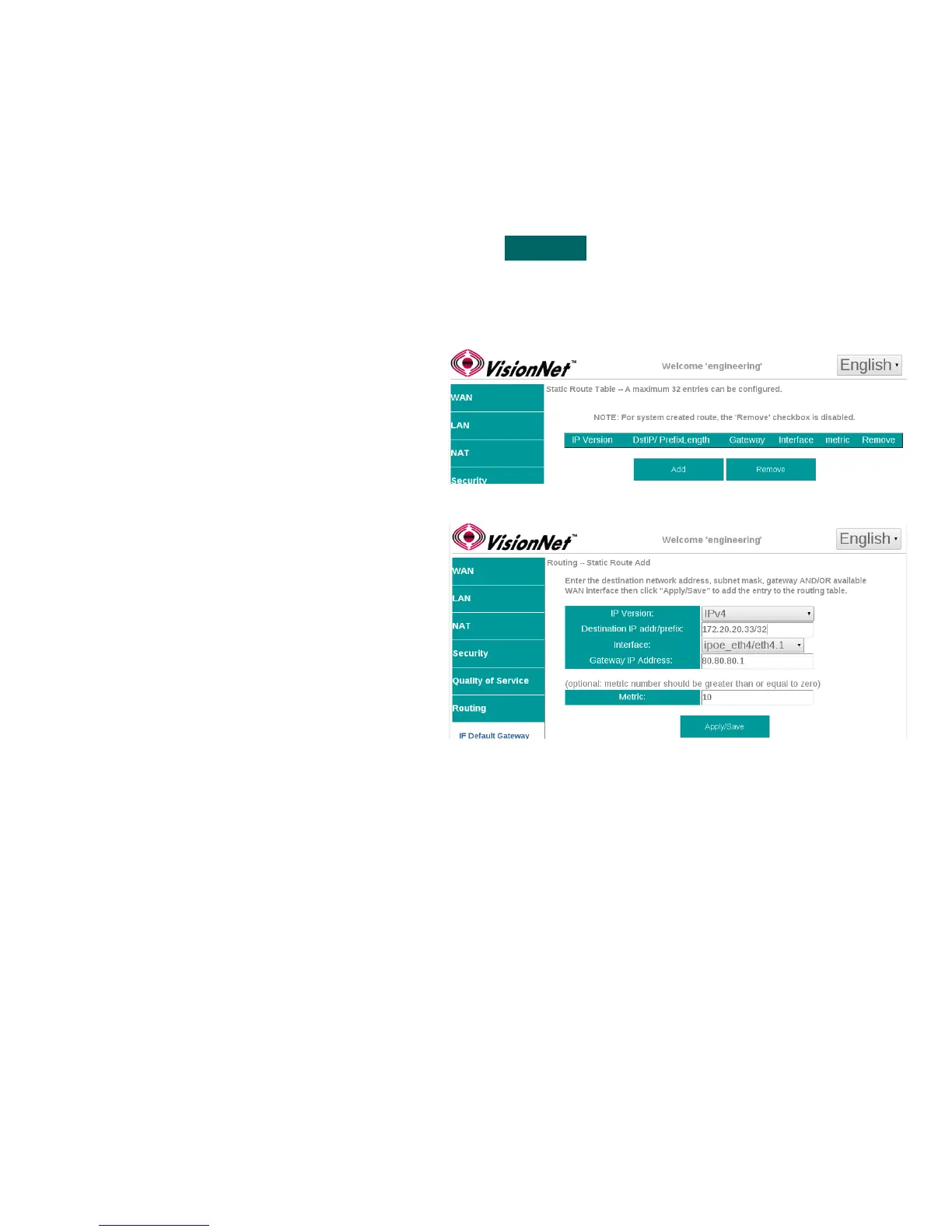
Once routed WAN Services have been created, outbound paths may be statically assigned.
The Static Route Table is defined by the Destination.
Step 1 Direct your browser to the Static Route Table page
1.A In the left-hand navigation pane, select:
Routing
Static Route Table
Step 2 Create the Static Route Table
2.A Add entry to Route Table
Select ”Add”
2.B Create the Table Entry
IP Version: v4 or v6
Destination IP / Prefix:
This must be entered in a standard format.
IPv6 Address compression is not supported.
Interface:
Select WAN Service for Outbound Path
Gateway IP Address:
This is the first outbound hop addresses
Metric:
This is the number of “hops” in the TTL
Step 3 When finished, select “ Apply / Save “.
VisionNet M504 / M505N R3 Page 40 of 62 User Manual Rev 0.1c



 To Next Page