SECTION 6: IPv4 ROUTE CONFIGURATION
SECTION 6.1 GATEWAY PRIORITIZATION
Abstract
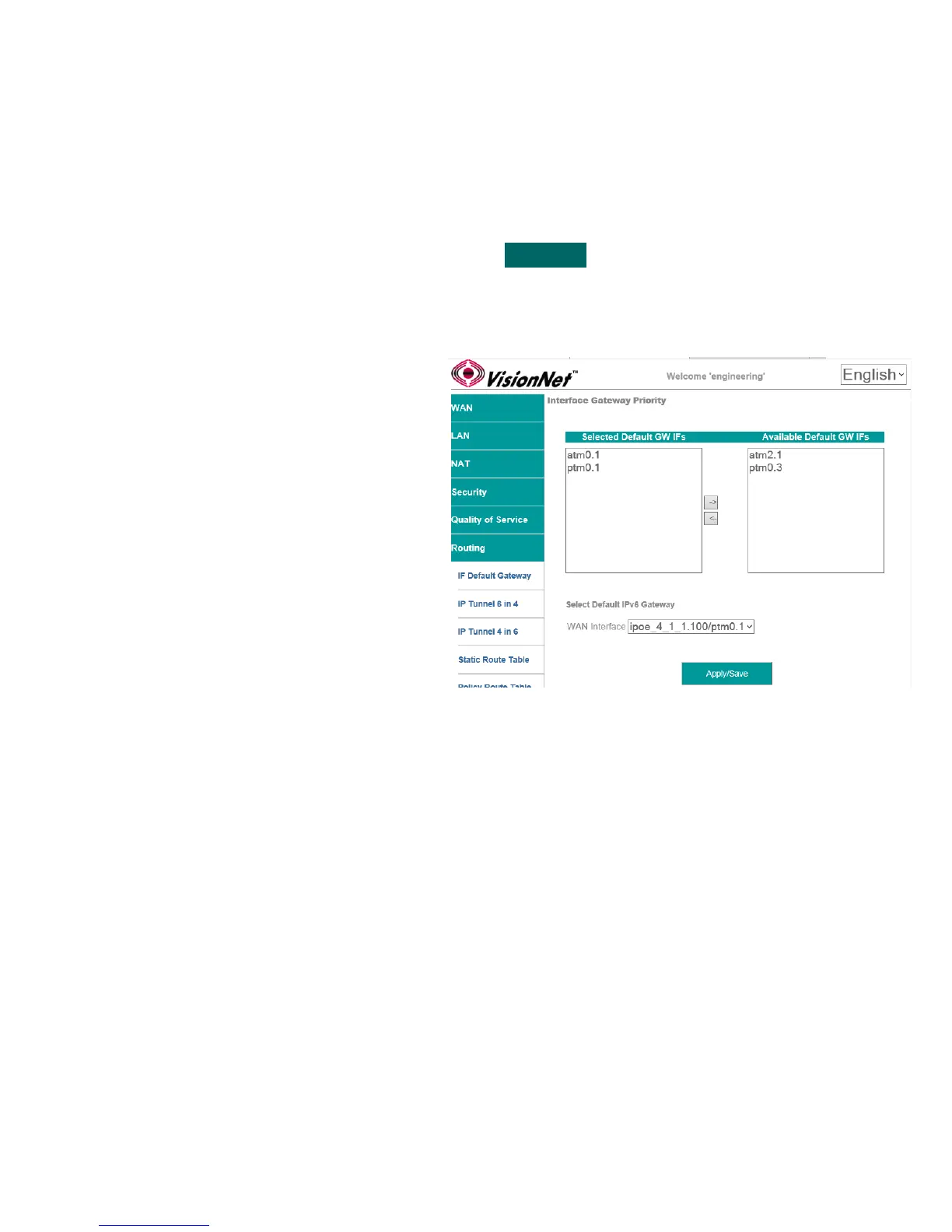
Once routed WAN Services have been created, they may be globally prioritized.
Step 1 Direct your browser to the IF Default Gateway page
1.A In the left-hand navigation pane, select:
Routing
IF Default Gateway
Step 2 Prioritize Default Gateway Information
2.A Add Service to Gateway Priority List
Available Interfaces will be available in the
column labeled “Available Default GWs IFs”.
Select the WAN IFs, to be utilized as
outbound paths, and move them to the
column labeled “Selected Default GW IFs”.
Gateways are prioritized from the top down.
In order to change the prioritization order, you
must remove the interfaces and place them in
the desired order.
NOTE: Option 121 does not need to be
assigned to the primary Gateway; but rather
the gateway that is the primary outbound
path for advertised routes.
Only one WAN Service can receive option
121 route paths.
Step 3 When finished, select “ Apply / Save “.
VisionNet M504 / M505N R3 Page 39 of 62 User Manual Rev 0.1c



 To Next Page