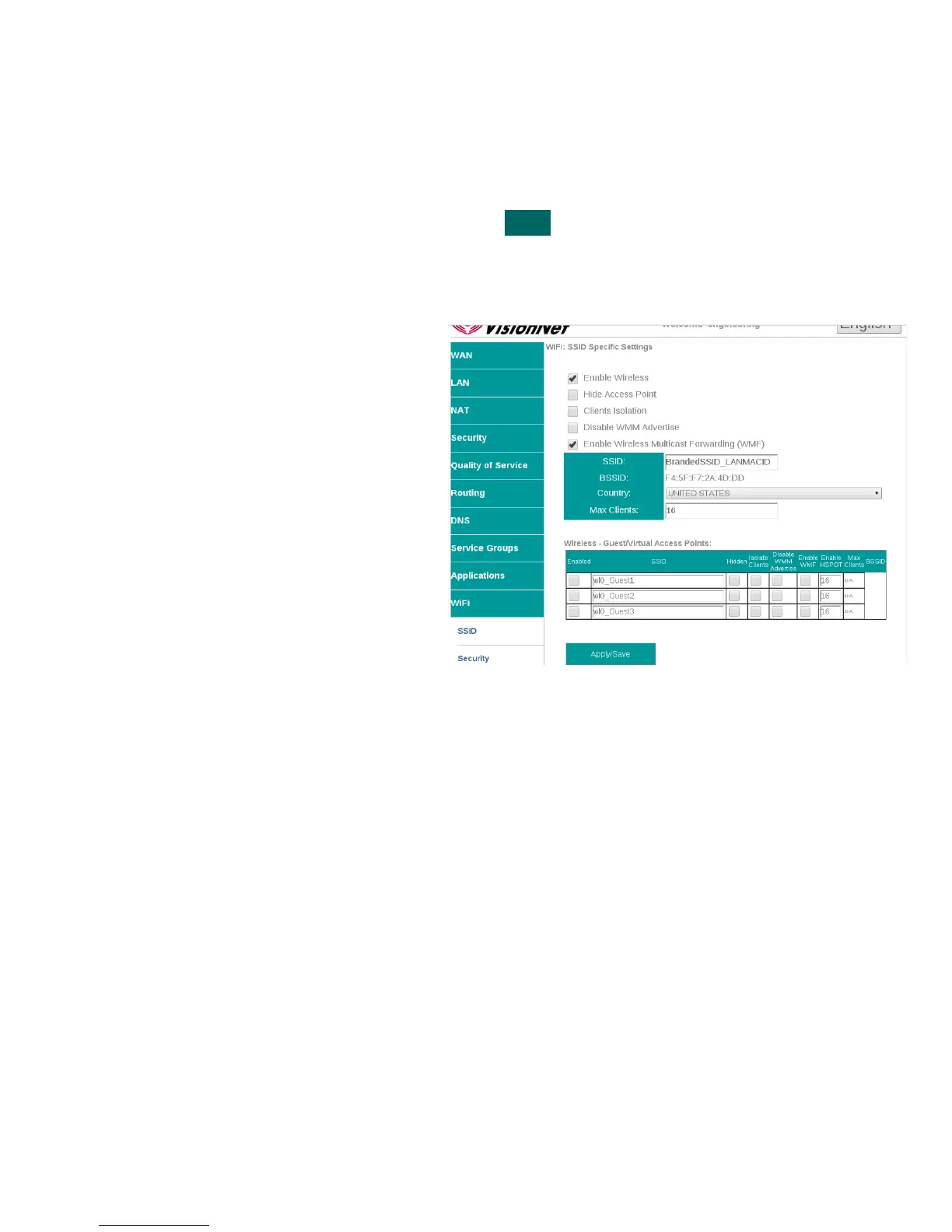
SECTION 9.2 Configure SSID Specific Settings
Abstract:
SSID Specific settings may be altered for optimized interoperability
Step 1 Direct your browser to the SSID page
1.A In the left-hand navigation pane, select:
WiFi
SSID
Step 2 SSID Related Settings
2.A ENABLE WIRELESS
This enables / Disables WiFi
services
HIDE ACCESS POINT
If this is selected, the SSID name will
not be broadcasted
CLIENTS ISOLATION
This prevents ad-hoc networks; but
could impede upon some
applications (ie: printing)
Disable WMM Advertise
WMM is required for modern
MultiMedia applications. Disable
only for support of legacy devices.
This will lower aggregate speed
Enable WMF
Wireless Multicast Forwarding is
useful for modern Media Sharing
applications
SSID Name
This is the broadcasted SSID name
Virtual / Guest networks
Mutliple SSIDs may be broadcasted
(ie: temporary access). Clients will
operate on the primary LAN
Step 3 When finished, select “ Apply / Save “.
It may take up to 1 minute for your change to take effect
VisionNet M504 / M505N R3 Page 51 of 62 User Manual Rev 0.1c



 To Next Page