SECTION 8.4 Port Triggering
Abstract
Once a Routed IPv4 WAN Interface has been created, and NAT Assigned, there may be a need to alter the way that specific
applications traverse NAT.
Port Forwarding opens ports, on the gateways WAN Interface, and forwards packets destined for those ports to a LAN host.
Port Translation can be specified, if a WAN Port on the gateway is to be forwarded to a different port on the LAN host.
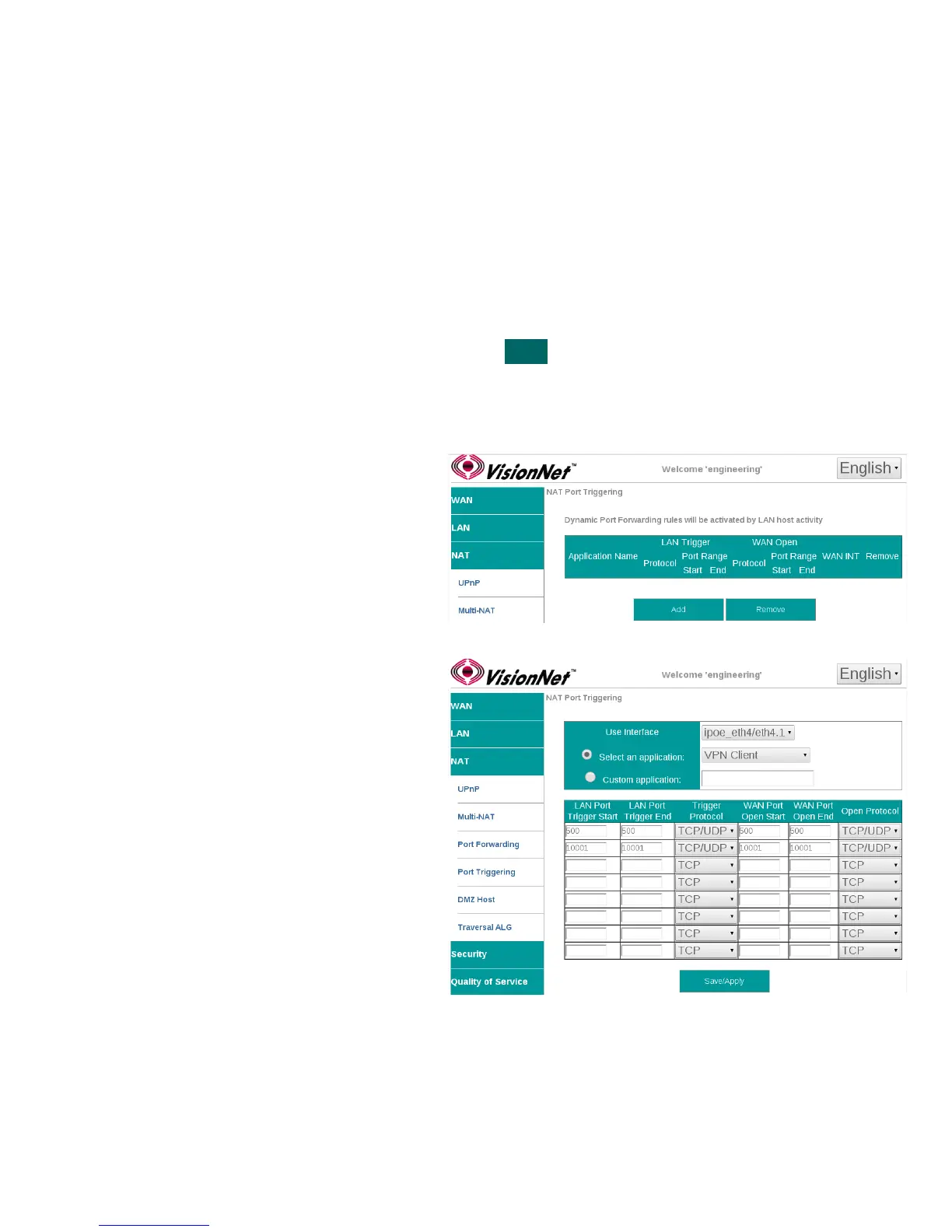
Port Triggering is a dynamic, host based, port forwarding algorithm. The ports that are opened, and forwarded, are based upon
outbound ports utilized by “hosts”. The gateway will then open ports based upon the table rules.
Step 1 Direct your browser to the Port Triggering page
1.A In the left-hand navigation pane, select:
NAT
Port Triggering
Step 2 Create Port Triggering Rules
2.A Select “Add”
2.B Use Interface
WAN interface associated with the rule
Select an Application
Use a pre-configured service; or create a
custom service.
Custom Application
Provide a unique name
Table Rules
LAN Port Trigger Start / End
Port Range requested by host
Protocol
TCP, UDP, or TCP/UDP
WAN Port Start / End
Port Range opened and forwarded
back to host.
Protocol
TCP, UDP, or TCP/UDP
Step 3 When finished, select “ Apply / Save “.
VisionNet M504 / M505N R3 Page 47 of 62 User Manual Rev 0.1c



 To Next Page