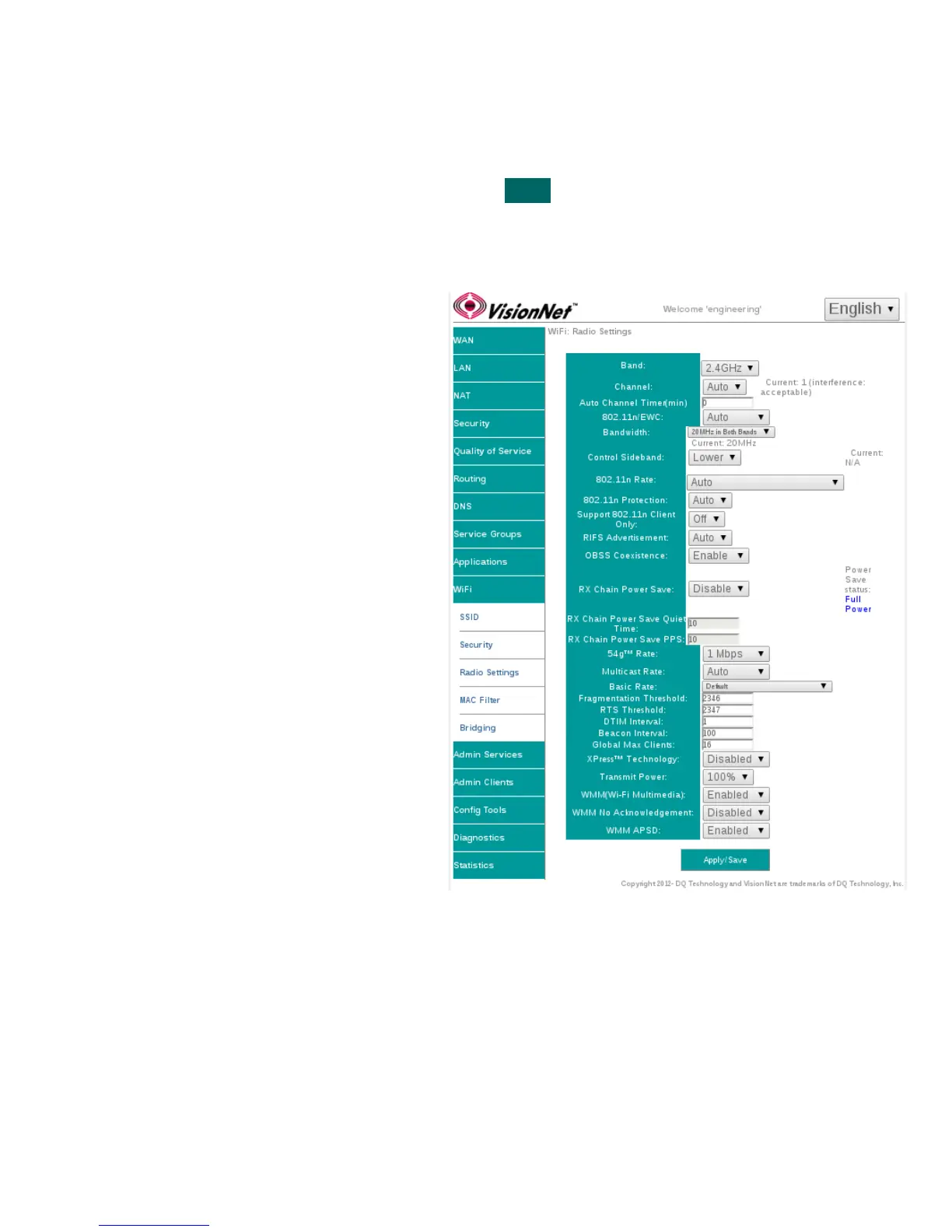
SECTION 9.4 WiFi Radio Settings
Abstract:
Most radio settings should be left as default. Below, are key settings for optimizing performance.
Step 1 Direct your browser to the SSID page
1.A In the left-hand navigation pane, select:
WiFi
Radio Settings
Step 2 SSID Related Security Settings
2.A
Band:
This device only supports 2.4Ghz
Channel:
Auto will allow the device to auto-select a channel. This will
also allow the WiFi button, located on the top front of the
device, to change the channel.
802.11n/EWC
Suggested Setting: Auto
802.11n Auto
Suggested Setting: Auto
802.11n Protection
Suggested Setting: Off
802.11n Client Only
Suggested Setting: Off
RIFS Advertisment
Suggested Setting: Auto
OBSS Coexistence
Suggested Setting: Enabled
RX Chain Power Save
Suggested Setting: Disabled
RX Chain Power Save Quiet Time:
Suggested Setting: 10
RX Chain Power Save PPS:
Suggested Setting: 10
54g Rate
Suggested Setting:1Mbps
Multicast Rate
Suggested Setting: Disabled
Basic Rate
Suggested Setting: Default
Fragmentation Threshold
Suggested Setting: 2346
RTS Threshold
Suggested Setting: 2347
DTIM Threshold
Suggested Setting: 1
Beacon Interface
Suggested Setting: 100
Global Max Clients:
Suggested Setting: 16
Xpress Technology
Suggested Setting: Disabled
Transmit Power
Suggested Setting: 100%
WMM
Suggested Setting: Enabled
WMM No Acknowledgement
Suggested Setting: Disabled
WMM APSD
Suggested Setting: Enabled
Step 3 When finished, select “ Apply / Save “.
It may take up to 1 minute for your change to take effect.
VisionNet M504 / M505N R3 Page 53 of 62 User Manual Rev 0.1c



 To Next Page