SECTION 6.3 POLICY ROUTE TABLE
Abstract
Once routed WAN Services have been created, outbound paths may be statically assigned
The Policy Route is defined by the originating Source.
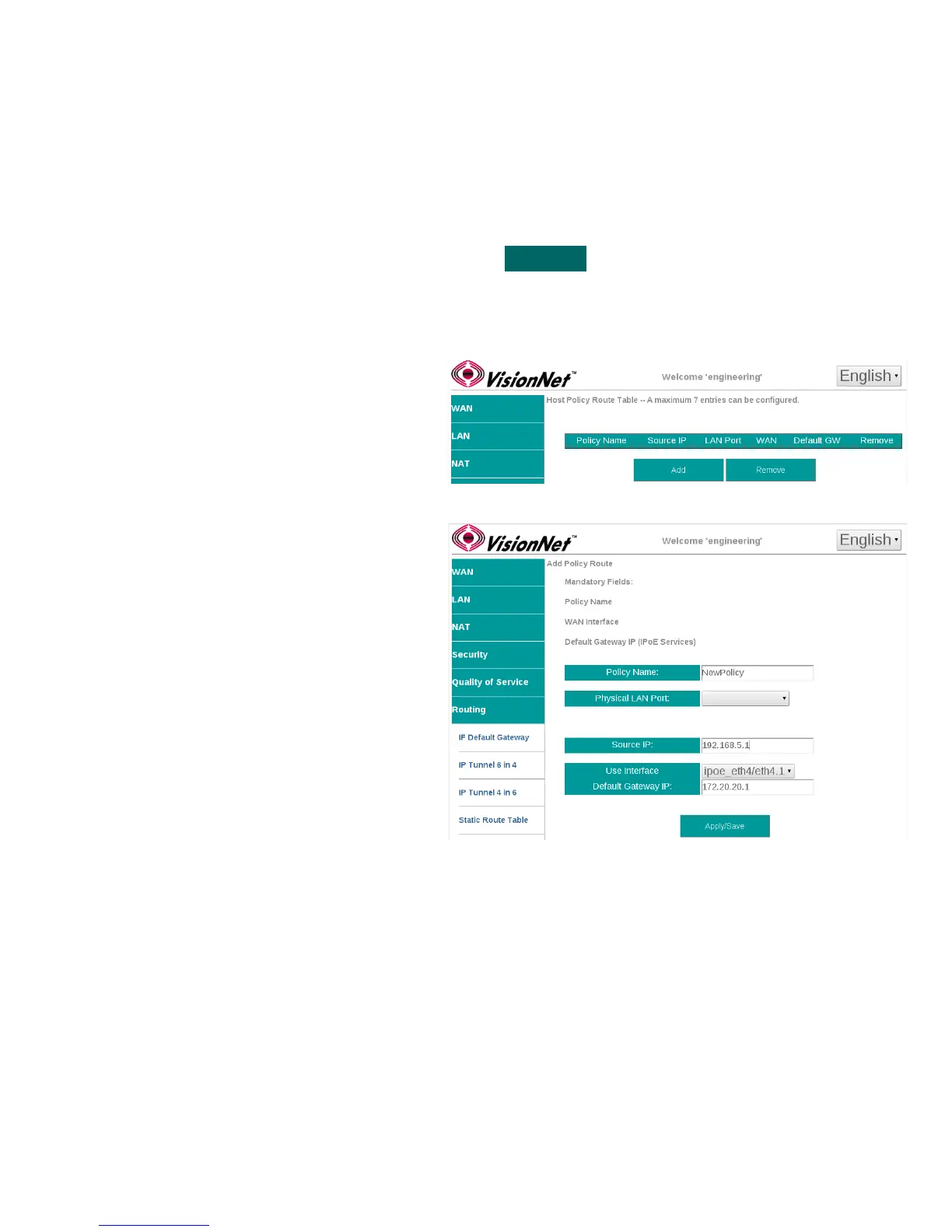
Step 1 Direct your browser to the Static Route Table page
1.A In the left-hand navigation pane, select:
Routing
Policy Route Table
Step 2 Prioritize Default Gateway Information
2.A Add Entry to Route Table
Select ”Add”
2.B Create the Table Entry
Policy Name: User Defined
Physical LAN Port
This can be left un-specified if you wish to
use the Source IP only.
Source IP:
This is the LAN IP of the host - this can be
left blank of a Physical LAN Port is to be
specified.
Use Interface
This specifies the Outbound WAN IF
Gateway IP Address:
This is the first outbound hop addresses
Step 3 When finished, select “ Apply / Save “.
VisionNet M504 / M505N R3 Page 41 of 62 User Manual Rev 0.1c



 To Next Page