SECTION 8.3 Port Forwarding
Abstract
Once a Routed IPv4 WAN Interface has been created, and NAT Assigned, there may be a need to alter the way that specific
applications traverse NAT.
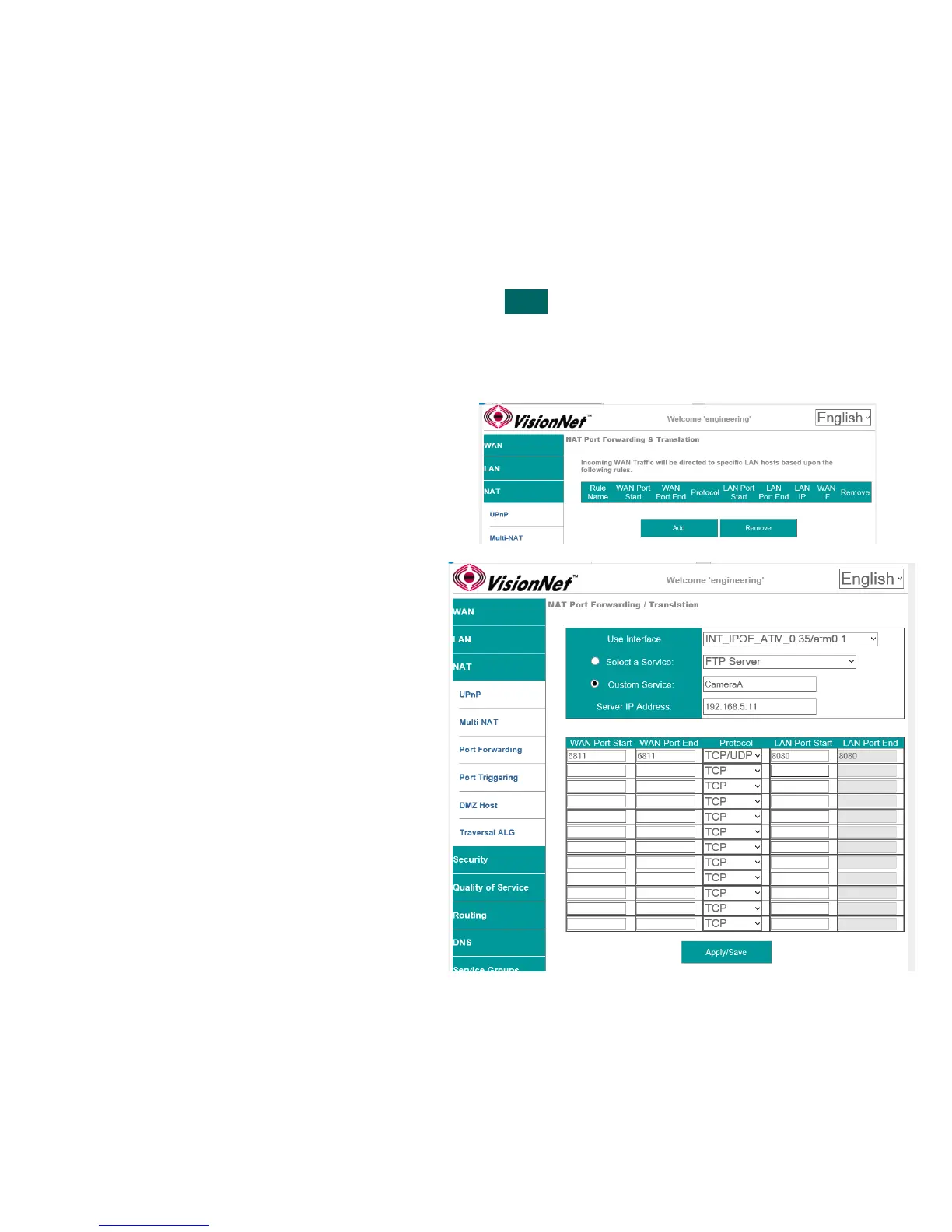
Port Forwarding opens ports, on the gateways WAN Interface, and forwards packets destined for those ports to a LAN host.
Port Translation can be specified, if a WAN Port on the gateway is to be forwarded to a different port on the LAN host.
Step 1 Direct your browser to the Port Forwarding page
1.A In the left-hand navigation pane, select:
NAT
Port Forwarding
Step 2 Create Port Forwarding Rules
2.A Select “Add”
2.B Use Interface
WAN interface associated with the rule
Service
Use a pre-configured service; or create a
custom service.
Custom Service
Provide a unique name
Server IP Address
This is the LAN host’s IP Address
Table Rules
Multiple port associations may be made per
rule entry
WAN Port Start / End
First and Last ports in entry (ie:6900)
Protocol
TCP, UDP, or TCP/UDP
LAN Port Start / End
First and Last ports in entry (ie:6900)
Step 3 When finished, select “ Apply / Save “.
VisionNet M504 / M505N R3 Page 46 of 62 User Manual Rev 0.1c



 To Next Page