SECTION 4.2 SERVICE GROUP CREATION
Abstract
This section will depict the creation of a Service Group, and will end with a list of items to be further defined post-creation.
The management device should be connected to a port that will ultimately be assigned to the 'default' service group.
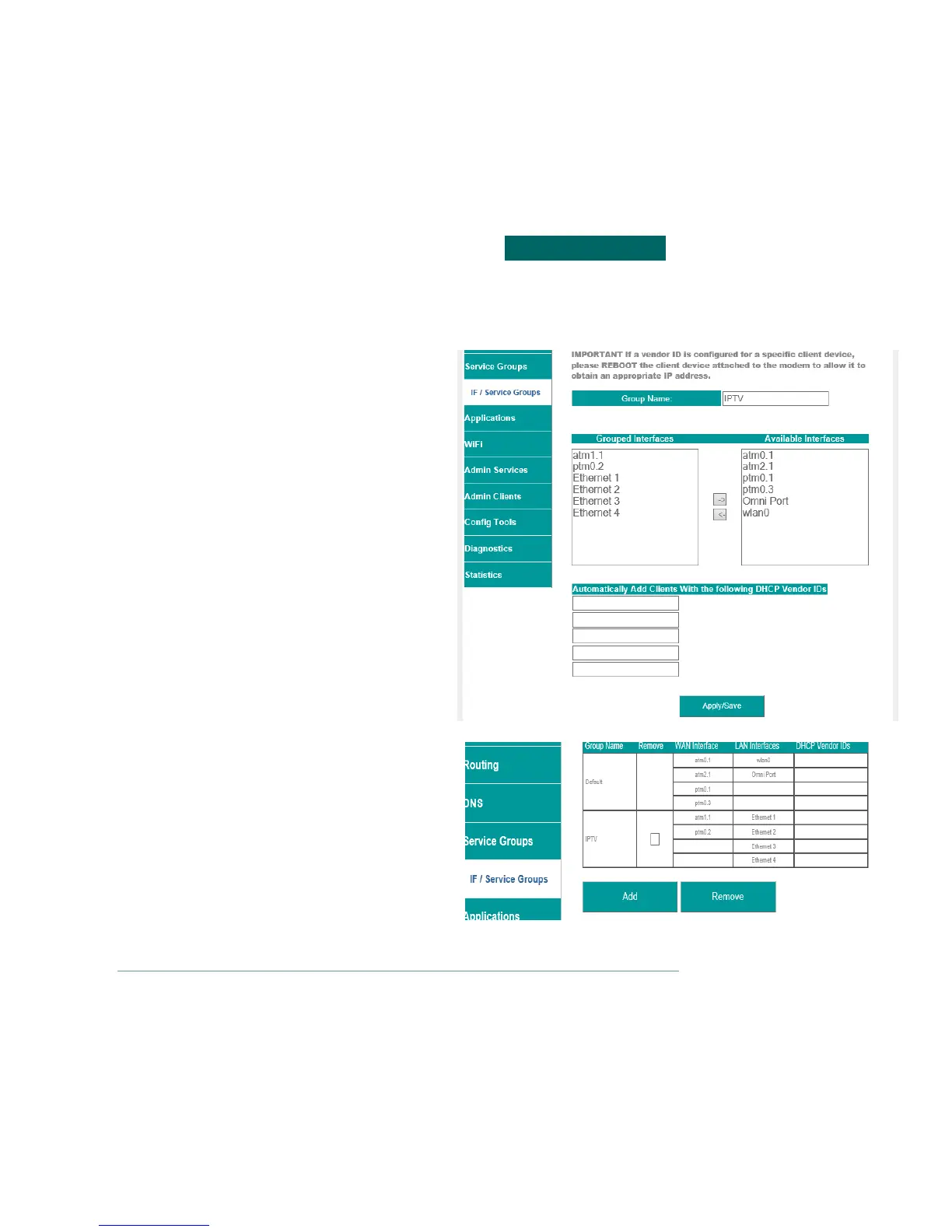
Step 1 Direct your browser to the IF / Service Groups page
1.A In the left-hand navigation pane, select:
Service Groups
IF / Service Groups
Step 2 Create a Service Group
2.A Group Name
This is the name for your Service Group
Grouped Interfaces
Interfaces may be taken, from the default
group, and placed within the desired
interface.
WAN Services and LAN Interfaces, within the
same Service Group, will operate as one
domain.
DHCP Vendor IDs
This is the BootP, Option 60, ID
Step 3 When finished, select “ Apply / Save “.
The WAN and Ethernet Interfaces will
now be listed as a separate group.
The LAN and Routing must be
specified for each service group.
Provisioning of service groups is not complete until you have
configured the LAN Services, This will be detailed in the next section
VisionNet M504 / M505N R3 Page 36 of 62 User Manual Rev 0.1c



 To Next Page