SECTION 2.2 x DSL LOGIC
Item 1 x DSL Physical Interfaces
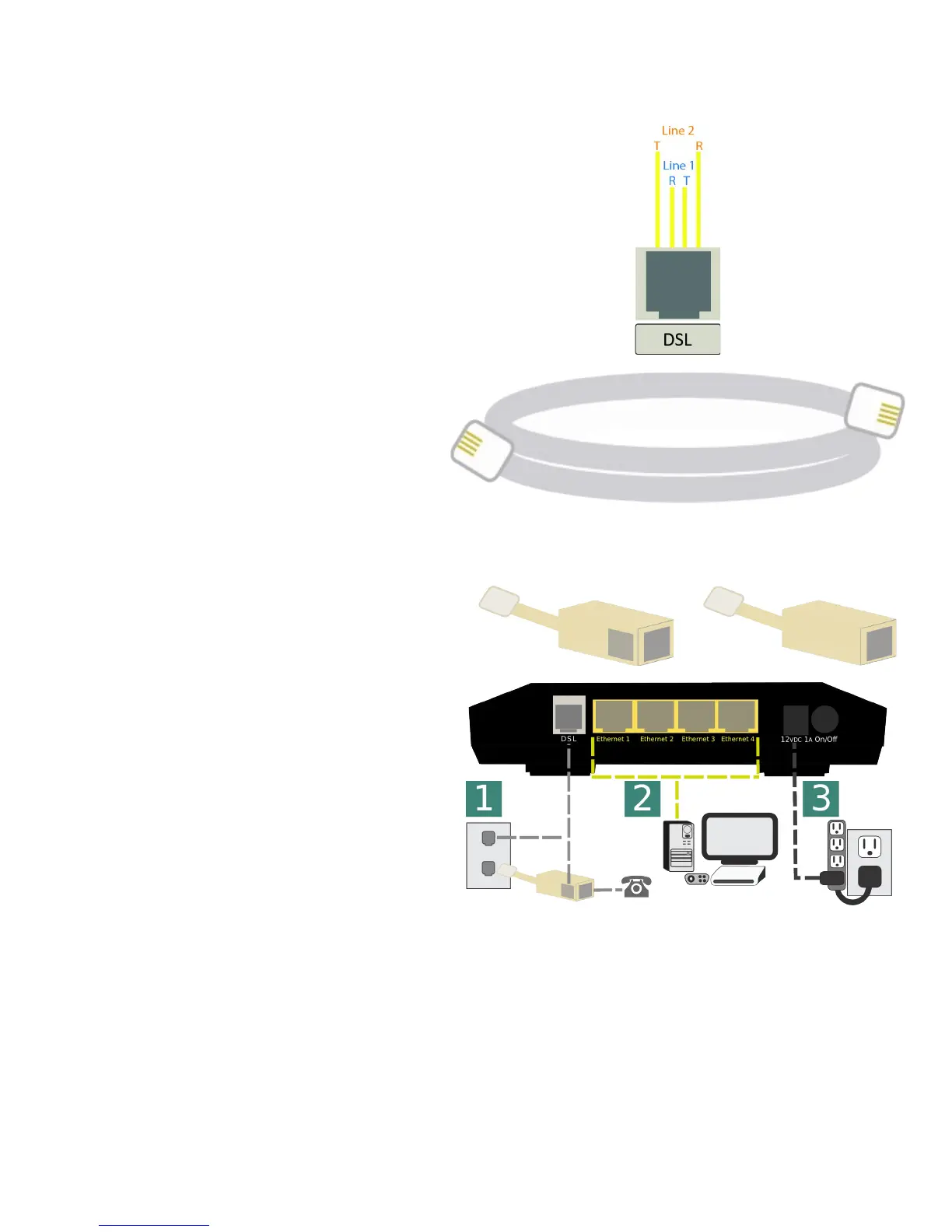
1.A xDSL Port Layout
Line Pinout
The CPE is designed to operate on one
line 1 Only.
1.B xDSL Line Cord Preferences
VisionNet provides a standard xDSL cable
Item 2 Physical Installation
2.A Filters may be provided by VisionNet, or
provided by a 3
rd
party to your company
Dual Line Filter Single Line Filter
2.B 1) Connect DSL
DSL May be connected directly to wall jack
A dual port filter may be used as well.
2) Connect Ethernet Devices
Ethernet is suggested for gaming consoles,
servers, and other synchronous, latency
dependent, applications
3) Connect Power
Connect power to Surge Protector
The over-voltage protection in the provided
PSU is not designed to replace a proper surge
protector.
VisionNet M504 / M505N R3 Page 14 of 62 User Manual Rev 0.1c



 To Next Page