SECTION 8: IPv4 NAT TRAVERSAL
SECTION 8.1 UPnP
Abstract
Once a Routed IPv4 WAN Interface has been created, and NAT Assigned, there may be a need to alter the way that
specific applications traverse NAT.
UPnP dynamically opens and forwards specific ports, requested by host applications, to be exposed to the internet.
UPnP is most commonly associated with gaming systems, Internet enabled surveilance systems, and AntiVirus Teredo
Tunnels.
While UPnP is used by many devices, it is also a potential security risk. UPnP allows devices to act as public servers,
with no human configuration; and should used only when necessary.
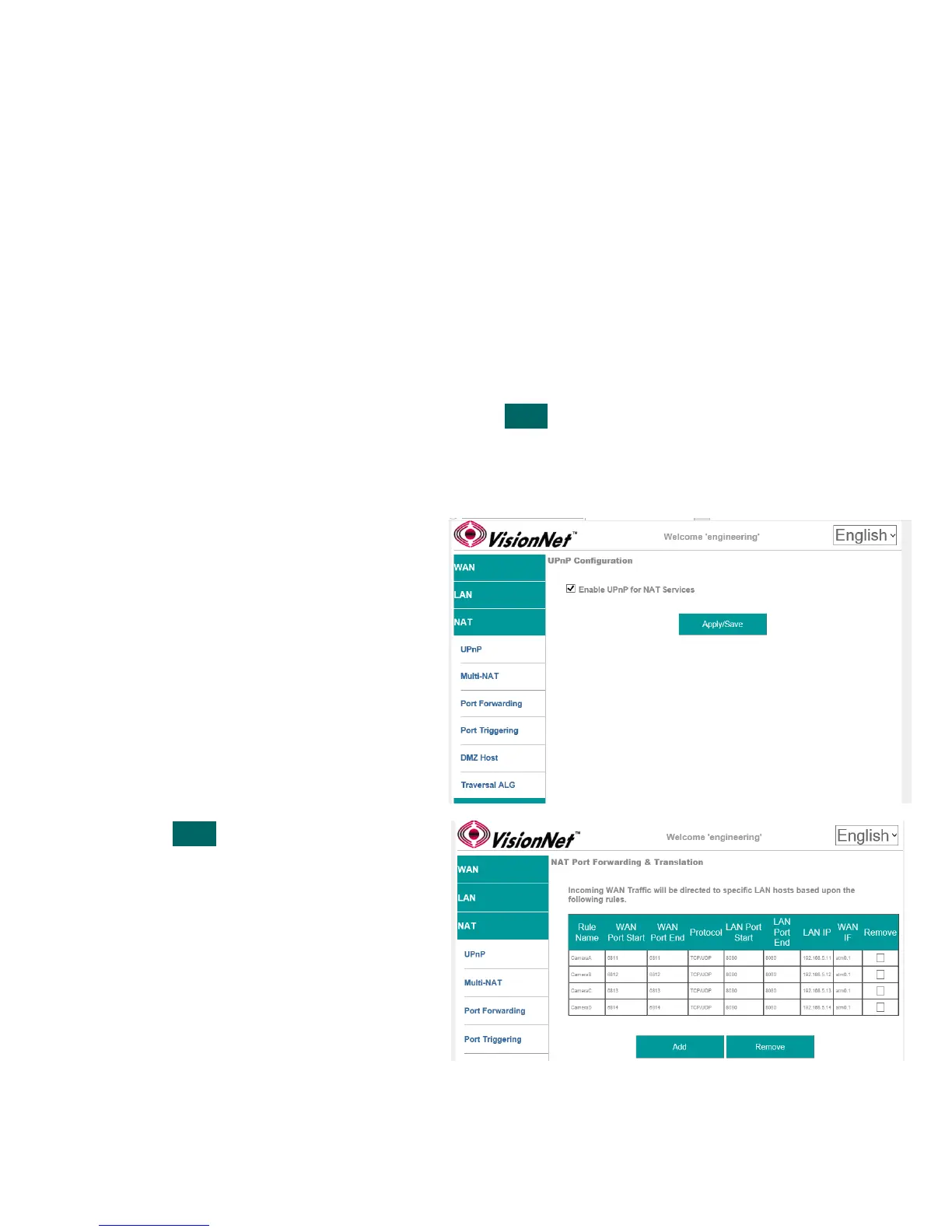
Step 1 Direct your browser to the UPnP page
1.A In the left-hand navigation pane, select:
NAT
UPnP
Step 2 Enable / Disable UPnP
2.A UPnP, when enabled, will utilize the ports
requested by hosts.
This could cause the default ports, used
for management, to change.
For this reason, non-standard
management ports are always suggested.
2.B
NAT
Port Forwarding
Step 3 When finished, select “ Apply / Save “.
VisionNet M504 / M505N R3 Page 44 of 62 User Manual Rev 0.1c



 To Next Page