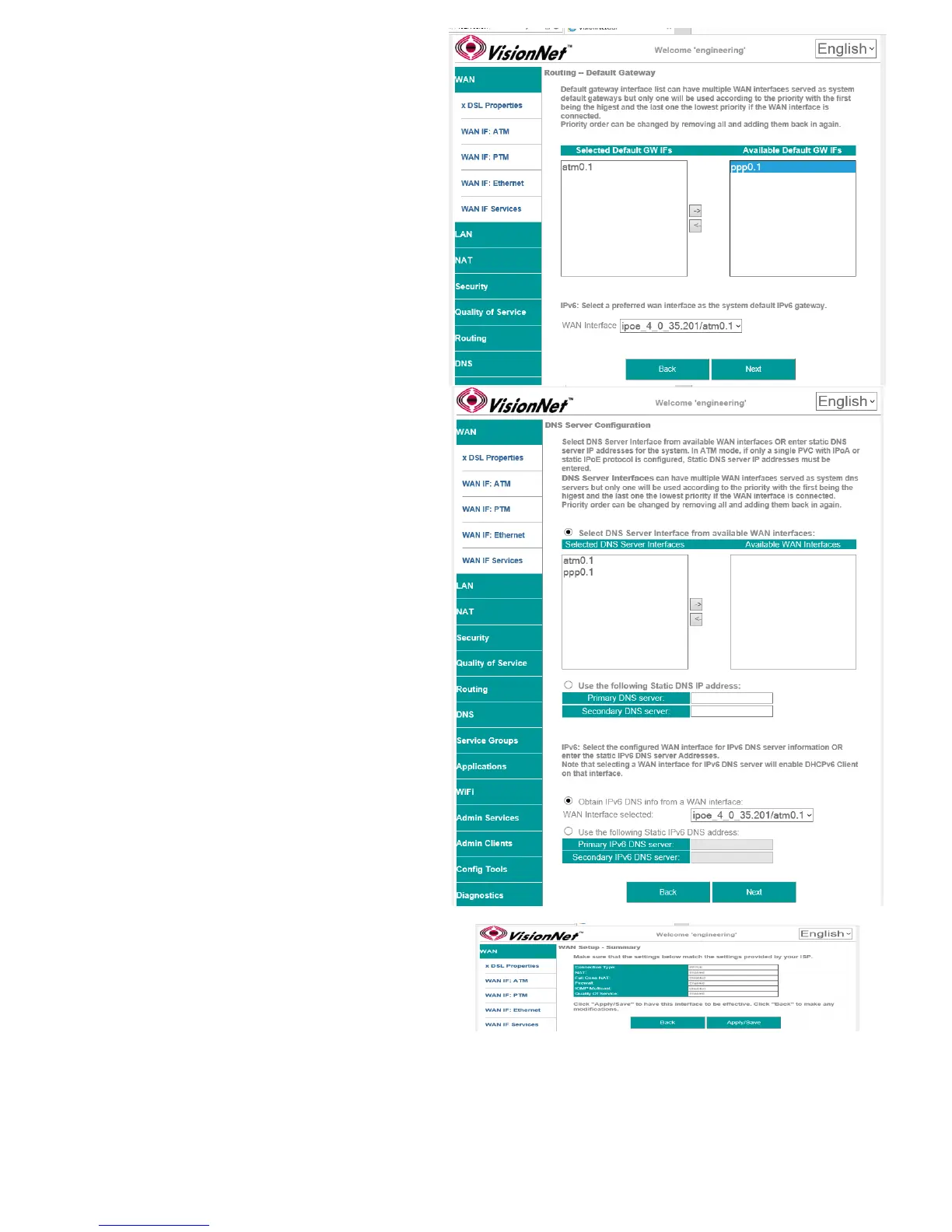
2.E Add Service to Gateway Priority List
(Not available in WAN Modification; For post
creation Modification See Section 4.1)
The Service will be available in the “Available
Default GWs column”.
Upon selection, you may place with the
“Selected Default Gateways” column.
Gateway prioritization runs from top to bottom,
and may be re-prioritized by removing WAN
services from the left column; and then re-
entering them in the desired order.
You may also select the IPv6 Default Gateway
interface.
2.F Add Service to DNS Priority List
(Not available in WAN Modification; For post
creation Modification See Section X)
The Service will be available in the “Available
WAN Interfaces column”.
Upon selection, you may place with the
“Selected DNS Server Interfaces” column.
DNS Service Prioritization runs from top to
bottom, and may be re-prioritized by removing
WAN services from the left column; and then
re-entering them in the desired order.
You may also select the IPv6 Default DNS
Interface.
2.G WAN Summary
Upon Review, select “Apply/Save”
VisionNet M504 / M505N R3 Page 31 of 62 User Manual Rev 0.1c



 To Next Page