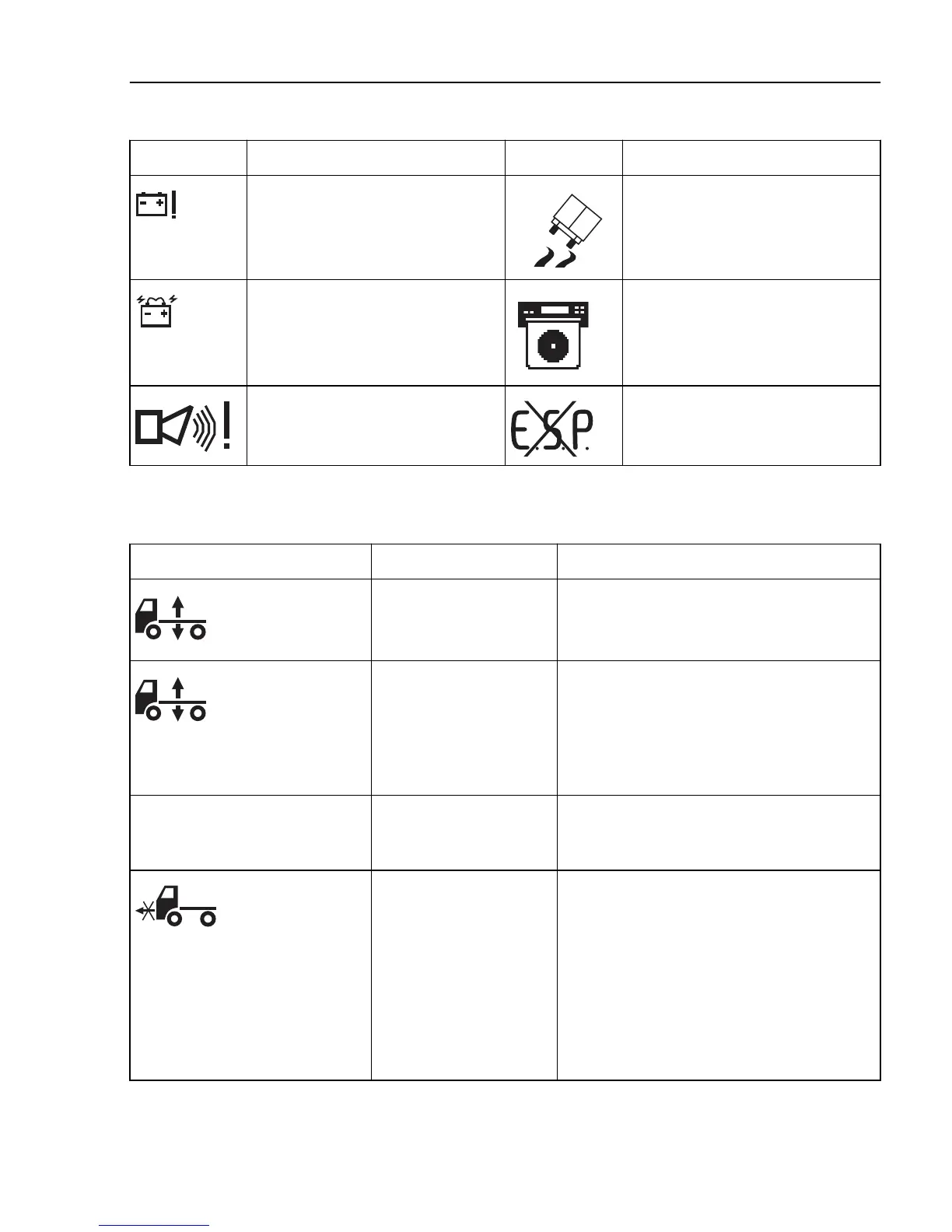
Symbol Meaning Symbol Meaning
Voltage warning Stability control active
Battery discharge Diagram sheet box open or sheet for
driver 1 missing. (Only for certain
variants)
Alarm in service position. ESP (electronic stability program)
temporarily disengaged
Symbols for air suspension
Symbol Meaning Action
The control button is set
to manual control or
adjustment of ride height.
Select ride height
Note! Drive very carefully when the symbol is
displayed.
If the control button is in
the centre position the air
suspension is in locked
position.
Check whether the air suspension is locked:
Turn the ignition key to the stop position (0)
and then back to the drive position (I).
If the symbol remains on the display the air
suspension is locked. See section "Air
suspension in locked position", page 628.
Axle load distribution 70% With "optimise traction",
the axle load distribution
is shown in the display.
None. The message disappears when optimal
load distribution has been achieved.
Truck not in drive
position.
Check that the control button is in the drive
position and wait until the truck reaches the
correct drive height.
Note! Drive very carefully when the symbol is
displayed.
A signal will sound if the speed is too high. If
a bellows is punctured, drive, at not more than
30 km/h
, to a Volvo workshop, or contact
Volvo Action Service.
Information display
87



 To Next Page